The phrase "AI video editor" now covers three completely different jobs — and most "best of" lists throw them in one blender. A tool that edits video by editing a transcript (Descript) is nothing like a tool that auto-clips a podcast into 20 shorts (OpusClip), which is nothing like a professional timeline that bolted on AI features (Premiere Pro). Pick the wrong category and you will fight your software instead of finishing your edit.
This guide fixes that. After testing the leading platforms on real footage — long-form interviews, talking-head clips, and social verticals — here are the best AI video editing tools in 2026, sorted by what they actually do best, with honest pricing, free-tier limits, and the one quality trap (the "AI look") that sinks more edits than any missing feature.
An AI video editor is software that uses machine learning to automate editing tasks — transcription-based cutting, auto-captions, silence and filler-word removal, vertical reframing, background cleanup, color matching, and clip generation — so you finish faster without touching every frame by hand.
For most creators in 2026, the strongest stack is: Descript for fast, transcript-driven editing, CapCut for free all-purpose and mobile work, and VideoDubber.ai to edit your finished video into 150+ languages so one edit reaches a global audience. The rest of this list covers the best specialists — repurposing, pro NLEs, generative AI, browser editing, and captions — so you can match the tool to the task.
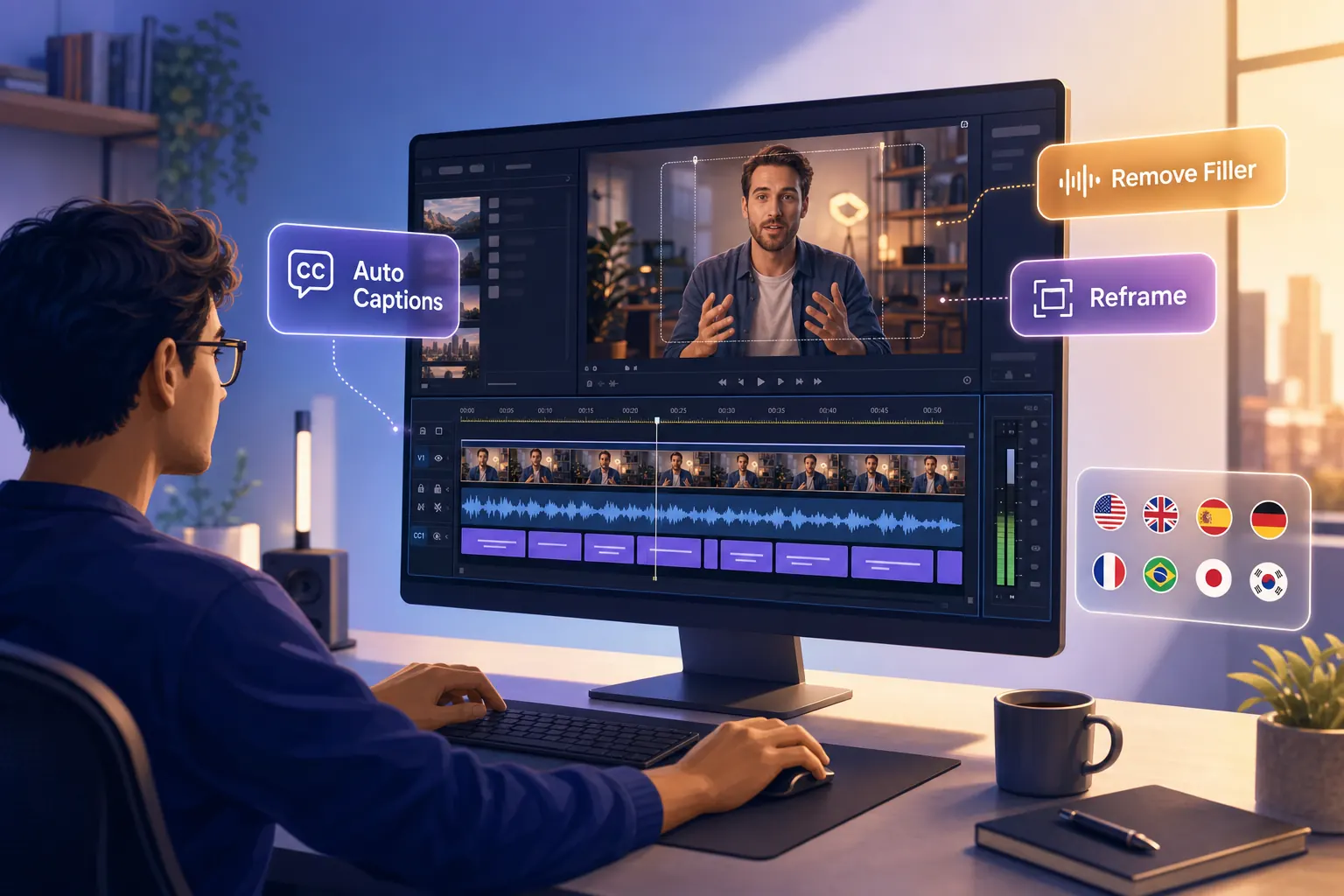
The best AI video editing tools in 2026 fall into three families — timeline editors, text-based editors, and repurposing engines — and the smartest creators chain them into one workflow.
What This Guide Covers
| Question | Section |
|---|---|
| What kinds of AI video editors exist? | The Three Types of AI Video Editors |
| How we ranked these tools | How We Evaluated AI Video Editors |
| Rankings at a glance | Quick Comparison: Best AI Video Editing Tools |
| Best overall (text-based) | 1. Descript |
| Best free + mobile | 2. CapCut |
| Best for multilingual editing | 3. VideoDubber.ai |
| Best for repurposing | 4. OpusClip |
| Best for professionals | 5. Adobe Premiere Pro |
| Best value (no subscription) | 6. DaVinci Resolve |
| Best generative AI editing | 7. Runway |
| Best browser-based all-in-one | 8. VEED.io |
| Best for captions | 9. Submagic |
| The full editing workflow | The AI Video Editing Workflow |
| How to avoid the "AI look" | How to Avoid the "AI Look" |
| Pricing & free tiers | Pricing & Free Tiers Compared |
| Which tool to pick | How to Choose by Your Bottleneck |
| Mistakes to avoid | Common Mistakes |
| FAQs | Frequently Asked Questions |
The Three Types of AI Video Editors
Before ranking anything, sort the field. Nearly every AI video editor in 2026 belongs to one of three families, and knowing which one you need eliminates 80% of the choice.
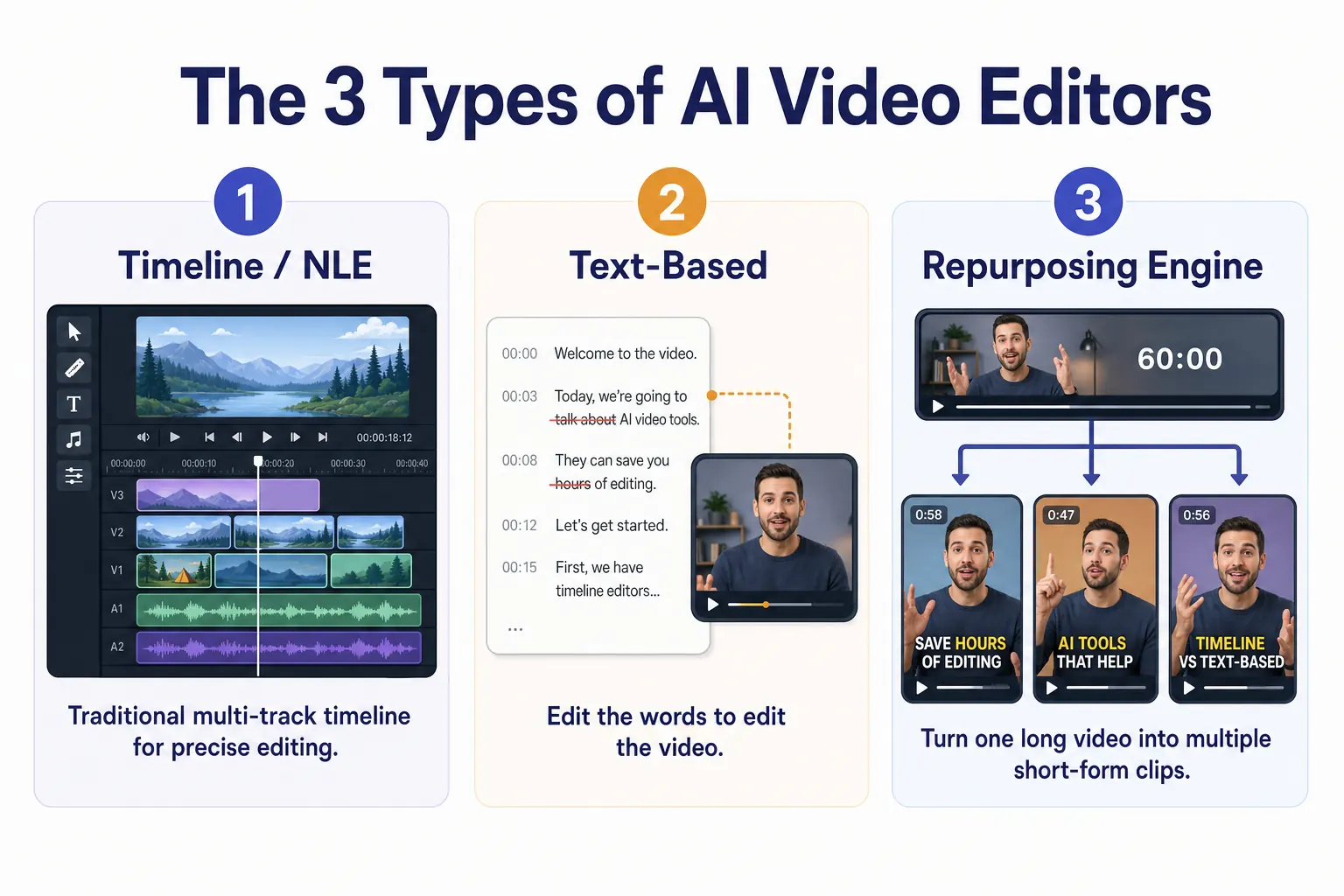
Timeline editors, text-based editors, and repurposing engines solve different problems — match the type to the job before comparing brands.
| Type | What it does | Best for | Examples |
|---|---|---|---|
| Timeline / NLE + AI | Traditional layer-based editing with AI features bolted on (auto-reframe, masking, color match) | Full creative control, complex edits | Premiere Pro, DaVinci Resolve, CapCut, Filmora |
| Text-based editors | Edit the video by editing its transcript; cut words to cut footage | Talking-head, podcasts, courses | Descript |
| Repurposing engines | Auto-find highlights in long video and output ready-to-post shorts | Podcasters, agencies, social teams | OpusClip, Vizard, Submagic |
A fourth, often-missed category sits alongside these: localization editors that edit a finished video's spoken track and subtitles into other languages — which is exactly where VideoDubber earns its place below. Most creators need two of these types working together, not one tool to rule them all.
How We Evaluated AI Video Editors
Each tool was weighed on six factors, in priority order:
- Automation depth — how much manual work the AI genuinely removes (not just marketing claims).
- Output quality — clean cuts, accurate captions, natural audio, and no "AI artifacts" or plastic-looking faces.
- Control vs. ease — can a beginner finish fast and can a pro fine-tune.
- Pricing & free tier — real value, including what the free plan actually allows.
- Speed — render and processing time on real footage.
- Reach features — captions, reframing, multi-language, and export/publishing options.
We prioritize finished, publishable output. A clever feature that leaves you cleaning up artifacts for an hour is worth less than a boring one that just works.
Quick Comparison: Best AI Video Editing Tools 2026
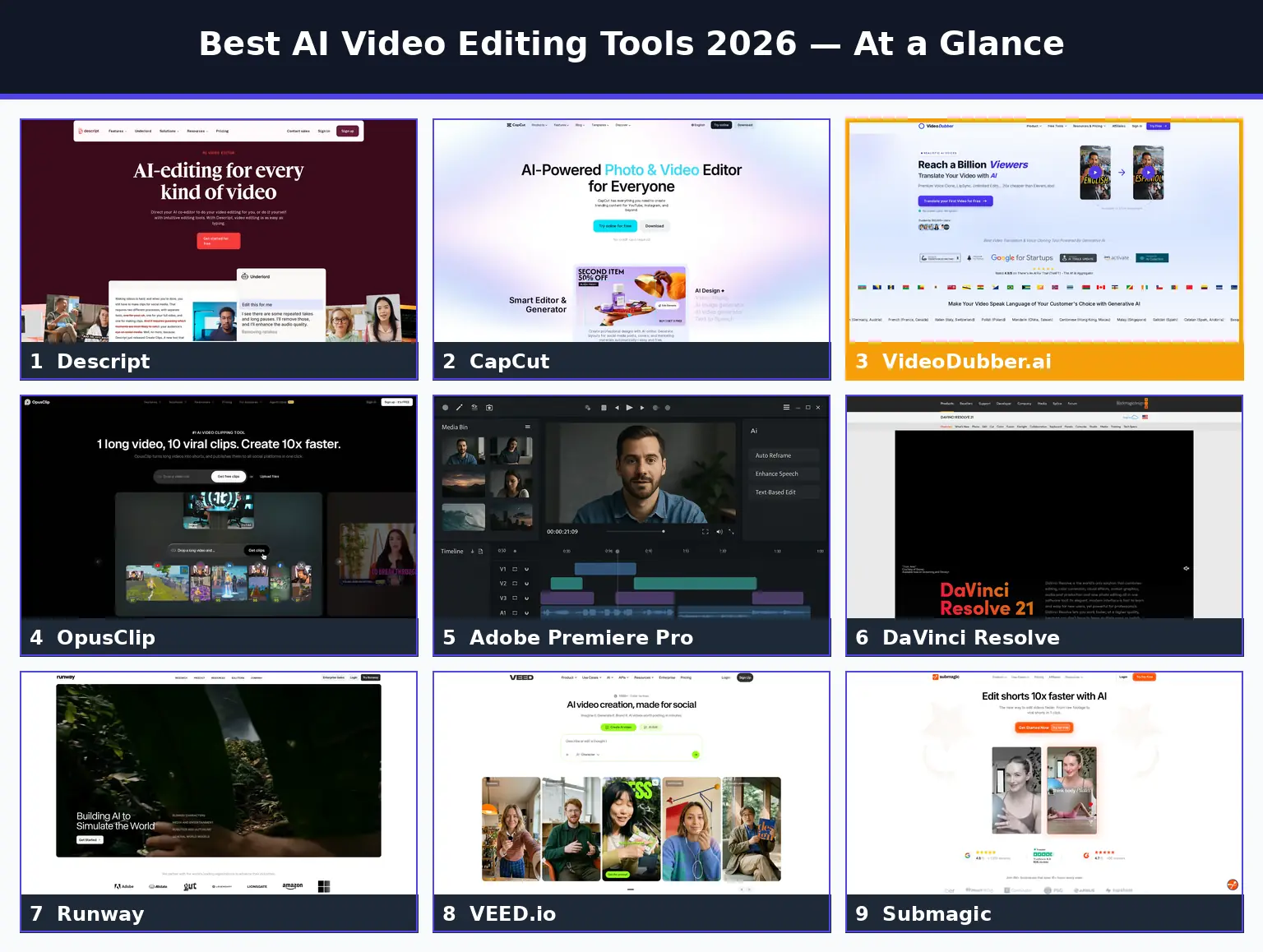
Side-by-side comparison of the top AI video editors, ranked by what they do best in 2026.
| Rank | Tool | Type | Best For | Free Tier | Starting Price |
|---|---|---|---|---|---|
| 1 | Descript | Text-based | Talking-head & podcasts | 1 hr/mo transcription | ~$12/mo |
| 2 | CapCut | Timeline + AI | Free, all-purpose, mobile | Generous, 4K export | ~$9.99/mo |
| 3 | VideoDubber.ai | Localization | Multilingual editing | First video free | ~$9/mo |
| 4 | OpusClip | Repurposing | Long-to-short clips | 60–90 credits/mo | ~$9/mo |
| 5 | Adobe Premiere Pro | Timeline + AI | Professional editors | None (trial only) | ~$22.99/mo |
| 6 | DaVinci Resolve | Timeline + AI | Pro power, no subscription | Full free version | $295 one-time |
| 7 | Runway | Generative | AI effects & cleanup | ~125 credits | ~$15/mo |
| 8 | VEED.io | Browser editor | All-in-one in browser | 720p watermarked | ~$12/mo |
| 9 | Submagic | Repurposing | Animated captions | Limited trial | ~$16/mo |
Pricing reflects publicly listed 2026 plans and changes frequently — confirm current terms on each provider's site. See individual sections for full details.
1. Descript: Best Overall AI Video Editor
Descript is a text-based video editor that turns your footage into an editable transcript — delete a word and the matching video disappears, cut a paragraph and the clip tightens. It invented document-style editing and remains the most mature, broadly useful AI editor in 2026.
Descript
Descript is the fastest path from raw talking-head footage to a finished cut. Its standout features — Studio Sound (broadcast-quality audio cleanup), automatic filler-word removal ("um," "uh"), Overdub voice cloning, and eye-contact correction — remove the most tedious parts of editing. For podcasters, course creators, and YouTubers who talk to camera, nothing else is this efficient.
| Feature | Descript Specification |
|---|---|
| Core method | Edit video by editing the transcript |
| Standout AI | Studio Sound, filler removal, Overdub, green-screen |
| Free tier | 1 hour transcription/month |
| Captions | Automatic, customizable |
| Collaboration | Yes — cloud projects |
| Starting price | ~$12–$15/month |
Pros and cons
| Pros | Cons |
|---|---|
| Fastest talking-head/podcast workflow | Less suited to cinematic, b-roll-heavy edits |
| Excellent audio cleanup (Studio Sound) | Free tier limited to 1 hr/month |
| Filler-word and silence removal | Timeline control shallower than a true NLE |
| Built-in screen recording & collaboration | Overdub voice cloning gated to paid tiers |
Verdict: Descript is the best overall AI video editor for anyone whose content is mostly someone talking. Pair it with VideoDubber to take a finished Descript edit global. For complex, effects-heavy projects, a timeline NLE (Premiere or Resolve) is the better base.
2. CapCut: Best Free and Mobile AI Editor
CapCut is a free, cross-platform video editor (mobile, desktop, and web) with a deep AI toolkit — auto-captions, background removal, auto-reframe, text-to-speech, and a constantly updated effects library — and an unusually generous free tier including 4K export.
CapCut
CapCut is the default editor for a huge slice of the creator economy because it is genuinely free, genuinely capable, and available everywhere. The AI features have caught up to its editing depth: one-tap captions, smart cutout, and trend-driven templates make it the fastest way to produce social-ready clips on a phone.
| Feature | CapCut Specification |
|---|---|
| Platforms | Mobile, desktop, web |
| Free tier | Generous; 4K export on desktop |
| Standout AI | Auto-captions, background removal, auto-reframe, TTS |
| Templates | Large, updated almost daily |
| Watermark | Avoidable on desktop exports |
| Pro plan | ~$9.99/month |
Pros and cons
| Pros | Cons |
|---|---|
| Genuinely capable free tier | Data-ownership considerations (ByteDance) |
| Works on mobile and desktop | Some AI features gated to Pro |
| Huge template & effects library | Less precise than a professional NLE |
| Fast captions and reframing | Account/region availability has shifted over time |
Verdict: CapCut is the best free, all-purpose AI editor — ideal for social clips and mobile creators. Avoid uploading sensitive footage given its ownership, and step up to a pro NLE when you need frame-perfect control.
3. VideoDubber.ai: Best for Multilingual Video Editing
VideoDubber.ai is an AI video localization editor that takes a finished video and edits its spoken track and subtitles into 150+ languages — translating, re-voicing with your cloned voice, lip-syncing, and letting you fine-tune everything in a browser editor with unlimited free edits.
VideoDubber.ai
Here is the step almost every "best AI video editor" list ignores: editing your video once finishes it for one language. The same edit, re-voiced in Spanish, Hindi, Portuguese, and Japanese, reaches roughly five times the audience for zero re-shooting. VideoDubber is the editor that does that — it is a localization-focused editing layer, not a timeline NLE, and it is the missing piece in most editing stacks.
Its browser editor lets you edit the translated transcript, adjust timing and speaker voices, swap background music handling, and export subtitles (SRT/VTT) — the same fine-grained control a text-based editor gives you, but aimed at language. You can edit and translate your first video for free with no credit card, and the output carries no watermark.
| Feature | VideoDubber Specification |
|---|---|
| Core method | Edit a video's audio + subtitles into new languages |
| Languages | 150+ with regional accents |
| Voice cloning | Instant (Starter) + Premium (Pro/Growth) |
| Lip sync | Premium lip sync on Growth and above |
| Editing | Unlimited free edits in browser |
| Free tier | First video free, no credit card |
| Watermark | None |
Pricing
| Plan | Monthly | Included Minutes | Effective $/min |
|---|---|---|---|
| Starter | $9 | 60 | $0.15 |
| Pro | $39 | 160 | $0.24 |
| Growth | $49 | 250 | $0.19 |
| Scale | $199 | 2,000 | $0.10 |
Why it earns the #3 spot
Descript and CapCut produce a polished cut. VideoDubber multiplies that cut across languages — the edit that actually grows reach. It also handles multi-speaker detection and background-music retention, so a single edited video ships as a complete multilingual package.
| Pros | Cons |
|---|---|
| No watermark, even on the free first video | Specializes in localization, not timeline editing |
| 150+ languages with regional accents | Premium lip sync requires the Growth plan |
| Unlimited free edits in the browser editor | Less-common languages vary in clone quality |
| Voice cloning ~20× cheaper than ElevenLabs |
Verdict: Use VideoDubber as the multiplier in your editing stack. Cut once in Descript or CapCut, then localize with VideoDubber so one edit earns views in a dozen markets. Start with the free first video, dub it into Spanish and Portuguese, and measure the reach lift. See our roundup of the best video translators in 2026 for more.
4. OpusClip: Best for Long-to-Short Repurposing
OpusClip is an AI repurposing engine that analyzes a long video, finds the most engaging moments, and outputs multiple ready-to-post vertical shorts with captions, reframing, and a virality score — turning a one-hour podcast into a dozen clips in minutes.
OpusClip
If your bottleneck is volume of short-form content, OpusClip is the specialist. It excels at extracting hooks from long-form footage, auto-reframing speakers to vertical, and adding animated captions — the exact workflow that powers most successful clip-based channels.
| Feature | OpusClip Specification |
|---|---|
| Core method | Auto-clip long video into shorts |
| Standout AI | Highlight detection, virality score, auto-reframe |
| Free tier | ~60–90 credits/month |
| Captions | Animated, customizable |
| Best for | Podcasters, agencies, social teams |
| Starting price | ~$9–$15/month |
Verdict: OpusClip is the best tool for turning long content into many shorts fast. Pair it with VideoDubber to publish those shorts in multiple languages, multiplying reach again. For more control over the clip edit itself, Descript or CapCut complement it well.
5. Adobe Premiere Pro: Best for Professional Editors
Adobe Premiere Pro is the industry-standard timeline editor with AI woven in through Adobe Sensei and Firefly — auto-reframe, scene-edit detection, text-based editing, speech-to-text captions, enhanced speech, and generative extend — so professionals keep full control while gaining AI speed.
Adobe Premiere Pro
Premiere is the choice when the edit is complex: multicam, layered effects, precise color, and tight integration with After Effects and the wider Creative Cloud. Its AI features accelerate the tedious parts without forcing you out of a professional workflow.
| Feature | Premiere Pro Specification |
|---|---|
| Type | Professional NLE + AI |
| Standout AI | Auto-reframe, text-based editing, enhance speech, generative extend |
| Free tier | None (trial only) |
| Integration | After Effects, Audition, Firefly |
| Best for | Pro editors, agencies, film/TV |
| Price | ~$22.99/month |
Verdict: Premiere is the best AI-assisted editor for professionals who need absolute control. It is overkill — and overpriced — for simple talking-head or social clips, where Descript or CapCut finish faster.
6. DaVinci Resolve: Best Value for Pro-Grade AI
DaVinci Resolve is a professional editing, color, and audio suite whose free version is astonishingly complete — and whose Neural Engine AI tools (Magic Mask, Voice Isolation, Smart Reframe, auto-subtitles) rival paid competitors without a subscription.
DaVinci Resolve
Resolve is the value champion. The base app is free with no watermark, and the one-time $295 Studio license unlocks the full AI toolkit forever — no recurring fees. It carries a steeper learning curve, but for color grading and pro-grade editing without subscription fatigue, nothing competes.
| Feature | DaVinci Resolve Specification |
|---|---|
| Type | Professional NLE + AI |
| Standout AI | Magic Mask, Voice Isolation, Smart Reframe, auto-subtitles |
| Free version | Full-featured, no watermark |
| Studio | $295 one-time (no subscription) |
| Best for | Colorists, filmmakers, value seekers |
| Learning curve | Steep |
Verdict: Resolve is the best value in pro AI editing — buy Studio once and own it. Beginners and fast social creators will move quicker in CapCut or Descript; serious editors who hate subscriptions should start here.
7. Runway: Best for Generative AI Editing
Runway is a generative AI video suite that blends editing with creation — inpainting to remove objects, generative extend, motion brush, green-screen without a green screen, and text-to-video — for creators who want AI to make footage, not just trim it.
Runway
Runway sits between editor and generator. Its standout editing powers are AI cleanup and effects: erase a passerby, extend a shot that ran short, or rotoscope a subject in seconds. It is less a daily-driver NLE and more a creative-effects layer you reach for when a shot needs something that wasn't filmed.
| Feature | Runway Specification |
|---|---|
| Type | Generative + AI editing |
| Standout AI | Inpainting, generative extend, motion brush, rotoscoping |
| Free tier | ~125 credits |
| Output | Up to 720p free |
| Best for | VFX-style cleanup, generative shots |
| Starting price | ~$15/month |
Verdict: Runway is the best tool for AI-generated effects and shot fixes. Use it alongside a primary editor rather than as your only one. For pure generation, see our guide to the best free AI video generators.
8. VEED.io: Best Browser-Based All-in-One
VEED.io is a browser-based AI video editor that runs entirely online — auto-subtitles, translation, background removal, voice cloning, and a clean timeline — with no installation and modest hardware requirements.
VEED.io
VEED is the most approachable all-in-one for people who want a real editor without downloading anything. It balances ease and capability well: subtitle accuracy is strong, the interface is friendly, and it handles the common social-and-marketing edits without a learning curve.
| Feature | VEED.io Specification |
|---|---|
| Type | Browser-based editor + AI |
| Standout AI | Auto-subtitles, translation, background removal |
| Free tier | 720p with watermark |
| Platform | Fully online |
| Best for | Marketers, teams, no-install editing |
| Starting price | ~$12–$18/month |
Verdict: VEED is the best browser-based all-rounder for marketers and teams. For the deepest localization, VideoDubber goes further on languages and voice cloning; for free power, CapCut wins.
9. Submagic: Best for Animated Captions
Submagic is a short-form AI editor focused on punchy, animated captions, auto-emojis, B-roll suggestions, and sound effects — the polish layer that makes Reels and TikToks feel native and retain viewers.
Submagic
Submagic does one thing extremely well: it makes short-form clips look professionally captioned in seconds. For creators whose hook depends on bold, perfectly timed captions, it is faster and more stylish than general editors.
| Feature | Submagic Specification |
|---|---|
| Type | Short-form repurposing/captions |
| Standout AI | Animated captions, auto-emoji, B-roll, SFX |
| Free tier | Limited trial |
| Best for | Reels, TikTok, Shorts polish |
| Starting price | ~$16/month |
Verdict: Submagic is the best caption-focused finisher for short-form. It pairs naturally after OpusClip (clip) and VideoDubber (localize). For full editing, you still need a primary editor.
Honorable mentions: Vizard (great for webinar and podcast long-to-short), Wondershare Filmora (friendly desktop NLE with solid AI), and HeyGen (AI avatars and digital twins) each win specific niches.
The AI Video Editing Workflow: Edit, Repurpose, Localize, Publish
The creators who win in 2026 do not pick one editor — they chain a few. Here is a complete pipeline that turns one recording into a global content library.
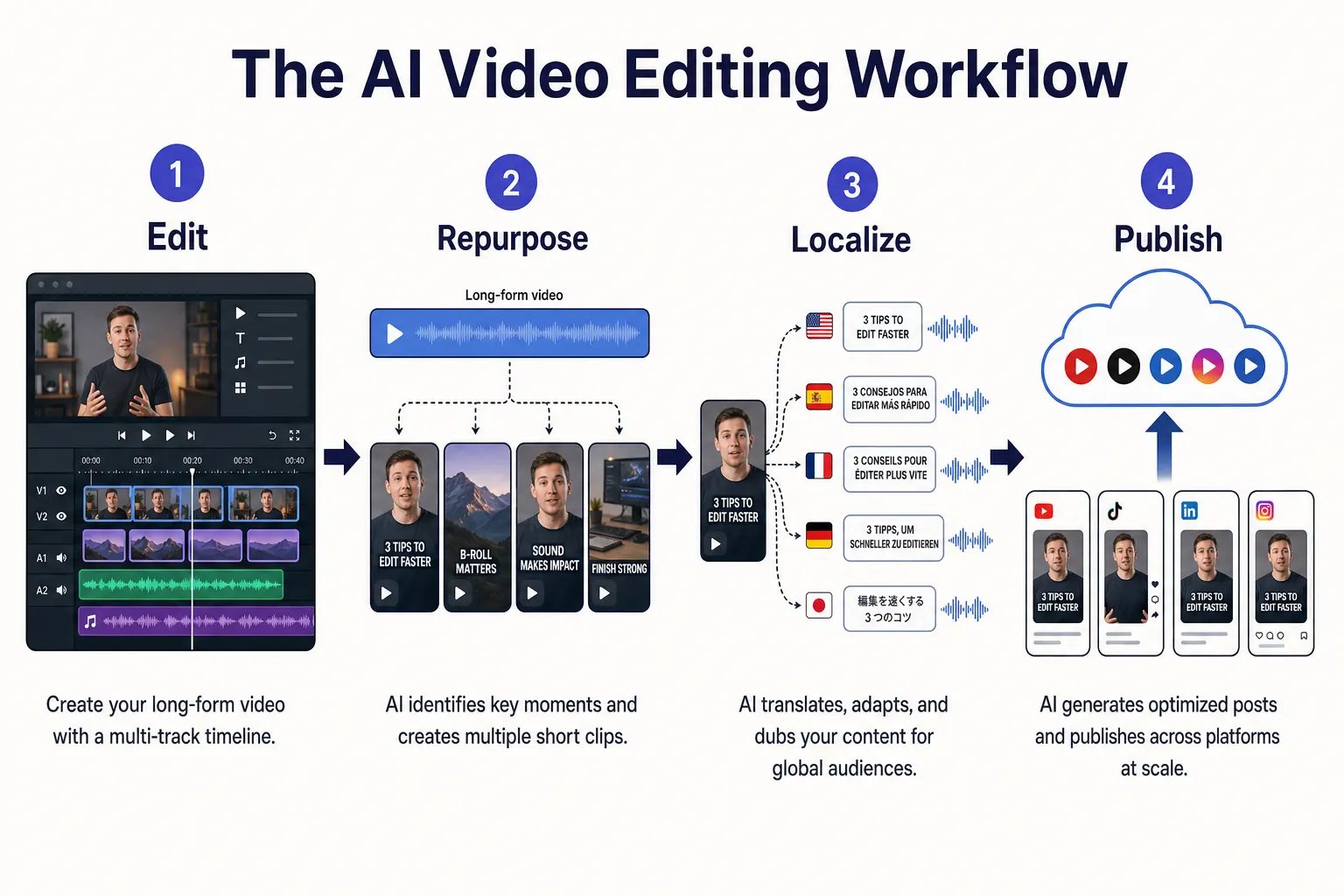
The four-stage workflow: edit the master, repurpose into shorts, localize into many languages, and publish everywhere.
Step 1: Edit the master
Cut your main video in Descript (talking-head), CapCut (social/mobile), or Premiere/Resolve (complex projects). Clean the audio, remove filler, add captions, and lock the final edit.
Step 2: Repurpose into shorts
Run the long version through OpusClip (or Vizard) to extract highlight clips, then polish hooks and captions in Submagic for platform-native short-form.
Step 3: Localize into many languages
Send the finished master and the shorts through VideoDubber.ai to edit them into Spanish, Portuguese, Hindi, and more — with your cloned voice, lip sync, and editable subtitles. One edit becomes a multilingual catalog. See how to translate videos into multiple languages.
Step 4: Publish everywhere
Upload the original with multi-language audio tracks (supported natively on YouTube), or post language-specific cuts per market. Then watch which languages drive watch time and double down.
This edit → repurpose → localize → publish stack is how a solo creator competes with a localized studio, on a creator budget.
How to Avoid the "AI Look": Quality Pitfalls
The fastest way to spot amateur AI editing is the artifacts. These habits keep your output looking human.
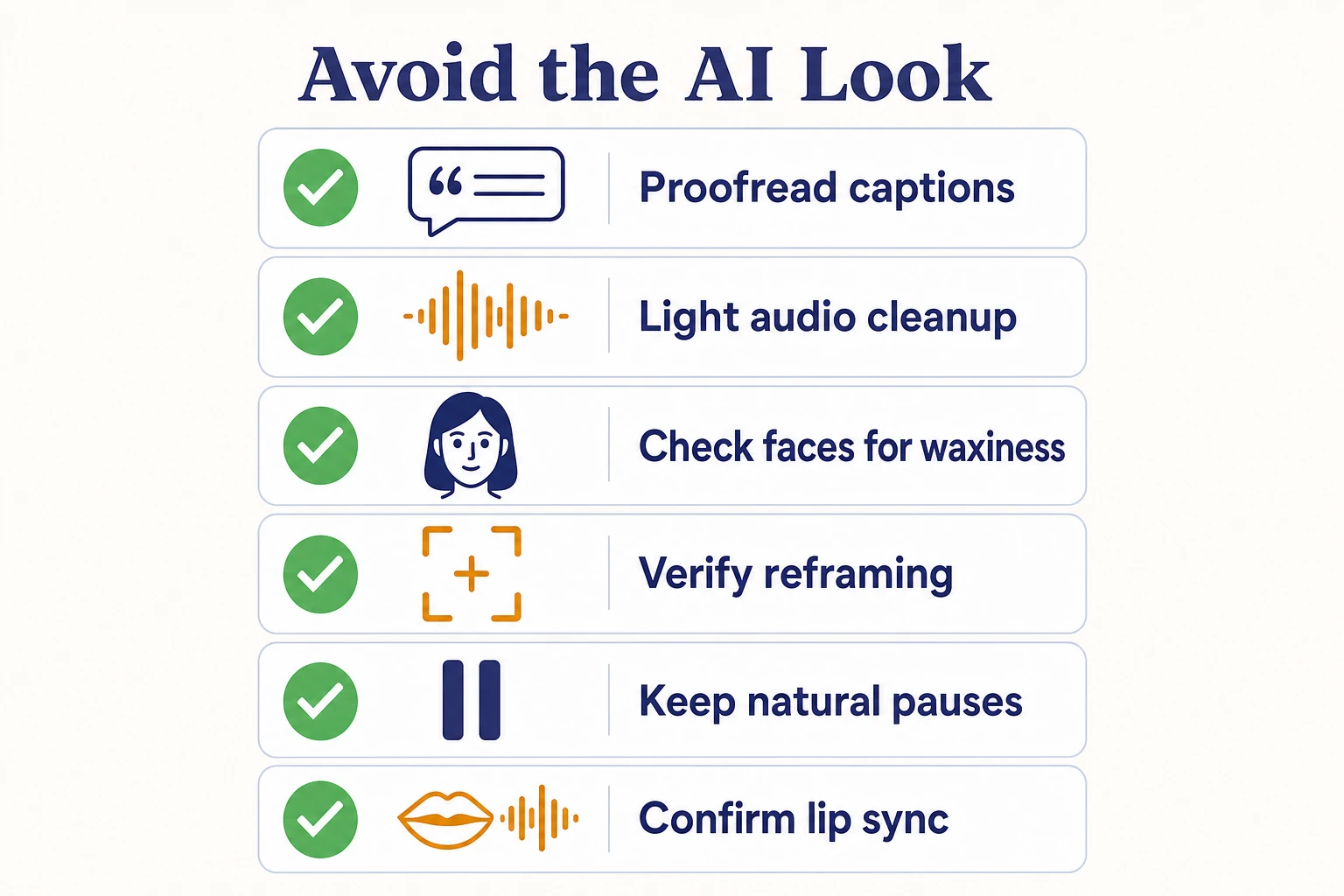
A quick quality pass catches the tells of over-automated editing before you publish.
- Review every auto-caption. AI transcription is ~98% accurate, which means roughly one wrong word every two sentences — always proofread, especially names and technical terms.
- Don't over-smooth audio. Aggressive "studio sound" can make voices sound underwater. Use the lightest setting that removes the noise.
- Check faces after AI effects. Eye-contact correction, face retouch, and generative fills can create a waxy, plastic look. Toggle effects off and compare.
- Watch reframing for cut-off heads. Auto-reframe occasionally crops the subject badly on fast movement — scrub the whole clip.
- Keep cuts breathing. Filler-word removal can make speech feel unnaturally clipped. Leave small pauses so it sounds human.
- Verify lip sync on localized video. When dubbing into other languages, scrub at 0.5× speed and fix any drift beyond ~0.3 seconds.
A two-minute quality pass is the difference between "edited with AI" and "obviously made by a robot."
Pricing & Free Tiers Compared
Most lists skip this. Here is what each tool actually costs — and what the free plan really allows.
| Tool | Free Tier (real limits) | Entry Paid | Pricing Model |
|---|---|---|---|
| Descript | 1 hr transcription/month | ~$12–$15/mo | Subscription |
| CapCut | Generous; 4K desktop export | ~$9.99/mo | Subscription |
| VideoDubber.ai | First video free, no card, no watermark | $9/mo (60 min) | Subscription + per-minute |
| OpusClip | ~60–90 credits/month | ~$9–$15/mo | Credit-based |
| Adobe Premiere Pro | Trial only | ~$22.99/mo | Subscription |
| DaVinci Resolve | Full free version, no watermark | $295 one-time | One-time (Studio) |
| Runway | ~125 credits | ~$15/mo | Credit-based |
| VEED.io | 720p watermarked | ~$12–$18/mo | Subscription |
| Submagic | Limited trial | ~$16/mo | Subscription |
The value standouts: DaVinci Resolve (free, or buy once and own it), CapCut (the most capable free tier), and VideoDubber (a genuine free first video with no watermark). Subscription fatigue is real — favor tools whose free tier or one-time license matches your actual volume.
How to Choose the Right AI Video Editor by Bottleneck
Pick by your bottleneck, not by feature counts.
| Your Bottleneck | Best Tool | Why |
|---|---|---|
| Editing talking-head/podcasts is slow | Descript | Text-based editing is the fastest workflow |
| Need to edit free, on a phone | CapCut | Most capable free, cross-platform editor |
| Content only reaches one language | VideoDubber.ai | Edit your video into 150+ languages |
| Not enough short-form volume | OpusClip | Auto-clips long video into many shorts |
| Complex, effects-heavy projects | Adobe Premiere Pro | Pro control + AI acceleration |
| Want pro power without subscriptions | DaVinci Resolve | Free or one-time $295 |
| A shot needs something not filmed | Runway | Generative fill, extend, object removal |
| Want a real editor with no install | VEED.io | Full browser-based editing |
| Captions need to pop | Submagic | Best animated captions for short-form |
There is no single best editor — there is a best editor per bottleneck. The pros assemble a small stack instead of forcing one tool to do everything.
Common Mistakes with AI Video Editors
- Using the wrong type of tool. A repurposing engine won't replace a timeline NLE, and vice versa. Match the type to the job.
- Trusting auto-captions blindly. Always proofread — names and jargon are where AI fails.
- Over-applying AI effects. Waxy faces and underwater audio scream "AI." Use the lightest effective setting.
- Editing in one language only. A single-language edit reaches a fraction of its potential audience. Localize it.
- Paying for overlap. Many tools duplicate features. Map your stack before subscribing to three things that each do captions.
- Ignoring data and privacy. Some free tools use uploads for training. Keep confidential footage off them.
- Skipping the quality pass. Two minutes of review prevents the artifacts that get clips dismissed as amateur.
Frequently Asked Questions
What is the best AI video editing tool in 2026?
Descript is the best overall AI video editor for talking-head and podcast content thanks to text-based editing, while CapCut is the best free, all-purpose option, and VideoDubber.ai is the best for editing a finished video into 150+ languages. The right choice depends on your bottleneck — most creators use a small stack rather than one tool.
What is the best free AI video editor?
CapCut has the most capable free tier, including 4K export on desktop. DaVinci Resolve offers a full-featured free version with no watermark for pro-grade editing, and VideoDubber.ai lets you edit and translate your first video free with no credit card and no watermark. Descript's free plan includes 1 hour of transcription per month.
What's the difference between an AI video editor and an AI video generator?
An AI video editor modifies existing footage — cutting, captioning, reframing, cleaning, and (with VideoDubber) localizing. An AI video generator creates new footage from a text prompt or image. Tools like Runway blur the line by doing both. See the best free AI video generators for generation-focused tools.
Can AI video editors edit videos in multiple languages?
Yes. VideoDubber.ai specializes in this — it edits a video's spoken track and subtitles into 150+ languages with voice cloning and lip sync, and lets you fine-tune the translation in a browser editor. VEED and CapCut also offer translation features, but VideoDubber goes deepest on languages and voice preservation. Learn more in how content creators grow views with video dubbing.
How do I avoid the "AI look" in edited video?
Proofread all auto-captions, use the lightest audio-cleanup setting, compare faces with AI effects off (to catch waxiness), check auto-reframe for cropped heads, and verify lip sync on localized clips at 0.5× speed. A short manual quality pass removes the tells of over-automated editing.
Is text-based video editing better than timeline editing?
For talking-head, podcast, and course content, text-based editing (Descript) is dramatically faster — you edit by deleting words. For complex, effects-heavy, or cinematic projects, a timeline NLE (Premiere or DaVinci Resolve) gives the control you need. Many editors use both: a text-based tool for the rough cut, a timeline for the finish.
Do AI video editors work on mobile?
Yes. CapCut is the dominant mobile AI editor, and VEED, Submagic, and OpusClip offer mobile or browser access. VideoDubber runs in the browser. Professional NLEs like Premiere Pro and DaVinci Resolve are desktop-focused, though Premiere has a companion mobile app.
Are AI video editors good enough for professional work in 2026?
Yes, for most use cases. Descript, Premiere Pro, and DaVinci Resolve produce broadcast-acceptable results, and AI features now save hours on captions, audio cleanup, and reframing. The key is a human quality pass to catch artifacts — AI accelerates professional editing rather than replacing professional judgment.
Build Your AI Editing Stack Today
The best AI video editing tool in 2026 is not one app — it is a workflow. Cut fast in Descript or CapCut, repurpose with OpusClip, polish captions in Submagic, and then do the step almost everyone forgets: edit your video into every major language with VideoDubber.ai so one edit reaches the whole world.
Three steps to start this week:
- Edit one video in Descript or CapCut and lock a clean master.
- Localize it free with VideoDubber's first-video-free offer — dub it into Spanish and Portuguese with your own voice.
- Publish and measure which languages drive watch time, then scale the winners.
The tools are affordable, many are free, and the only real cost is staying single-language in a global market. For more, explore the best free AI video generators, the best video translators in 2026, and best lip sync tools in 2026.
Further Reading
Best Free AI Video Generators in 2026: Ranked & Compared
Best free AI video generators in 2026, ranked and honestly compared: Veo 3, DeeVid, HeyGen, VideoDubber, Kling, Seedance — free tiers, watermarks, commercial use.
Best Video Translators in 2026: The Complete Guide to AI Dubbing and Localization Tools
Best video translators in 2026 compared: VideoDubber, CAMB.AI, HeyGen, Synthesia & more. Features, pricing, voice cloning, lip-sync verdicts — choose the right tool.
How to Translate Videos to Multiple Languages: The Complete 2026 Guide
How to translate videos to multiple languages with AI dubbing in minutes. Step-by-step workflow, cost data, voice cloning tips, and distribution strategy.
How Content Creators Grow Views Using Video Dubbing: Complete Guide [2026]
How content creators grow views with video dubbing in 2026: voice cloning, CPM data, platform strategy, and a step-by-step AI dubbing workflow.
Best Lip Sync Tools in 2026: Complete Rankings and Buyer's Guide
Best lip sync tools in 2026 ranked by quality, price, and voice cloning. Full comparison table, pricing data, and use-case guide inside.