
How to Start a YouTube Channel in 2026: The Complete Creator's Playbook
April 24, 2026 20 mins read
A YouTube channel is a dedicated content hub on YouTube where creators publish videos, connect with subscribers, and build an audience around a specific niche or theme. With over 2.7 billion monthly active users, YouTube remains the world's largest video platform. Starting a channel requires a Google account, a clear niche, and a consistent content strategy. Channels that launch with 3–5 videos and optimized metadata grow significantly faster than single-upload launches, according to YouTube Creator Academy data.
Key 2026 YouTube Statistics:
| Metric | 2026 Data |
|---|---|
| Monthly active users | 2.7 billion |
| Daily active users | 122 million |
| Active creators | 69 million (11.6% YoY growth) |
| Daily hours watched | 1 billion+ |
| Mobile watch share | 63% |
| Daily Shorts views | 70 billion |
| Revenue share (long-form) | 55% to creators |
| YouTube Premium subscribers | 100+ million |
Source: YouTube Official Blog, 2025–2026
Starting a YouTube channel in 2026 needs three essentials — a clear niche, reliable audio, and a plan to publish 3–5 videos at launch.
| Question | Section |
|---|---|
| Why should I start a YouTube channel in 2026? | Step 1: Clarify Your Purpose |
| How do I pick the right niche for YouTube? | Step 2: Choose Your Niche |
| How do I set up a YouTube channel correctly? | Step 3: Set Up Your Channel |
| How do I plan YouTube content that gets views? | Step 4: Research and Plan Content |
| What equipment do I need to start a YouTube channel? | Step 5: Creator Toolkit |
| How does the YouTube algorithm work in 2026? | Step 6: Master the Algorithm |
| How do I optimize YouTube videos for search? | Step 7: SEO & Discovery |
| How do I launch a YouTube channel successfully? | Step 8: Launch With Impact |
| How do I promote my YouTube channel? | Step 9: Promote Like a Pro |
| How do I track YouTube analytics and improve? | Step 10: Track, Improve, Repeat |
| How do I monetize a YouTube channel? | Monetization Strategies |
| What are YouTube Shorts best practices in 2026? | Mastering YouTube Shorts |
| Frequently asked questions about starting YouTube | FAQ |
Purpose-driven channels grow faster, produce more consistent content, and attract loyal communities. Answer these three foundational questions:
Draft a one-sentence Channel Mission Statement — e.g.: "I help remote workers reclaim their mornings with practical productivity systems." Use it in your channel description and as a filter for every content decision.
A YouTube niche is the specific topic category your channel covers consistently — niche channels dramatically outperform general channels in growth, watch time, and monetization in 2026. The algorithm recommends your video to viewers who watched similar content, so consistency lets it match your videos to engaged audiences precisely.
Profitable niches combine: personal passion, audience demand, and monetization potential. Growing categories:
Use Google Trends, TubeBuddy, and Channel Finder to validate demand. A strong niche is one where you can produce at least 50 distinct video ideas without repeating yourself.
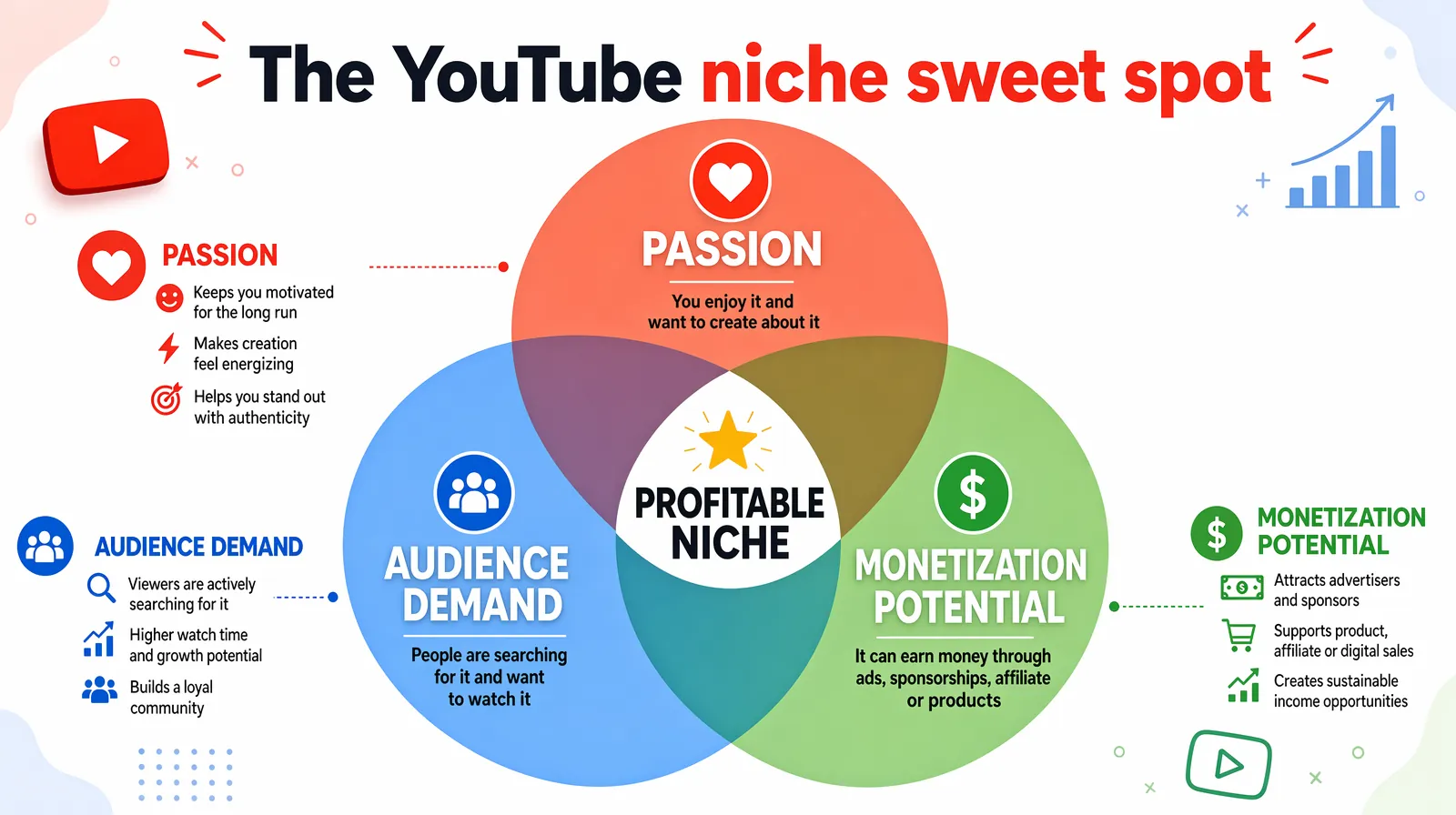
Profitable YouTube niches sit where personal passion, audience demand, and monetization potential overlap — never one or two alone.
Incomplete channels signal amateur status to viewers and the algorithm. Channels with complete profiles, professional banners, and clear descriptions rank higher in search. Follow this setup checklist:
As of July 2026, YouTube requires creators to be at least 16 for live streaming. Creators aged 13–15 need adult supervision. YouTube uses AI age estimation and may prompt verification via payment method, government ID, or selfie. Complete verification early to avoid disruptions.
Content planning separates channels that grow from channels that stall. Creators publishing to a documented content calendar retain more viewers between uploads and build topical authority the algorithm rewards.
Build your content system in three layers:
Frame each video around: solving a problem, answering a question, or delivering entertainment.
Starting a YouTube channel does not require expensive equipment — but poor audio causes immediate drop-off. YouTube Creator Academy data shows audio drives viewers away faster than poor video. Prioritize your microphone above everything.
| Equipment Category | Budget Option | Mid-Range | Pro Option |
|---|---|---|---|
| Camera | iPhone 13+ or Android flagship | Canon M50 Mark II | Sony ZV-E10 or Sony A7C |
| Microphone | Blue Snowball ($50) | Rode Wireless GO II ($300) | Sennheiser MKH 416 ($1,000) |
| Lighting | Window/natural light | Elgato Key Light (~$200) | Aputure 120D softbox kit |
| Editing Software | CapCut (free) | Final Cut Pro ($300, Mac) | Premiere Pro ($55/mo) |
| Teleprompter | Cue cards | PromptSmart app ($25) | Parrot Teleprompter hardware |
Ideal starter kit: smartphone + Rode Wireless GO II + Neewer ring light + CapCut — under $400, professional results. Use Descript for AI-assisted editing that removes filler words automatically.
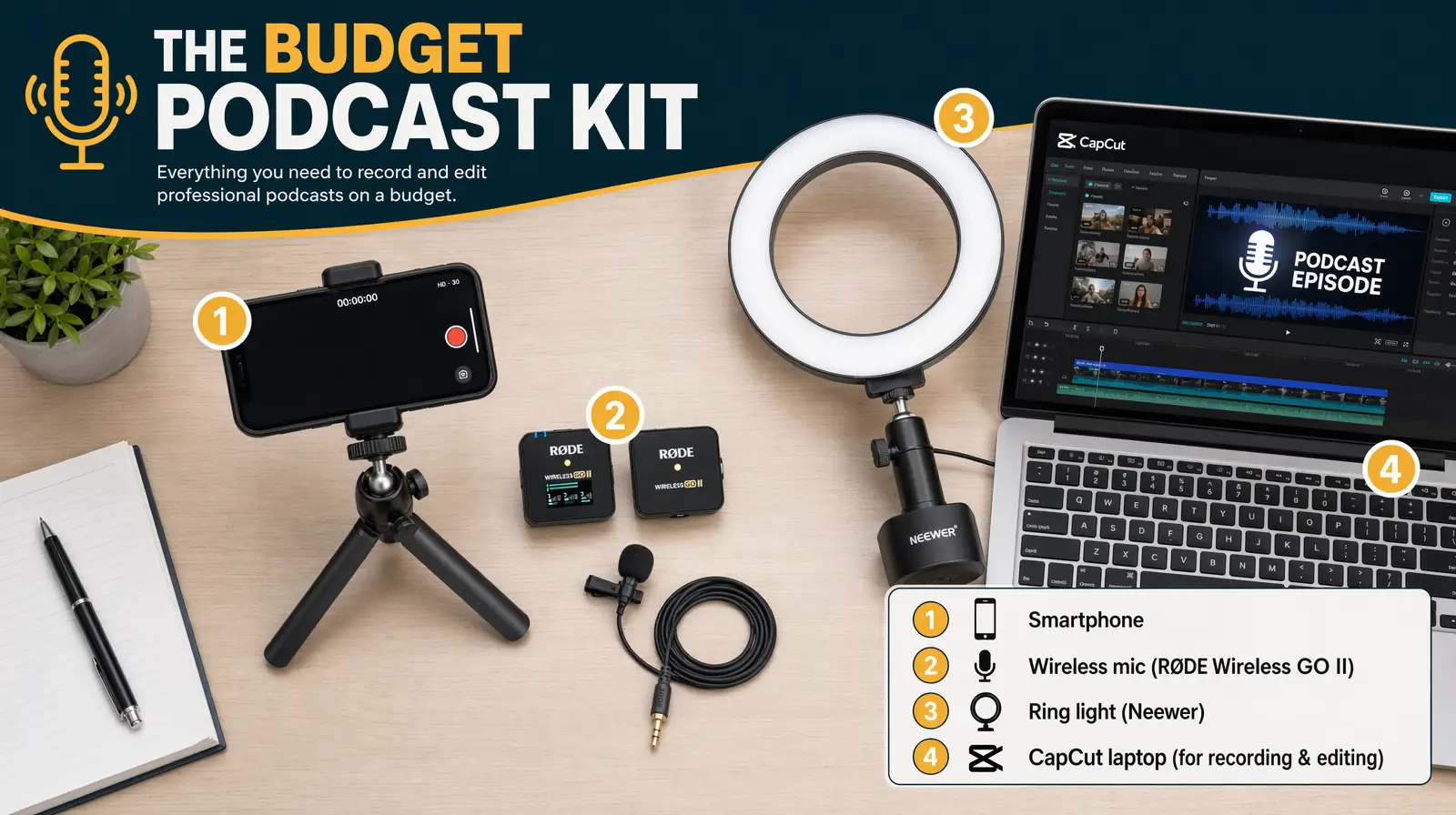
A complete sub-$400 creator kit — smartphone, wireless lav mic, ring light, and free editing software — produces professional results out of the box.
The YouTube algorithm is a recommendation engine matching each viewer's interest graph to videos predicted to maximize watch time. In 2026, it analyzes micro-behaviors like hover time on thumbnails, skip patterns, and rewatch segments.
The 2026 algorithm prioritizes:
Use YouTube Studio Analytics and Rank Checker to monitor video placement in search results.
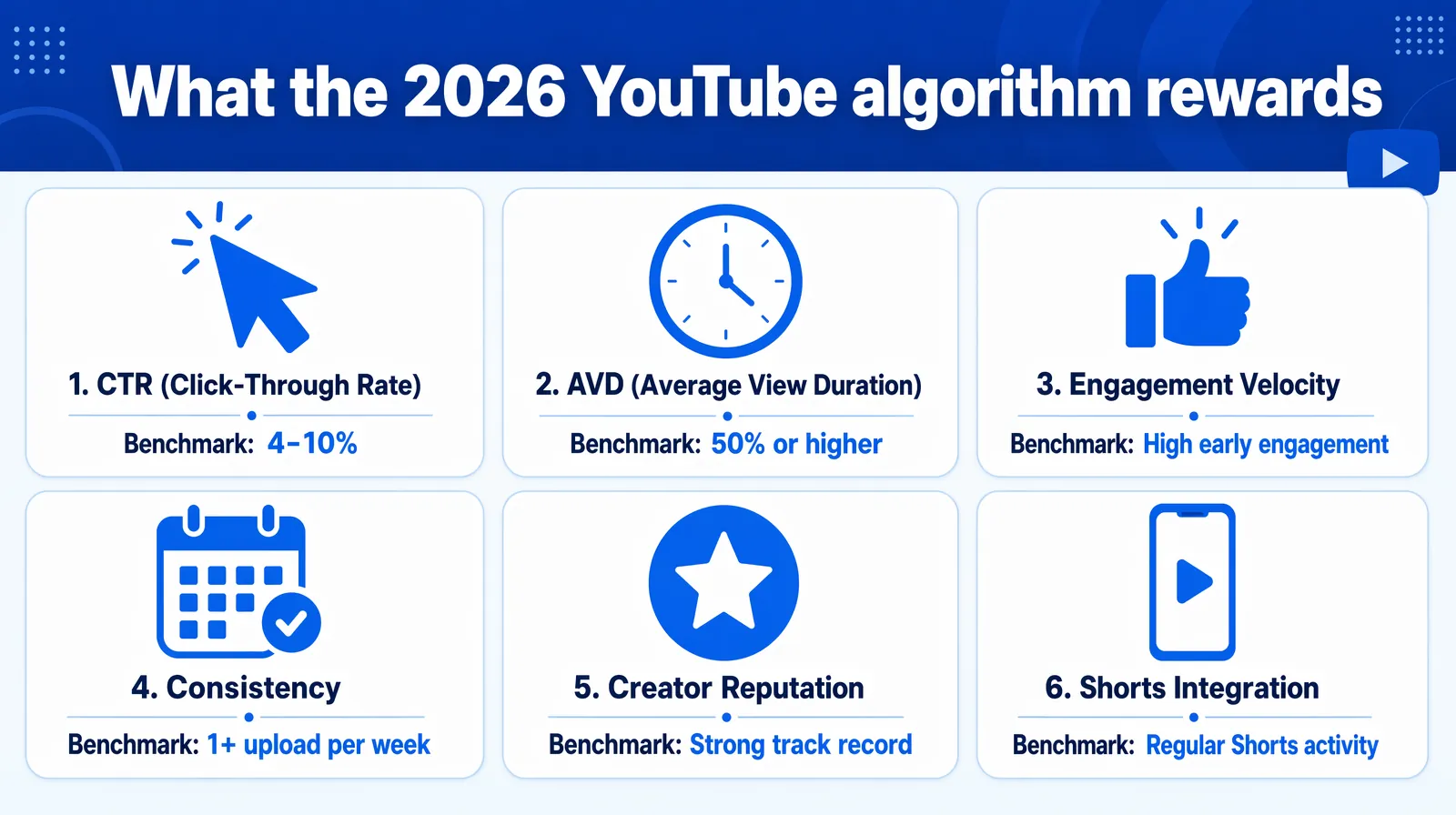
The 2026 YouTube algorithm weighs six signals — master all of them and your channel compounds faster than competitors optimizing for just one.
YouTube SEO is optimizing your video title, description, tags, and metadata so YouTube can correctly surface your content. With 800+ million videos on the platform, discoverability requires deliberate metadata strategy.
Apply these elements to every video:
YouTube's 2026 policy actively penalizes misleading titles and thumbnails — multiple clickbait strikes suppress distribution platform-wide. The algorithm now measures "satisfaction signals" (post-watch surveys, return-visit rates) as a counter-balance to raw CTR.
Generative Engine Optimization (GEO) structures content so AI search engines (ChatGPT, Perplexity, Google AI Overviews) cite it — use conversational, structured descriptions mirroring how people query AI assistants. Answer Engine Optimization (AEO) targets "People Also Ask" boxes: provide concise, complete FAQ-style answers AI can quote verbatim.
Channels launching with 3–5 published videos retain new subscribers at 2–3× the rate of single-video launches, because visitors immediately have a watch session rather than a single viewing event.
Strategic cross-platform promotion compresses the growth timeline by feeding the algorithm early engagement signals that trigger broader distribution.
Use Comment Finder to analyze viewer sentiment and identify recurring questions for future content ideas.
Respond to every comment within 24 hours. Use the Community Tab for polls and behind-the-scenes updates 2–3 times per week. Host monthly live Q&A sessions as you grow — live streams generate Super Chat revenue and boost recommendations.
Channels that make data-driven decisions outperform those relying on intuition. Commit to a weekly 30-minute analytics review.
| Metric | What It Tells You | Target Benchmark |
|---|---|---|
| Audience Retention | Where viewers drop off | 50%+ average for long-form |
| Click-Through Rate (CTR) | Thumbnail + title effectiveness | 4–10% for established channels |
| Subscriber Growth Rate | Content conversion power | Positive week-over-week trend |
| Traffic Sources | How viewers find you | Mix of search, suggested, browse |
| Revenue per 1,000 views (RPM) | Monetization efficiency | $2–$15 typical range |
A/B test thumbnails and titles using YouTube Studio — a thumbnail change alone can double CTR on existing videos. Also use VideoDubber's free audit tools: Dislike Checker, Monetization Checker, Playlist Length Calculator, Child Safety Checker, and Copyright Checker.
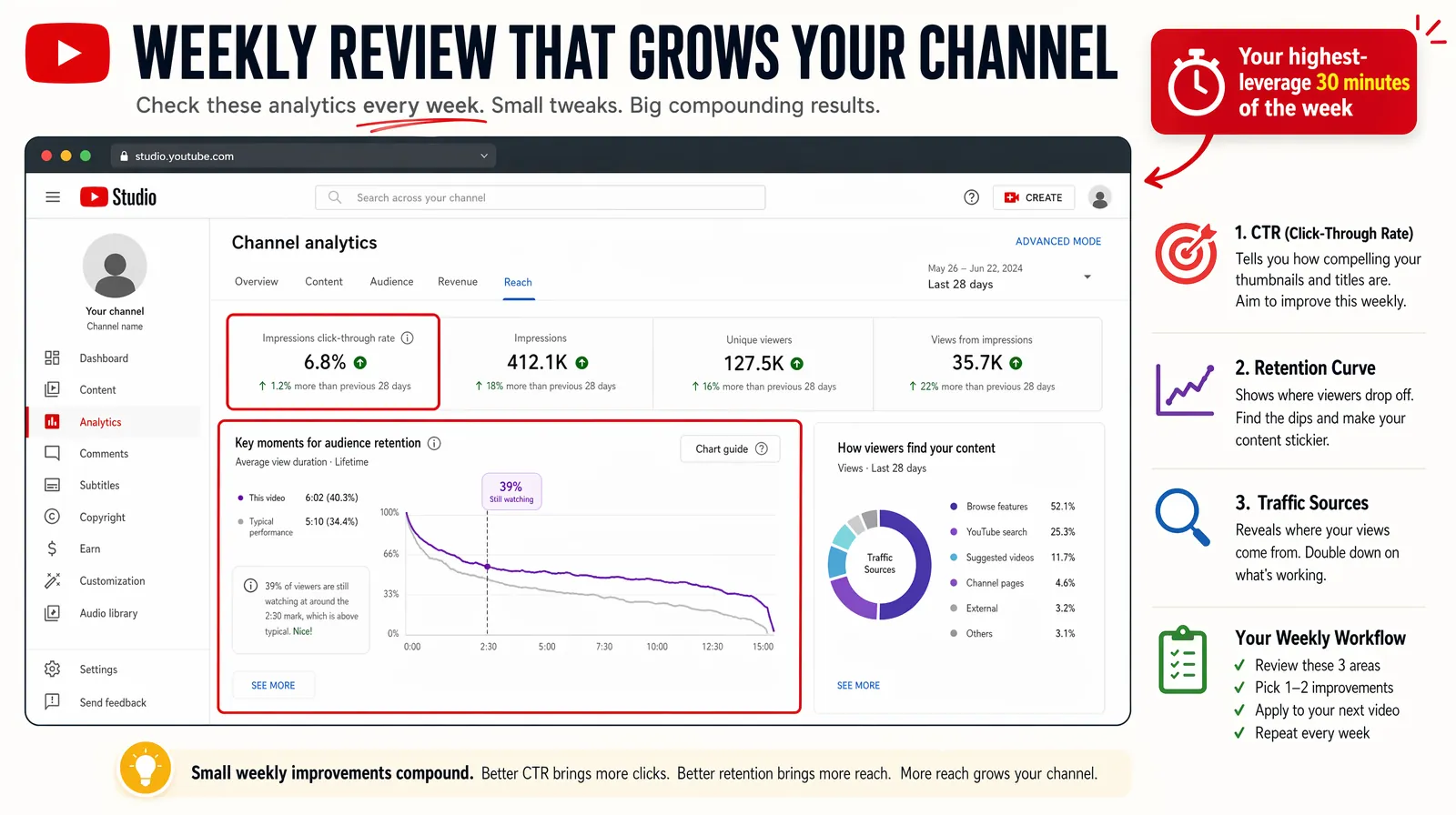
A weekly 30-minute analytics review — retention curve, CTR, traffic sources, and RPM — is the single highest-leverage habit for compounding channel growth.
YouTube Shorts is a short-form vertical video format (up to 3 minutes) generating 70 billion daily views globally — offering new channels the highest organic reach opportunity on the platform. Shorts are distributed to non-subscribers by default, functioning as a built-in discovery mechanism.
2026 Shorts Performance Benchmarks:
| Metric | 2026 Data |
|---|---|
| Daily Shorts views | 70 billion globally |
| Shorts uploaded daily | 12 million |
| Average engagement rate | 5.91% (vs. TikTok's 5.75%) |
| New subscribers per 10,000 views | 16.9 average |
| Optimal length for completion | 50–60 seconds (76% completion rate) |
| Creators using Shorts consistently | 45% of all YouTube creators |
Sources: YouTube Official Blog, Social Media Today, 2025–2026
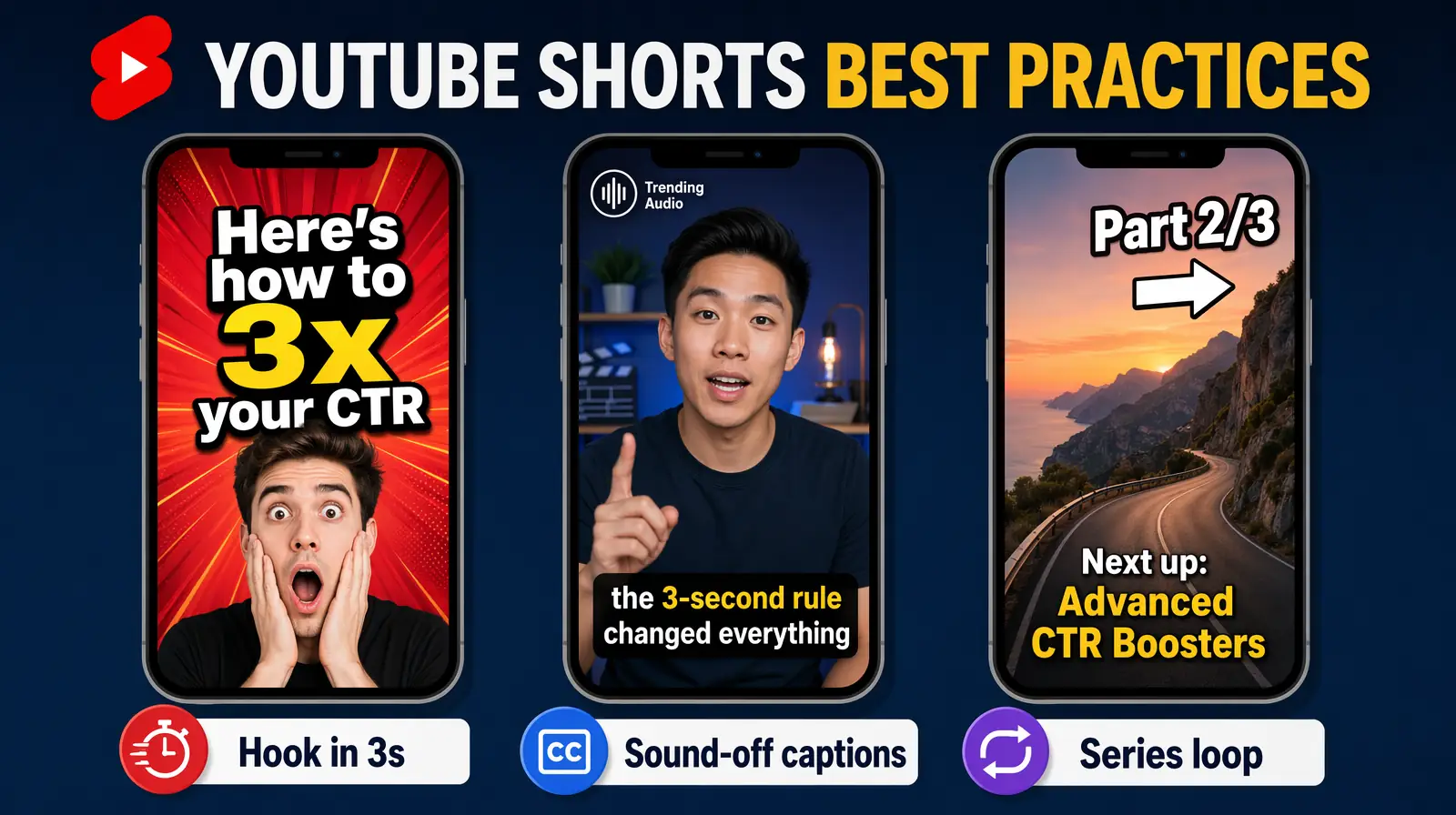
High-performing Shorts in 2026 share a formula — a 3-second payoff hook, on-screen text, 50–60 second length, and trending audio layered under narration.
Shorts Best Practices:
YouTube monetization extends beyond ad revenue — creators with fewer than 1,000 subscribers can earn through affiliate marketing, brand partnerships, and digital products before reaching Partner Program eligibility. The most successful creators build diversified revenue stacks with four to six income streams.
| Requirement | Standard YPP | Shorts-Focused Path |
|---|---|---|
| Subscribers | 1,000 | 1,000 |
| Watch hours | 4,000 valid public watch hours (12 months) | — |
| Shorts views | — | 10 million Shorts views (90 days) |
| Policy compliance | Community Guidelines in good standing | Community Guidelines in good standing |
Long-form creators receive 55% of ad revenue. Shorts creators receive 45% after music licensing deductions, generating $0.01–$0.07 per 1,000 views. Over 25% of YPP channels now earn meaningfully through Shorts, per YouTube's 2025 Creator Report.
Channel Memberships ($0.99–$49.99/month) contributed $1.3 billion in annual creator income as of 2025. Super Chat generates live stream revenue. YouTube Shopping drives $2.7 billion in annual product sales through creator promotions. Build an email list in parallel — direct audience contact outside the algorithm is your most durable asset.
YouTube's creative ecosystem contributed over $55 billion to U.S. GDP in 2024, supporting 490,000+ full-time equivalent jobs, per Oxford Economics.
Most channels receive consistent organic views within 3–6 months of weekly uploads, though Shorts can generate views within 24–48 hours. Channels publishing 2–3 times per week typically see exponential growth between videos 30–50.
You need 1,000 subscribers and either 4,000 watch hours (12 months) or 10 million Shorts views (90 days) for the YouTube Partner Program. However, affiliate marketing, sponsorships, and digital products work at any subscriber count — micro-creators in high-value niches often earn more from direct monetization than larger ad-dependent channels.
Minimum viable setup: modern smartphone (iPhone 13+, Samsung Galaxy S22+), USB or lavalier microphone ($50–$150), and CapCut (free). Audio quality matters more than video. Natural window light eliminates early lighting costs. Total: under $150 with a modern smartphone.
Once per week is the proven minimum for consistent growth. Consistency matters more than frequency — a channel posting every Tuesday outperforms one posting four videos one week then nothing for three. Set a sustainable schedule for 6–12 months, then increase as efficiency improves.
No — with 69 million active creators (growing 11.6% annually) and expanding audiences, opportunity remains strong. Broad generic channels face intense competition, but niche-specific channels with defined audiences continue growing in AI tools, sustainable living, mental health, and creator education.
Publish 3–5 videos before launching, optimize titles and thumbnails with TubeBuddy, promote on 2–3 external platforms, and engage with every early comment. Channels combining long-form with Shorts grow 2–3× faster. First 100 subscribers come from your network; the next 900 from SEO and algorithmic distribution.
The best niche sits at the intersection of genuine expertise, audience demand, and advertiser value. AI tutorials, personal finance, health/fitness, and business education produce CPMs of $5–$25. However, authentic passion in a smaller niche outperforms disengaged content in high-CPM categories.
The algorithm is a multi-signal recommendation engine matching each viewer's interest graph to videos predicted to maximize session watch time. Primary inputs: click-through rate, average view duration, engagement velocity (first 48 hours), and creator reputation. It also analyzes hover time on thumbnails and skip patterns for hyper-personalized recommendations.
Starting a YouTube channel is a marathon, not a sprint. The tools and monetization opportunities in 2026 are better than ever. Your future subscribers are out there — hit record.

With a background in AI and a passion for clear technical communication, I enjoy breaking down complex tools and processes. Exploring new software and sharing insights is a key focus.
How to stream on Twitch in 2026: step-by-step OBS setup, gear recommendations, internet requirements, audience growth strategies, and monetization explained.
How to record with OBS Studio in 2026: step-by-step setup, scenes, audio filters, bitrate settings, best plugins, and pro tips for crisp recordings.
How much does TikTok pay in 2026? Creator Rewards pays $0.40–$1.00/1K views. All 6 income streams, RPM by region, brand deal rates, and real earnings scenarios.
Is CapCut banned in 2026? Country-by-country status, €530M EU fine, June 2025 ToS IP risks, biometric data facts, and best privacy-safe alternatives.
How to add subtitles to YouTube videos: step-by-step guide for YouTube Studio, SRT uploads, auto-captions, and third-party tools. Boost SEO and accessibility.