The Synthesia AI video generator turns plain text into a polished video narrated by a realistic AI avatar — no camera, microphone, or actor needed. You paste a script, pick an avatar and language, and Synthesia generates a presenter-style video in minutes. This hands-on review covers exactly how it works, the 2026 pricing, where it shines, where it falls short, and the best alternatives — including the one to use when your real goal is translating or dubbing video into many languages.
Synthesia is an AI video generation platform built for business: training, onboarding, product explainers, and corporate communications at scale. It is the category leader for avatar-led videos, with the widest avatar and language coverage of any direct competitor as of June 2026.
By the end, you will know whether Synthesia is worth it for your use case, what it actually costs, and when a focused tool like VideoDubber.ai is the smarter pick.
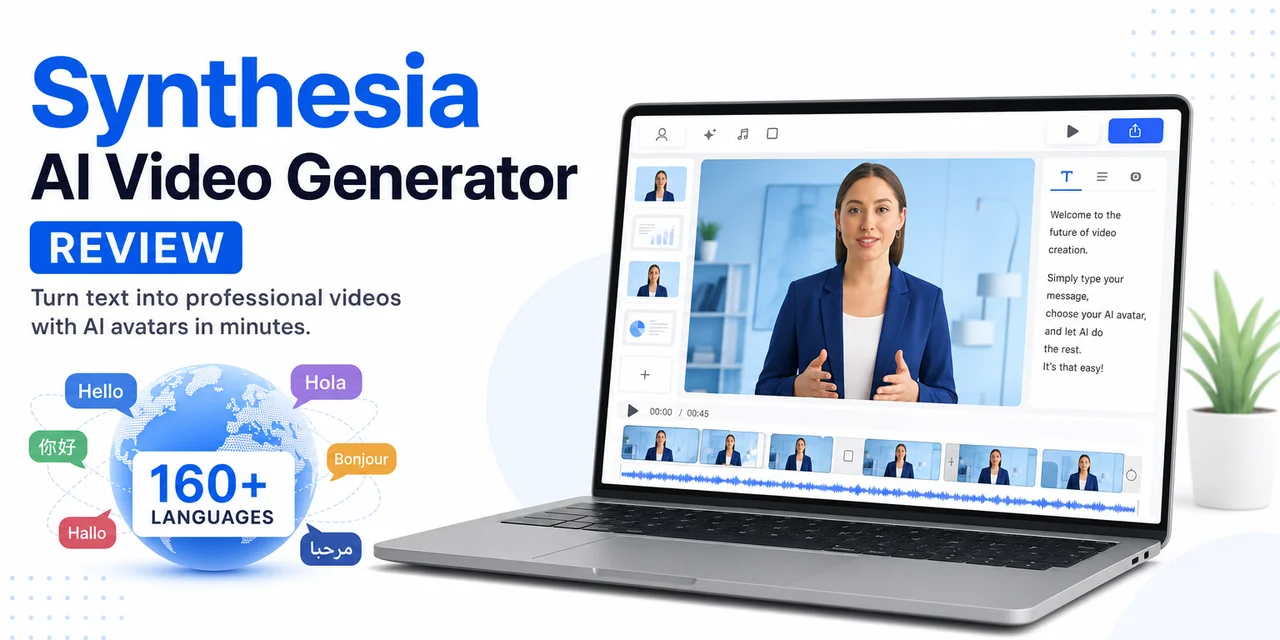
Synthesia turns a text script into an avatar-narrated video in 160+ languages — here is our hands-on review and the alternatives worth knowing.
Quick Answer: Is Synthesia Worth It?
- What it is: An AI video generator that converts text scripts into videos narrated by realistic AI avatars in 160+ languages.
- Best for: Corporate training, onboarding, HR, and product explainer videos produced at scale.
- Pricing: Free plan (10 min/month, watermarked); paid plans from $18/month (Starter, billed annually) to $64/month (Creator); custom Enterprise.
- Avatars & languages: 9 to 240+ avatars depending on plan; 160+ languages and 1,000+ AI voices.
- Biggest catch: Avatars can look stiff in motion, it is among the priciest per minute, and it is built around avatar presenters — not translating or dubbing your existing footage.
- Best alternative: VideoDubber.ai for affordable video translation and dubbing into 150+ languages; HeyGen for cheaper avatar videos.
What Is the Synthesia AI Video Generator?
Synthesia is an AI video generation platform that creates videos from text using digital AI avatars. You write a script, choose an avatar and a voice, and Synthesia produces a video of that avatar speaking your words — lip-synced, in any of 160+ languages, with no filming required.
Founded in 2017 and used by over 1 million users and a large share of the Fortune 100, Synthesia targets business video rather than cinematic or social content. Its sweet spot is high-volume, explanation-based video: employee training, software walkthroughs, compliance, sales enablement, and internal comms that previously needed a studio and a presenter.
In 2026 Synthesia ships several standout capabilities:
- Express-2 avatar engine — full-body movement, hand gestures, and micro-expressions at 1080p.
- AI Dubbing — upload an existing video and translate it into 30+ languages with lip-sync.
- Custom (personal) avatars — record a short clip of yourself and turn it into a reusable digital twin.
- AI Video Assistant and Copilot — generate and edit scripts and scenes with AI.
- Interactivity, quizzes, and SCORM export — for learning and development teams.
How to Use the Synthesia AI Video Generator (Step by Step)
Creating your first Synthesia video takes only a few minutes. Here is the full workflow from a blank workspace to a finished, downloadable video.
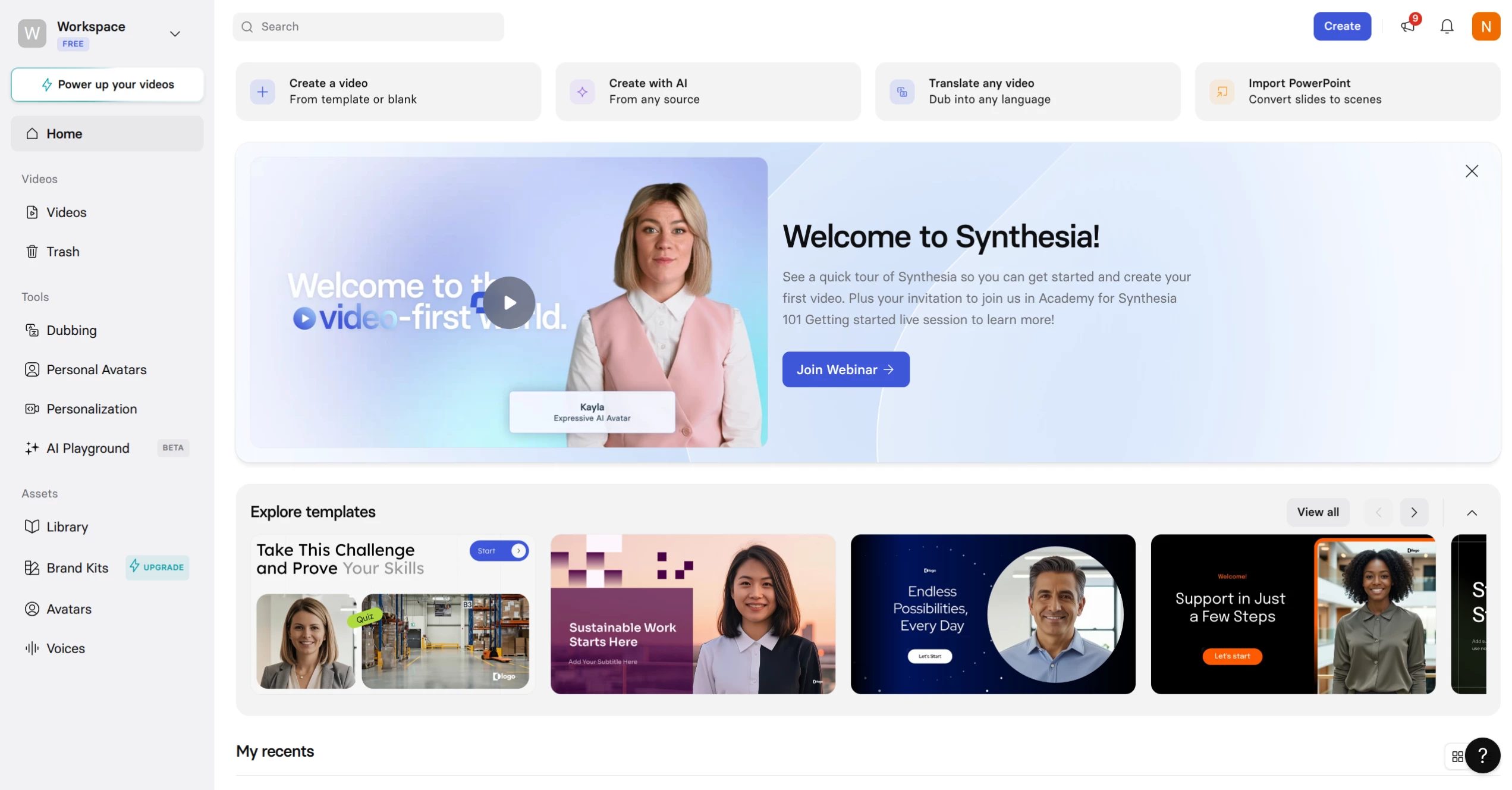
The Synthesia workspace: create a video from a template, generate one with AI, or translate and dub an existing video.
Step 1: Create a new video
From the Synthesia home screen, choose Create a video (from a template or blank), Create with AI (generate a draft from a prompt or source), or Import PowerPoint to convert slides into scenes. Templates are the fastest start for training and explainer videos.
Step 2: Write or generate your script
Type or paste your script into each scene, or let the AI Video Assistant draft one from a topic, document, or URL. Keep scenes short — one idea per scene reads more naturally when an avatar delivers it.
Step 3: Choose an AI avatar
Open the Avatars panel and pick a stock AI avatar, or select a personal avatar you have created from your own recording. Position the avatar in the scene and choose a background, layout, and brand colors.
Step 4: Select a voice and language
Pick from 1,000+ AI voices across 160+ languages and accents. You can change languages per scene, and the avatar will lip-sync to the new audio automatically — the core advantage over recording a human presenter.
Step 5: Add media, branding, and interactivity
Drop in images, screen recordings, music, shapes, and on-screen text. On higher plans, add interactive elements — buttons, quizzes, and branching — useful for training and onboarding.
Step 6: Generate, review, and download
Select Generate. Synthesia renders the video; you preview it, leave comments for collaborators, and then download the MP4 (paid plans) or share a branded video page. Free-plan exports carry a Synthesia watermark.
Synthesia Features at a Glance
| Feature | Synthesia (2026) |
|---|---|
| Type | Text-to-video with AI avatars |
| AI avatars | 9 (Free) to 240+ (Enterprise) |
| Personal avatars | 3 (Starter) to unlimited (Enterprise) |
| Languages | 160+ languages and accents |
| AI voices | 1,000+ |
| AI dubbing | Yes — translate existing video into 30+ languages |
| Avatar engine | Express-2 (full-body, gestures, micro-expressions) |
| Interactivity / quizzes | Yes (Creator and up) |
| SCORM / LMS export | Yes (Enterprise) |
| API access | Yes (Creator and up) |
| Free tier | Yes — 10 min/month, watermarked |
| Best for | Corporate training, onboarding, explainers at scale |
Plan limits and features reflect Synthesia's publicly listed June 2026 pricing and change often — confirm current details on Synthesia's pricing page.
Synthesia Pricing 2026: How Much Does It Cost?
Synthesia has four plans in 2026: Free, Starter, Creator, and Enterprise. Paid plans start at about $18/month billed annually, and the headline differences are video minutes per month, the number of avatars, and business features like API access and SSO.
| Plan | Price (annual) | Price (monthly) | Video limit | Avatars | Highlights |
|---|---|---|---|---|---|
| Free | $0 | $0 | 10 min/month | 9 AI avatars | No card; watermark; 160+ languages |
| Starter | $18/mo | $29/mo | 120 min/year | 125+ AI, 3 personal | Download, AI Dubbing, no logo |
| Creator | $64/mo | $89/mo | 360 min/year | 180+ AI, 5 personal | API, interactivity, branded pages, priority support |
| Enterprise | Custom | Custom | Unlimited | 240+ AI, unlimited personal | SAML/SSO, SCORM, Brand Kits, dedicated CSM |
Annual billing saves up to ~38% versus monthly. The 10-minutes-per-month entry ceiling and per-minute cost make Synthesia one of the most expensive options per finished minute at the low end — the trade-off for its avatar quality and enterprise security stack (SOC 2 Type II, ISO 27001, ISO 42001, GDPR with EU data residency).
Is Synthesia free?
Yes — Synthesia has a free plan that lets you create up to 10 minutes of video per month with 9 stock avatars and 160+ languages, no credit card required. The catch: free videos carry a Synthesia watermark and cannot be downloaded as clean MP4s. To remove the logo and download, you need the Starter plan or higher.
Synthesia Pros and Cons
After testing it for avatar-led video, here is the honest balance sheet.
Pros
- Widest avatar and language coverage — 240+ avatars and 160+ languages beat every direct competitor.
- Genuinely fast — a finished, narrated training video in minutes, no studio or reshoots.
- Enterprise-grade security and compliance — the full SOC 2 / ISO / GDPR stack, rare in this category.
- Strong for training and L&D — interactivity, quizzes, SCORM export, and PowerPoint import.
- Easy multilingual versions — change the language and the avatar re-lip-syncs automatically.
Cons
- Avatars still look slightly stiff in motion — fine for onboarding, weak for emotional or sales videos.
- Expensive per minute at the entry tier, with hard monthly minute caps.
- Built around avatars, not your footage — its AI Dubbing covers 30+ languages, far fewer than dedicated dubbing tools, and is geared to its own video pipeline.
- Not for cinematic or B-roll-heavy content — it is a talking-presenter tool, not a generative film studio.
Synthesia Limitations (When to Use Something Else)
Synthesia is excellent at one job — avatar-narrated business video — and runs into walls outside it:
- Dubbing your own videos at scale. Synthesia's AI Dubbing tops out around 30+ languages and is built for its own pipeline. If your real goal is taking existing YouTube videos, courses, or footage and voicing them in many languages cheaply, a dedicated dubbing tool goes further.
- Budget creators. The minute caps and per-minute cost add up fast for individual creators and small teams.
- Persuasive or emotional content. Avatars don't yet pass for real humans in motion, which hurts sales and brand storytelling.
- Standalone voiceover or audio export. Synthesia is a video tool; pulling clean, exportable audio or subtitles for other workflows is not its focus.
If any of these is your priority, the alternatives below are a better fit.
Best Synthesia Alternative for Video Translation: VideoDubber.ai
VideoDubber.ai is the best Synthesia alternative when your goal is translating and dubbing video rather than generating avatar presenters. Where Synthesia is built to create new avatar videos from scripts, VideoDubber is built to take the videos you already have and voice them in 150+ languages — affordably, with the background music and timing preserved.
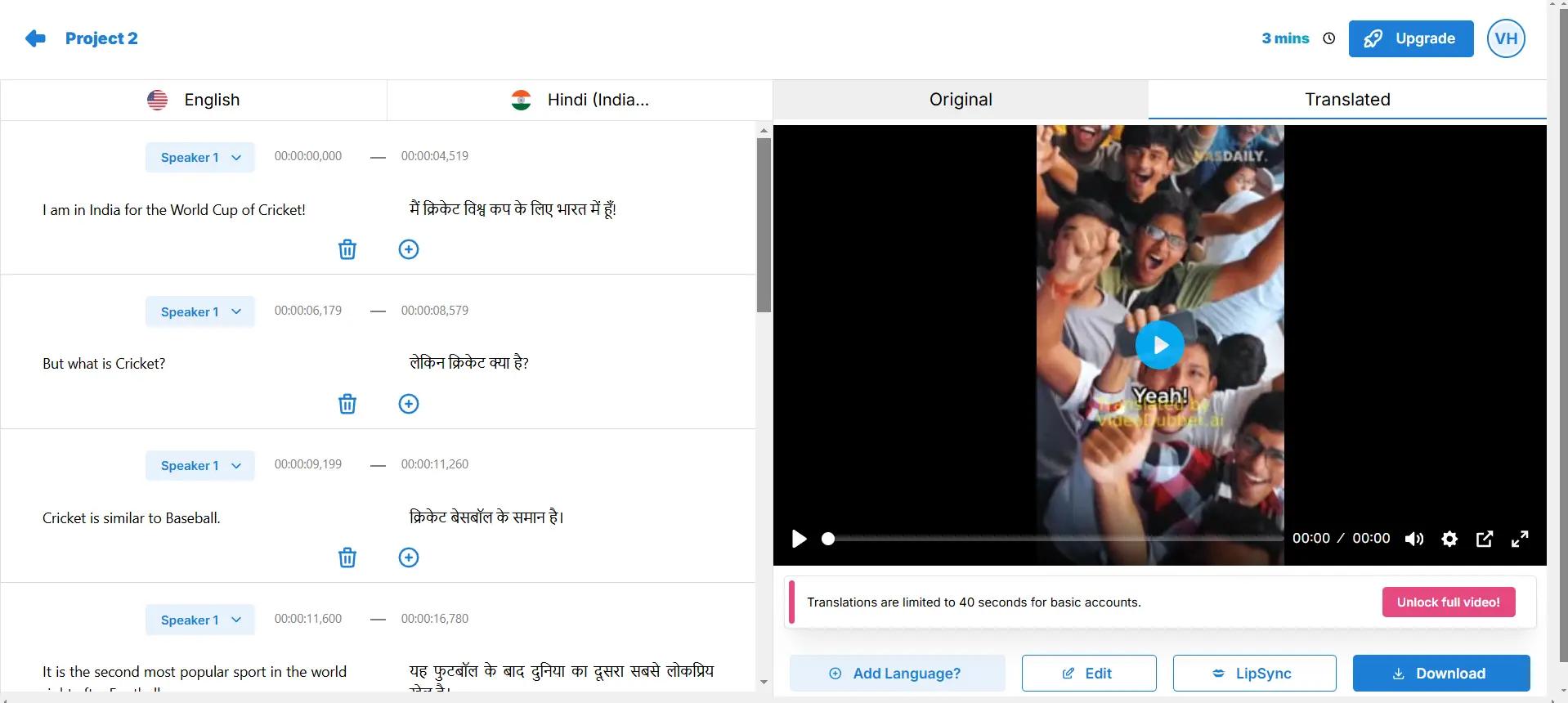
VideoDubber dubs an existing video into 150+ languages and exports the audio and subtitles — the job Synthesia's avatar pipeline stops short of.
This matters because Synthesia's own AI Dubbing covers far fewer languages and is wrapped around its avatar workflow and pricing. VideoDubber gives you both sides — generate a video and localize it:
- Generate videos with the VideoDubber AI video generator — a direct, no-watermark alternative to Synthesia for turning a script or prompt into a finished video.
- Dub video into 150+ languages — more than 5× Synthesia's dubbing language count, with natural translated voiceovers that keep the original background audio.
- Export real audio and subtitles — download MP3/WAV plus SRT/VTT, not just an avatar MP4.
- Voice cloning ~20× cheaper than ElevenLabs — keep one consistent voice across every language.
- No watermark, even on your free first video — a real free entry point, no credit card required.
- Built for any footage — talking heads, tutorials, courses, ads, or social clips, not just avatar scripts.
You can try the VideoDubber AI video generator free — no credit card — or translate and dub your first video in 150+ languages. New to localization? Start with our guide on how to translate video.
Synthesia vs VideoDubber
| Factor | Synthesia | VideoDubber.ai |
|---|---|---|
| Core job | Generate avatar videos from text | Generate videos + translate & dub them |
| Languages | 160+ (avatar TTS), 30+ for dubbing | 150+ for dubbing |
| Works on your own footage | Limited (AI Dubbing) | Yes — core feature |
| Keeps background music | N/A | Yes |
| Audio / subtitle export | Not the focus | MP3/WAV + SRT/VTT |
| Voice cloning cost | Personal avatar add-ons | ~20× cheaper than ElevenLabs |
| Free tier | 10 min/month, watermarked | First video free, no watermark |
| Best for | Corporate training & explainers | Multilingual video localization |
Verdict: Use Synthesia to create avatar-led training videos. Use VideoDubber the moment your goal is to translate a video — to reach a Spanish, Hindi, or Portuguese audience without re-recording anything.
Best Synthesia Alternatives (Other AI Video Generators)
Synthesia is not your only avatar-video option. Here is how the top alternatives compare for different needs.
| Tool | Best For | Starting Price | Standout |
|---|---|---|---|
| Synthesia | Enterprise training & explainers | ~$18/mo (annual) | Widest avatar & language coverage |
| HeyGen | Cheaper avatar videos & social | ~$24/mo | Fast feature rollout, strong dubbing |
| VideoDubber.ai | AI video generation + translation & dubbing | Free first video | AI video generator, 150+ languages, cheap voice cloning |
| Colossyan | L&D and training | ~$27/mo | Interactive quizzes, multi-avatar scenes |
| ElevenLabs | Most realistic voices | ~$5/mo | Best AI voice expressiveness |
For a full, tested ranking of AI video tools, see our best free AI video generators and best AI video editing tools guides.
How to Choose the Right Tool
Match the tool to the job:
| Your Goal | Best Pick |
|---|---|
| Avatar-narrated training/onboarding videos | Synthesia |
| The same, at a lower price | HeyGen |
| Translate or dub an existing video into many languages | VideoDubber.ai |
| Interactive courses for L&D teams | Colossyan |
| The single most realistic voice | ElevenLabs |
| Export standalone audio + subtitles | VideoDubber.ai |
Many teams pair the two approaches: Synthesia (or HeyGen) to generate the source video, then VideoDubber to localize it into every market they sell in.
Frequently Asked Questions
What is the Synthesia AI video generator?
Synthesia is an AI video generation platform that turns text scripts into videos narrated by realistic AI avatars in 160+ languages. You write a script, choose an avatar and voice, and Synthesia produces a lip-synced presenter video in minutes — no camera, microphone, or actor required. It is built mainly for corporate training, onboarding, and explainer videos.
Is Synthesia free?
Yes, Synthesia has a free plan with up to 10 minutes of video per month, 9 stock avatars, and 160+ languages, with no credit card required. However, free videos carry a Synthesia watermark and cannot be downloaded as clean MP4s. To remove the logo and download videos, you need a paid plan starting at about $18/month billed annually.
How much does Synthesia cost in 2026?
Synthesia has four plans in 2026: Free ($0, 10 min/month, watermarked), Starter (~$18/month annual or $29 monthly, 120 min/year), Creator (~$64/month annual or $89 monthly, 360 min/year), and custom Enterprise pricing with unlimited minutes. Annual billing saves up to about 38% versus monthly.
Is Synthesia worth it?
Synthesia is worth it for businesses producing training, onboarding, and explainer videos at scale, thanks to its 240+ avatars, 160+ languages, and enterprise security. It is less ideal for budget creators, persuasive or emotional content, or translating your own footage — where cheaper or more focused tools like HeyGen and VideoDubber are a better fit.
What is the best Synthesia alternative?
The best Synthesia alternative depends on your goal. For cheaper avatar videos, HeyGen is the closest competitor. VideoDubber.ai is a strong pick if you want both an AI video generator and the ability to translate and dub video into 150+ languages — going much further than Synthesia's built-in AI Dubbing. For interactive training, Colossyan is strong; for the most realistic voices, ElevenLabs leads.
Can Synthesia translate and dub videos?
Yes, Synthesia has an AI Dubbing feature that translates an existing video into 30+ languages with lip-sync. However, it covers fewer languages than dedicated dubbing tools and is built around Synthesia's own avatar pipeline. For broader, more affordable localization — 150+ languages with background music preserved — a tool like VideoDubber.ai is purpose-built for the job.
Are Synthesia avatars realistic?
Synthesia's 2026 Express-2 avatars are noticeably more realistic than earlier versions, with full-body movement, hand gestures, and micro-expressions at 1080p. They look professional for training and explainer videos, but reviewers note they can still appear slightly stiff in motion and don't fully pass for real humans — a limitation for sales or emotionally persuasive content.
The Bottom Line
The Synthesia AI video generator is the category leader for turning scripts into avatar-narrated business videos — fastest when you need professional training, onboarding, or explainer content in many languages without a studio. Its weak spots are price at the low end, avatars that still look slightly stiff, and a focus on generating avatar videos rather than localizing the footage you already have.
If you want a Synthesia alternative that both creates and localizes video, VideoDubber.ai is the natural next step: spin up a video with the VideoDubber AI video generator, then dub it into 150+ languages, export the audio and subtitles, and clone your voice for ~20× less than ElevenLabs — the first video free, no watermark. Explore how to translate video, the best free AI video generators, and our best video translator guide to go further.
Further Reading
Best Free AI Video Generators in 2026: Ranked & Compared
Best free AI video generators in 2026, ranked and honestly compared: Veo 3, DeeVid, HeyGen, VideoDubber, Kling, Seedance — free tiers, watermarks, commercial use.
Best AI Video Editing Tools in 2026: Ranked & Compared
Best AI video editing tools in 2026, ranked and tested: Descript, CapCut, VideoDubber, OpusClip, Premiere, DaVinci Resolve — pricing, free tiers, and workflow.
How to Translate Your Video Using VideoDubber.ai
Learn how to dub your video into multiple languages effortlessly with VideoDubber.ai. This guide walks you through the easy steps of uploading, translating, and adding voiceovers to your video for multilingual audiences.
Best Video Translator in 2024: My Honest Experience with the Top 10 Tools
Dive into my hands-on experience with the top 10 video translators of 2024. From speed and language options to usability, discover which tools truly deliver and why VideoDubber.ai stands out.
Canva AI Voice Generator: How to Use It (+ Alternative)
How to use the Canva AI voice generator step by step: access it, add a voiceover, languages, character limits, and pricing. Plus the best alternative for exporting audio and dubbing video in 150+ languages.