Search "best text to speech" and every result swears its tool sounds human. After running the same 200-word script through the leading platforms in 2026 — and reading the licensing fine print most reviews skip — the honest answer is that there is no single winner. The best text to speech software depends on whether you need broadcast-grade voiceover, a free reader for documents, a low-latency API for voice agents, or audio that can become a video in a dozen languages.
Text to speech (TTS) is technology that converts written text into spoken audio using AI voice models. Modern neural TTS produces natural prosody, emotion, and pronunciation that most listeners can no longer reliably tell apart from a human voice actor in a blind A/B test.
This guide ranks the best text to speech tools in 2026 — free and paid — by voice realism, language coverage, pricing, commercial rights, and the one factor every other list ignores: whether your TTS audio can travel beyond a single language.
The best text to speech software in 2026 spans realistic voiceover, free document readers, developer APIs, and tools that turn one script into voice in 150+ languages.
Quick Answer: Best Text to Speech Software in 2026
- Best overall realism: ElevenLabs — the most expressive, human-like AI voices and cloning.
- Best for multilingual video & dubbing: VideoDubber.ai — turn TTS into voiced video in 150+ languages, no watermark.
- Best for business voiceover: Murf AI — studio workflow for ads, e-learning, and demos.
- Best for listening on the go: Speechify — read any document or article aloud, 1,000+ voices.
- Best free for documents: NaturalReader — 20 free minutes daily for PDFs and articles.
- Best fully free: Balabolka and open-source models — no cost, no usage cap.
What This Guide Covers
| Question | Section |
|---|---|
| How we tested and ranked | How We Evaluated Text to Speech Software |
| All tools at a glance | Quick Comparison Table |
| Most realistic voices | 1. ElevenLabs |
| TTS for multilingual video | 2. VideoDubber.ai |
| Business & marketing voiceover | 3. Murf AI |
| Reading documents aloud | 4. Speechify |
| Developer API | 5. PlayHT |
| Best free document reader | 6. NaturalReader |
| Cloud TTS for scale | 7. Cloud APIs |
| Real-time voice agents | 8. Inworld & Cartesia |
| 100% free desktop tool | 9. Balabolka |
| Free & unlimited (self-hosted) | 10. Open-source TTS |
| Which one should you pick | How to Choose the Right TTS Tool |
| TTS vs voice cloning | TTS vs Voice Cloning |
| Mistakes to avoid | Common Mistakes |
| FAQs | Frequently Asked Questions |
How We Evaluated Text to Speech Software
Rankings are only useful if you know the yardstick. Each tool below was weighed on six factors, in priority order:
- Voice realism — natural prosody, emotion, and pronunciation, judged in blind listening tests.
- Language & accent coverage — how many languages, and how natural the non-English voices sound.
- Pricing & free tier — real cost per hour of audio and how usable the free plan is.
- Commercial rights — whether the output is licensed for ads, monetized video, and client work.
- Workflow fit — document reading, video voiceover, API, or real-time agents.
- Export & integration — MP3/WAV download, SSML control, SRT/subtitle support, and API access.
We prioritized usable, publishable audio over demo reels. A stunning voice you cannot legally monetize — or that only exists inside a locked editor — is worth less than a slightly plainer voice you own and can ship.
Quick Comparison: Best Text to Speech Software 2026
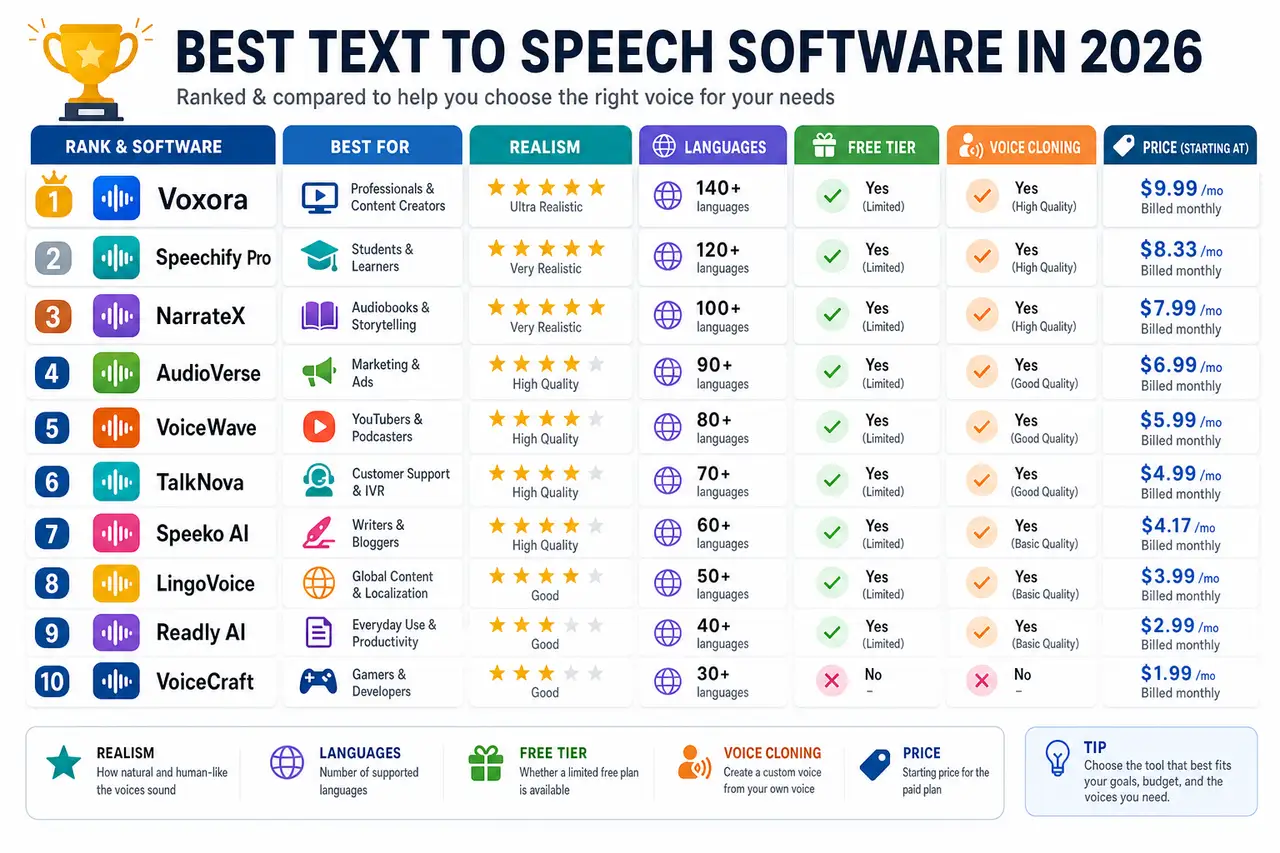
Side-by-side comparison of the top text to speech tools in 2026, ranked for real-world use.
| Rank | Tool | Best For | Free Tier | Languages | Voice Cloning | Starting Paid Price |
|---|---|---|---|---|---|---|
| 1 | ElevenLabs | Overall realism & cloning | Yes (limited) | 30+ | Yes | $5/mo (Starter) |
| 2 | VideoDubber.ai | Multilingual video & dubbing | First video free | 150+ | Yes (instant + premium) | Usage-based |
| 3 | Murf AI | Business & marketing voiceover | 10 min trial | 20+ | Enterprise | $19/mo (annual) |
| 4 | Speechify | Reading & listening on the go | Yes | 60+ | Yes (higher tiers) | ~$11.58/mo (annual) |
| 5 | PlayHT | Developers & API | Yes (limited) | 30+ | Yes | ~$31/mo |
| 6 | NaturalReader | Free document reading | 20 min/day | 20+ | No (read-only focus) | ~$10/mo |
| 7 | Azure / Google / Polly | Cloud scale & apps | Free monthly quota | 100+ | Custom (Azure) | Pay-as-you-go |
| 8 | Inworld / Cartesia | Low-latency voice agents | API credits | 20+ | Limited | Usage-based |
| 9 | Balabolka | 100% free desktop | Free (no cap) | OS-dependent | No | Free |
| 10 | Open-source (Kokoro, XTTS, Piper) | Free & unlimited self-hosting | Free | Model-dependent | Yes (XTTS) | Free |
Prices and free-tier limits reflect publicly listed June 2026 terms and change often — confirm current details on each provider's site. See the sections below for full breakdowns.
1. ElevenLabs: Best Overall Voice Realism
ElevenLabs is an AI voice platform widely regarded as the realism leader in 2026 — its voices carry emotion, pacing, and breath that hold up in blind tests, and its voice cloning needs only a short sample to reproduce a speaker.
ElevenLabs is the default pick when the voice itself is the product: audiobooks, character work, premium narration, and expressive multilingual content. It supports 30+ languages, offers a large library of stock voices, and gives fine control through its model settings and SSML-like tags.
| Feature | ElevenLabs Specification |
|---|---|
| Standout | Most realistic, expressive voices |
| Languages | 30+ |
| Voice cloning | Yes (instant + professional) |
| Free tier | Yes, limited monthly characters |
| Paid plans | Starter ~$5, Creator ~$22, Pro ~$99/mo |
| Best for | Audiobooks, character voices, premium narration |
Pros and cons
| Pros | Cons |
|---|---|
| Best-in-class realism and emotion | Character credits run out fast on lower tiers |
| Strong voice cloning from short samples | Costs climb quickly for high-volume work |
| Good multilingual quality | Free tier is closer to a trial |
| Developer API available | Commercial rights need a paid plan |
Verdict: Start with ElevenLabs when voice quality is non-negotiable. For long-form or high-volume audio, watch the per-character pricing — and if your end goal is video in many languages, pair it with VideoDubber (next), which is built for that exact job at a fraction of the cost.
2. VideoDubber.ai: Best for Multilingual Video and Dubbing
VideoDubber.ai is an AI text-to-speech, translation, and dubbing platform that does the thing most TTS tools stop short of: it turns your script or video into fully voiced, lip-synced audio in 150+ languages — with your own cloned voice and no watermark.
VideoDubber.ai text to speech
Here is the gap every other "best text to speech" list ignores: generating one English voiceover reaches one audience. The same script, voiced in Spanish, Hindi, Portuguese, Japanese, and Arabic, reaches several times more people for almost no extra work. VideoDubber is the tool built around that multiplier — it generates the TTS and the localized versions, so one script becomes a global library.
You can convert text to speech and translate your first video for free with no credit card, which makes it a genuine free entry point rather than a locked trial. Output keeps your source quality and carries no watermark — and voice cloning runs roughly 20× cheaper than ElevenLabs, the difference that matters most at volume.
| Feature | VideoDubber Specification |
|---|---|
| Core output | TTS + translated, dubbed video |
| Languages | 150+ with regional accents |
| Voice cloning | Instant (Starter) + Premium (Pro/Growth) |
| Lip sync | Premium lip sync on Growth and above |
| Free tier | First video free, no credit card |
| Watermark | None |
| Export | MP3/WAV audio, SRT/VTT subtitles |
Why it earns the #2 spot
The tools above generate a voice. VideoDubber generates every language version of that voice and syncs it to video — multi-speaker detection, background-music retention, and subtitle export included. For creators, marketers, and course makers, that turns a single recording into publish-ready multilingual content.
| Pros | Cons |
|---|---|
| 150+ languages with regional accents | Specializes in video/dubbing, not document reading |
| Voice cloning ~20× cheaper than ElevenLabs | Premium lip sync needs the Growth plan |
| No watermark, even on the free first video | Less suited to pure audiobook narration |
| Keeps background music and source quality |
Verdict: Use VideoDubber when your TTS needs to become video — or reach beyond English. Generate the voiceover, then dub it into Spanish and Portuguese and measure the reach lift. New to the workflow? Start with our guide on how to convert text to speech online.
3. Murf AI: Best for Business and Marketing Voiceover
Murf AI is a studio-style TTS platform aimed at teams producing ads, e-learning, product demos, and corporate narration, with 200+ voices, a timeline editor, and built-in pronunciation and emphasis controls.
Murf's strength is the workflow, not just the voice: you can sync narration to slides or video, tweak pitch and pacing per word, and keep brand-consistent voices across a library of content. Its free tier offers 10 minutes of generation across all voices for trial, but excludes downloads and commercial use — paid plans start at $19/month (annual) and add commercial rights.
| Feature | Murf AI Specification |
|---|---|
| Standout | End-to-end voiceover studio |
| Voices / languages | 200+ voices, 20+ languages |
| Free tier | 10 min trial, no download/commercial |
| Paid plans | Creator ~$19/mo, Business ~$66/mo (annual) |
| Voice cloning | Enterprise tier |
| Best for | Ads, e-learning, demos, corporate video |
Verdict: Murf is the pick for marketing and L&D teams who need a repeatable production pipeline rather than a single clip. Confirm you are on a paid plan before publishing — the free tier's output is trial-only.
4. Speechify: Best for Reading and Listening on the Go
Speechify is a TTS reader app built to listen to anything — articles, PDFs, emails, even photographed pages via OCR — across phone, browser, and desktop, with 1,000+ voices and 60+ languages.
Where ElevenLabs and Murf are creation tools, Speechify is a consumption tool: students, commuters, and people with dyslexia or visual impairment use it to turn reading into listening. It also produces voiceover, but its real edge is mobile listening and document accessibility.
| Feature | Speechify Specification |
|---|---|
| Standout | Listen to any document anywhere |
| Voices / languages | 1,000+ voices, 60+ languages |
| OCR | Yes — scan and read physical pages |
| Free tier | Yes (limited voices/speed) |
| Paid plans | ~$11.58–$20.75/mo billed annually |
| Best for | Reading, studying, accessibility |
Verdict: Choose Speechify if your goal is to consume text as audio rather than produce polished voiceover. Note that the affordable monthly rate requires an annual commitment.
5. PlayHT: Best for Developers and API Access
PlayHT (Play.ai) is a developer-focused TTS platform known for low-latency streaming voices and a clean API, making it a favorite for embedding speech into apps, IVR systems, and voice agents.
PlayHT pairs realistic voices with the infrastructure developers need — streaming output, voice cloning, and SDKs — while keeping a web studio for non-coders. It supports 30+ languages and offers a limited free tier for testing before you scale on usage-based pricing.
| Feature | PlayHT Specification |
|---|---|
| Standout | API + low-latency streaming |
| Languages | 30+ |
| Voice cloning | Yes |
| Free tier | Yes, limited |
| Paid plans | From ~$31/mo, plus API usage |
| Best for | Apps, IVR, real-time products |
Verdict: PlayHT is the developer's pick when you need TTS inside a product. For one-off voiceover, a studio tool like Murf or ElevenLabs is simpler.
6. NaturalReader: Best Free Tier for Reading Documents
NaturalReader is a text-to-speech reader for PDFs, Word docs, and web pages, with text highlighting that follows along — and one of the most generous free tiers at 20 minutes of premium voice daily.
NaturalReader sits between Speechify (mobile-first listening) and a creation tool: it is excellent for students and professionals who want to listen to documents and have a real free daily allowance rather than a trial. Paid plans unlock more premium voices and commercial use.
| Feature | NaturalReader Specification |
|---|---|
| Standout | Generous 20 min/day free tier |
| Inputs | PDF, Word, web, ebooks |
| Languages | 20+ |
| Free tier | 20 minutes premium voice daily |
| Paid plans | From ~$10/mo |
| Best for | Reading documents, accessibility |
Verdict: NaturalReader is the best free option for reading documents aloud day to day. For producing publishable voiceover, look to ElevenLabs, Murf, or VideoDubber.
7. Azure, Google, and Amazon Polly: Best Cloud TTS for Scale
Cloud TTS APIs from Microsoft Azure, Google Cloud, and Amazon Polly are the infrastructure layer behind much of the industry — pay-as-you-go neural voices in 100+ languages, with the reliability, SLAs, and SSML control that production apps require.
These are not consumer apps; they are services you call from code. They win on scale, uptime, and breadth of languages, and each includes a free monthly character quota. Azure adds custom neural voice (cloning) for approved use cases, while Polly and Google emphasize broad language coverage and predictable per-character pricing.
| Provider | Standout | Free Quota | Languages |
|---|---|---|---|
| Azure AI Speech | Custom neural voice, SSML depth | Monthly free chars | 140+ |
| Google Cloud TTS | WaveNet/Neural2 quality | Monthly free chars | 50+ |
| Amazon Polly | Simple, cheap at scale | 12-month free tier | 30+ |
Verdict: Choose a cloud API when you are building software that needs TTS at scale with guaranteed uptime. For human-facing creative work, the studio tools above are faster to a finished result.
8. Inworld and Cartesia: Best for Low-Latency Voice Agents
Inworld and Cartesia are real-time TTS engines optimized for conversational AI, where latency decides whether a voice agent feels natural. Cartesia's Sonic models deliver time-to-first-audio around 90ms, and Inworld's TTS scored at the top of several 2026 naturalness blind tests.
If you are building a live voice agent, a game NPC, or any application where the voice has to respond instantly, these latency-first engines beat slower, higher-fidelity batch tools. They trade some editing convenience for speed and streaming reliability.
| Feature | Inworld / Cartesia |
|---|---|
| Standout | Ultra-low latency (~90ms TTFA) |
| Best for | Voice agents, NPCs, live apps |
| Access | API / usage-based |
| Languages | 20+ |
| Voice cloning | Limited / model-dependent |
Verdict: These are specialist engines for real-time products, not voiceover studios. Pick them when responsiveness matters more than a deep editing UI.
9. Balabolka: Best Fully Free Desktop TTS
Balabolka is a free Windows desktop TTS program with no cost and no usage cap. It uses the voices installed on your system (plus SAPI voices) to read and export text to audio files.
Balabolka will not match neural-AI realism — it relies on the voices your OS provides — but for offline reading, batch converting documents to MP3, and zero-budget projects, it is genuinely free and unlimited, with no account required.
| Feature | Balabolka Specification |
|---|---|
| Standout | Completely free, no usage cap |
| Platform | Windows desktop |
| Voices | System/SAPI voices |
| Export | MP3, WAV, and more |
| Best for | Offline reading, batch conversion |
Verdict: Balabolka is the answer when "free" has to mean actually free with no limits. For natural AI voices, you will need one of the neural tools above.
10. Open-Source TTS: Best Free and Unlimited for Developers
Open-source TTS models run on your own hardware — no credits, no caps, and full control. The field matured fast through 2025–2026, and several models now rival commercial quality if you have the GPU and setup time.
- Kokoro — a tiny 82M-parameter model with surprisingly natural output that runs on modest hardware; the best lightweight pick.
- Coqui XTTS — multilingual with voice cloning from a short sample; the most capable all-rounder.
- Piper — fast, offline, and lightweight; built for Raspberry Pi and accessibility on low-power devices.
| Model | Standout | Voice Cloning | Min Hardware |
|---|---|---|---|
| Kokoro | Tiny, natural, efficient | No | CPU / modest GPU |
| Coqui XTTS | Multilingual + cloning | Yes | Mid GPU |
| Piper | Offline, low-power | No | CPU / Raspberry Pi |
Verdict: Open-source TTS removes every usage ceiling and keeps data on your machine — ideal for developers and privacy-sensitive work. For everyone else, the hosted tools are far faster to a finished result.
How to Choose the Right Text to Speech Tool
There is no single best TTS tool — there is a best tool per job. Match the tool to your goal:
| Your Goal | Best Tool | Why |
|---|---|---|
| Most realistic single voice | ElevenLabs | Top-rated realism and cloning |
| Reach a global, multilingual audience | VideoDubber.ai | TTS + dubbing in 150+ languages, no watermark |
| Ads, e-learning, corporate video | Murf AI | Full voiceover studio workflow |
| Listen to documents on the go | Speechify | Mobile-first reader with OCR |
| Embed TTS in an app | PlayHT or cloud APIs | API + streaming |
| Read documents free | NaturalReader | 20 free minutes daily |
| Real-time voice agents | Cartesia / Inworld | Lowest latency |
| Truly free, no limits | Balabolka or open-source | No cost, no cap |
The creators and teams who get the most from TTS rarely bet on one platform — they use a realism tool for the source voice and a localization tool to make that voice travel.
Text to Speech vs Voice Cloning: What's the Difference
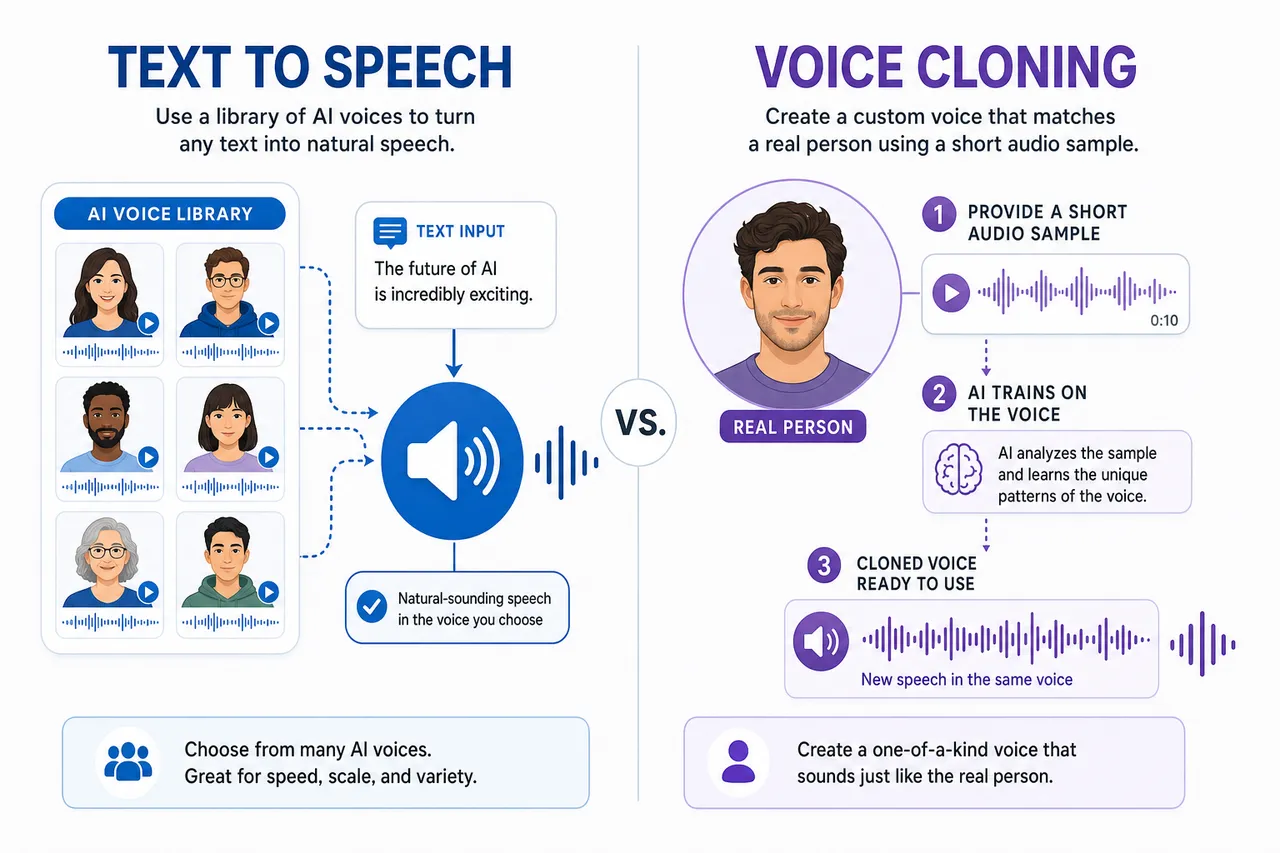
Text to speech uses ready-made AI voices; voice cloning recreates a specific person's voice from a sample.
Text to speech uses a library of ready-made AI voices to read your text. Voice cloning creates a new voice that mimics a specific person from a short audio sample, then uses that cloned voice for TTS. Most leading platforms now offer both.
- Use stock TTS when any natural, professional voice will do — explainers, e-learning, IVR, accessibility.
- Use voice cloning when the voice must be yours or a specific person's — personal branding, consistent narration across a series, or dubbing your own video into other languages while keeping your voice.
VideoDubber, ElevenLabs, PlayHT, and Speechify all support cloning; cost is the differentiator, and VideoDubber's cloning runs roughly 20× cheaper than ElevenLabs. For a deeper explanation, see what is voice cloning and how AI voice cloning works for video dubbing.
Common Mistakes When Choosing TTS Software
- Picking on voice demos alone. Demo reels are cherry-picked. Test your own script — especially numbers, names, and acronyms — before committing.
- Ignoring commercial rights. Many free tiers (Murf's trial, parts of ElevenLabs free) forbid commercial use. Generating ≠ licensing.
- Overpaying on per-character pricing. High-volume narration adds up fast on premium tiers. Match the plan to your real monthly word count.
- Forgetting other languages. A voiceover in English alone reaches a fraction of its potential audience. Localize it.
- Settling for robotic free voices. Free OS voices (Balabolka) are fine for reading, not publishing. Use a neural tool for content that ships.
- Skipping pronunciation control. Brand names and jargon often need SSML or phoneme tweaks — check the tool supports them before you scale.
Frequently Asked Questions
What is the best text to speech software in 2026?
ElevenLabs is the best text to speech software for overall voice realism and cloning, while VideoDubber.ai is best when you need that audio in many languages or as dubbed video, Murf AI leads for business voiceover, and Speechify and NaturalReader are best for reading documents aloud. The best choice depends on your use case — most professionals use more than one.
What is the most natural-sounding text to speech?
ElevenLabs is widely rated the most natural and expressive in 2026 blind tests, with Inworld and Murf AI close behind for naturalness. Cloud neural voices from Azure and Google are also highly realistic for app use. For non-English content, test the specific language — quality varies significantly by voice and language.
What is the best free text to speech software?
For reading documents, NaturalReader offers the most usable free tier (20 minutes of premium voice daily) and Balabolka is completely free with no cap on Windows. For creating publishable voiceover free, VideoDubber.ai gives a free first video with no credit card and no watermark, and ElevenLabs and Speechify include limited free tiers.
Is AI text to speech legal to use commercially?
Often yes, but only on the right plan. Most platforms grant commercial rights on paid tiers and restrict free tiers to personal use — Murf's free trial blocks downloads and commercial use, for example. Always confirm the license before using TTS audio in ads, monetized video, or client work.
How much does text to speech software cost?
Free tiers exist on most tools, while paid plans typically run $5–$30/month for creators and $100+/month for professional or enterprise use with unlimited generation and cloning. Cloud APIs (Azure, Google, Polly) charge per character — roughly $0.01–$0.10 per 1,000 characters — which is cheapest at scale.
Can text to speech clone my own voice?
Yes. ElevenLabs, VideoDubber.ai, PlayHT, Speechify, and open-source XTTS can clone a voice from a short sample, then use that cloned voice for TTS. Cost varies widely — VideoDubber's cloning is about 20× cheaper than ElevenLabs — so compare pricing if you need cloning at volume.
Can I turn text to speech into a video in another language?
Yes. Generate your voiceover, then run it through VideoDubber.ai, which produces voiced, lip-synced video in 150+ languages with your own cloned voice — the first video is free. This turns one script into a multilingual library. See our best video translators guide for more.
Start Creating with the Right TTS Tool Today
The best text to speech software in 2026 is the one that fits your job: ElevenLabs for pure realism, Murf for marketing studios, NaturalReader for free reading, and Balabolka or open-source when it must be truly free. But the step almost everyone skips is the highest-ROI one — making that voice reach the whole world.
Three steps to start this week:
- Pick a realism tool and generate one clean voiceover from a tested script.
- Localize it free with VideoDubber.ai — voice it in Spanish and Hindi with your own cloned voice, no watermark.
- Publish and measure which languages drive engagement, then scale the ones that work.
For more, explore how to convert text to speech online, the best free AI video generators, and what is voice cloning.
Further Reading
How to Convert Text to Speech Online: Complete 2026 Guide
How to convert text to speech online: step-by-step, cost data, TTS vs voice cloning, best practices for natural-sounding audio. AI TTS in 150+ languages. 2026.
What is Voice Cloning? Complete Guide to AI Voice Replication
Voice cloning explained: how AI replicates any voice from 3 seconds of audio. Best 2026 models, pricing comparison, ethical guide, and use cases.
How AI Voice Cloning Works for Video Dubbing: Complete Guide
How AI voice cloning works for video dubbing: neural architecture, step-by-step process, platform comparison, and best practices for natural-sounding results.
Best Free AI Video Generators in 2026: Ranked & Compared
Best free AI video generators in 2026, ranked and honestly compared: Veo 3, DeeVid, HeyGen, VideoDubber, Kling, Seedance — free tiers, watermarks, commercial use.
Best Video Translators in 2026: The Complete Guide to AI Dubbing and Localization Tools
Best video translators in 2026 compared: VideoDubber, CAMB.AI, HeyGen, Synthesia & more. Features, pricing, voice cloning, lip-sync verdicts — choose the right tool.