Choosing the wrong video translation tool costs creators and businesses thousands of dollars in wasted production — or worse, content that sounds robotic and loses audience trust the moment it plays.
The best video translators in 2026 combine AI voice cloning, neural lip-sync, accurate multilingual translation, and scalable pricing. After analyzing six leading platforms across language support, pricing, voice quality, and use-case fit, this guide delivers a clear, data-driven verdict on which tool belongs in your workflow.
Video translation software is a platform that automatically transcribes, translates, and re-voices video content in one or more target languages — ideally preserving the original speaker's vocal identity through voice cloning and synchronizing mouth movements with dubbed audio through lip-sync technology.
For most content creators and businesses in 2026, VideoDubber.ai offers the best balance of features, affordability, and quality. For live events, CAMB.AI leads. For AI avatar content, HeyGen and Synthesia are specialized leaders. Full verdict details follow in each section below.
VideoDubber Dashboard
What This Guide Covers
| Question | Section |
|---|---|
| What is video translation software and how does it work? | How AI Video Translation Works in 2026 |
| What is the best video translator for most users? | VideoDubber.ai: Best Overall |
| Which tool handles the most languages and live events? | CAMB.AI: Best for Live Events and Language Breadth |
| Which tool is best for AI avatars and marketing video? | HeyGen: Best for AI Avatars and Marketing |
| Which tool is best for corporate training content? | Synthesia: Best for Corporate and Training |
| Which tool is most affordable for small businesses? | Rask AI: Best for SMBs |
| Which all-in-one platform combines dubbing and avatars? | AI Studios by DeepBrain AI: Best All-in-One |
| How do all these tools compare head-to-head? | Full Comparison Table |
| What should I look for when choosing a video translator? | How to Choose the Right Video Translation Tool |
| What are best practices before and after translation? | Best Practices for Video Translation |
| How much does AI video translation cost? | Frequently Asked Questions |
How AI Video Translation Works in 2026
AI video translation is a multi-stage automated pipeline that converts a source-language video into a dubbed target-language video by combining automatic speech recognition (ASR), neural machine translation (NMT), voice cloning, and lip-sync rendering.
Understanding the pipeline helps you evaluate tools accurately. A 2026-era video translation platform processes your video through these stages:
- Speech Recognition (ASR): The AI transcribes the original audio into text with speaker diarization (distinguishing between multiple speakers).
- Machine Translation: The transcript is translated into the target language using neural machine translation models, preserving sentence structure and meaning.
- Voice Synthesis / Voice Cloning: The translated text is spoken in the target language. With voice cloning, the AI generates audio that matches the original speaker's tone, pitch, pacing, and style — not a generic voice.
- Lip-Sync Rendering: The video frames are adjusted so the speaker's mouth movements align with the new audio. This is computationally intensive and is the primary differentiator between consumer-grade and professional-grade tools.
- Background Audio Retention: The original background music, ambient sound, and sound effects are preserved and mixed with the new dubbed audio.
The quality of each stage varies significantly between platforms. The sections below evaluate each tool across all five stages.
VideoDubber.ai: Best Overall
VideoDubber.ai is an AI video translation platform that combines voice cloning, lip-sync dubbing, and multilingual support for over 150 languages in a single workflow — starting at $0.29 per minute, making it the most affordable professional-grade option for most users in 2026.
Why It Leads for Most Users
VideoDubber stands out because it handles the full pipeline — transcription, translation, voice cloning, lip-sync, and background music retention — without requiring external tools or manual audio editing. For content creators, educators, and businesses producing regular video content, this end-to-end workflow at sub-$0.33/min pricing is unmatched in the market.
Creators who use VideoDubber to translate content into Spanish, Portuguese, Japanese, and German typically see a 3–5× increase in total audience reach without any additional filming, according to adoption patterns across the creator community.
Feature Comparison
| Feature | Details |
|---|---|
| Languages supported | 150+ languages |
| Price per minute | Starting at $0.29/min (Starter plan) |
| Voice cloning | Yes — retains original speaker's tone and style |
| Expressive voices | Yes — ElevenLabs premium voices on Growth plan |
| Lip-sync technology | Yes — advanced frame-by-frame alignment |
| Multi-speaker detection | Yes — identifies and dubs multiple speakers |
| Background music retention | Yes — preserves original ambient audio |
| Watermark | None on all plans |
| Subtitle export | Yes — SRT/VTT export included |
Pricing Plans
| Plan | Monthly Cost | Included Minutes | Price per Minute | Key Features |
|---|---|---|---|---|
| Starter | $29 | 100 minutes | $0.29/min | No watermark, multi-speaker studio, denoise, background music retention |
| Pro | $39 | 120 minutes | $0.33/min | All Starter + instant voice cloning, Gemini Translator |
| Growth | $49 | 150 minutes | $0.33/min | All Pro + ElevenLabs natural voices, premium voice cloning, premium lip-sync |
| Scale | $199 | 2,000 minutes | $0.10/min | All Growth + priority support, bulk processing |
Pros and Cons
| Pros | Cons |
|---|---|
| Most affordable professional-grade pricing | Some less common languages have limited support |
| Excellent voice cloning fidelity | Advanced features require Growth plan or higher |
| Advanced lip-sync included | Voice cloning quality varies with source audio quality |
| 150+ languages | |
| Multi-speaker detection | |
| Background music and denoising included | |
| No watermark on any plan |
Verdict: For independent creators, marketing teams, and businesses producing 50–2,000 minutes of video content monthly, VideoDubber offers the strongest combination of quality, features, and cost-efficiency. It is the top recommendation for most use cases in 2026.
CAMB.AI: Best for Live Events and Language Breadth
CAMB.AI is an enterprise-grade video dubbing platform that offers real-time dubbing capabilities for live events and broadcasts, powered by its proprietary MARS voice synthesis engine and BOLI translation framework — supporting 140+ languages with emotional accuracy.
CAMB.AI targets production studios, broadcasters, and enterprise teams with complex multilingual requirements. Its live dubbing capability — enabling real-time translation of conferences, webinars, and live broadcasts — is unique in the market among dedicated dubbing platforms.
CAMB.AI Dashboard
Feature Comparison
| Feature | Details |
|---|---|
| Languages supported | 140+ languages |
| Price per minute | Custom enterprise pricing |
| Voice cloning | Yes — high-quality from a few seconds of audio |
| Expressive voices | Yes — MARS synthesis with emotional accuracy |
| Lip-sync technology | Yes — professional cinematic quality |
| Live/real-time dubbing | Yes — unique capability for live events |
| Contextual translation | Yes — BOLI engine for nuanced accuracy |
Pros and Cons
| Pros | Cons |
|---|---|
| Real-time dubbing for live events | Custom pricing, not transparent for small users |
| MARS voice synthesis with emotional accuracy | Higher cost than competitors for standard projects |
| BOLI contextual translation engine | May be overkill for simple content creation |
| Professional cinematic-quality output | |
| Fast voice cloning from minimal audio | |
| Ideal for global broadcasts and conferences |
Verdict: CAMB.AI is the strongest choice for broadcasters, event producers, and enterprises that need live dubbing or require the highest tier of emotional accuracy in translation. For standard pre-recorded content, it is often more expensive than needed.
HeyGen: Best for AI Avatars and Marketing
HeyGen is an AI video platform that combines avatar-based video generation with multilingual dubbing, supporting 175+ languages and dialects — making it the leading choice for marketing and explainer video teams that produce avatar-driven or presentation-style content.
HeyGen's differentiator is the combination of AI avatar generation and dubbing. Rather than requiring a camera, teams can generate a realistic human avatar that speaks in any of 175+ languages — useful for product demos, sales enablement videos, and educational content where a presenter must appear on screen.
HeyGen Dashboard
Feature Comparison
| Feature | Details |
|---|---|
| Languages supported | 175+ languages and dialects |
| Price per minute | Varies by plan; free tier available |
| Voice cloning | Yes — AI-cloned voices maintain original tone |
| Expressive voices | Yes — hyper-realistic voice outputs |
| Lip-sync technology | Yes — excellent automatic mouth movement sync |
| AI avatar generation | Yes — creates or uses existing avatars |
| Free plan | Yes — limited video generations per month |
Pros and Cons
| Pros | Cons |
|---|---|
| Largest language support (175+ languages) | Pricing can be expensive for advanced features |
| AI avatar integration | AI avatars may not suit all content types |
| Excellent lip-sync for avatar content | Voice cloning may not capture all emotional nuances |
| Free plan for testing | Lip-sync accuracy varies with video complexity |
| Great for marketing and explainer content |
Verdict: For marketing teams and product educators who need avatar-based multilingual video without a camera operator, HeyGen is the strongest choice. For creators who want to dub their own face-on-camera content, VideoDubber's voice cloning better preserves personal identity.
Synthesia: Best for Corporate and Training
Synthesia is an enterprise AI video platform that generates training and corporate communication videos using realistic human-like avatars in 120+ languages — making it the top solution for L&D teams, HR departments, and corporate communications that require professional, scalable multilingual video production.
Synthesia removes the need for studios entirely for internal-facing content. A training script is typed in, an avatar is selected, and the platform generates a complete video in the target language — at a fraction of the cost of traditional video production.
Synthesia Dashboard
Feature Comparison
| Feature | Details |
|---|---|
| Languages supported | 120+ languages |
| Pricing | Subscription-based, starts around $30/month |
| Voice cloning | Yes — custom voice cloning available |
| Expressive voices | Yes — natural-sounding AI voices |
| Lip-sync technology | Yes — realistic with AI avatars |
| Avatar library | Yes — 140+ built-in avatars plus custom |
| Template library | Yes — corporate-focused templates |
Pros and Cons
| Pros | Cons |
|---|---|
| Professional-grade AI avatars | Higher subscription cost for full features |
| Ideal for corporate training and compliance | Limited to avatar-based content formats |
| Natural lip-sync with avatar models | Not suited for dubbing real-person footage |
| Broad language support | Custom avatar creation is a premium add-on |
| Standardized brand-consistent output |
Verdict: Synthesia is the best choice for enterprise L&D and corporate communications teams producing avatar-based training content at scale. For creators dubbing their own videos, other tools are better suited.
Rask AI: Best for SMBs
Rask AI is an AI-powered video localization platform that delivers context-aware dubbing, lip-sync, and multi-speaker detection in 130+ languages — starting at $19/month, making it the most accessible entry point for small and medium-sized businesses.
Rask AI's context-aware translation engine goes beyond word-for-word conversion: it evaluates sentence context to choose regionally accurate phrasing, a critical feature for business content where translation errors damage brand credibility.
Rask AI Dashboard
Feature Comparison
| Feature | Details |
|---|---|
| Languages supported | 130+ languages |
| Price | Free trial available; paid plans from $19/month |
| Voice cloning | Yes — customizable |
| Expressive voices | Yes — multiple voice styles |
| Lip-sync technology | Yes — industry-leading accuracy for this price tier |
| Context-aware translation | Yes — evaluates sentence context |
| Multi-speaker detection | Yes |
Pros and Cons
| Pros | Cons |
|---|---|
| Most affordable entry-level paid tier ($19/month) | Free tier is limited in minutes and features |
| Context-aware translation | Advanced features (lip-sync, premium voices) require paid plans |
| Multi-speaker detection | |
| Customizable voice cloning | |
| Good fit for business and marketing content |
Verdict: Rask AI is an excellent starting point for SMBs and freelancers who need professional-quality video localization without enterprise pricing. As volume and quality requirements increase, upgrading to VideoDubber's Growth plan offers better voice cloning and lip-sync at comparable monthly cost.
AI Studios by DeepBrain AI: Best All-in-One
AI Studios by DeepBrain AI is a browser-based video creation and dubbing platform that combines AI avatars, voice cloning, automatic subtitles, and dubbing in 150+ languages — offering a free entry tier and comprehensive tooling for teams that want all capabilities in one interface.
AI Studios Dashboard
Feature Comparison
| Feature | Details |
|---|---|
| Languages supported | 150+ languages |
| Price | Free plan; paid from ~$30/month |
| Voice cloning | Yes — preserves original speaker's tone |
| Expressive voices | Yes — AI avatar delivery |
| Lip-sync technology | Yes — synchronized lip movements |
| AI avatars | Yes — combined with dubbing in one tool |
| Browser-based | Yes — no software installation required |
Pros and Cons
| Pros | Cons |
|---|---|
| All-in-one platform (avatars + dubbing + subtitles) | Avatar format may not suit all content styles |
| Free plan available | Higher-tier plans can be costly |
| Browser-based convenience | Lip-sync may require manual adjustments on complex videos |
| Good language support | |
| Suitable for diverse content types |
Verdict: AI Studios is best for teams that need both avatar generation and video dubbing in a single platform without toggling between tools. For pure dubbing quality, dedicated platforms like VideoDubber and CAMB.AI outperform.
Full Comparison Table
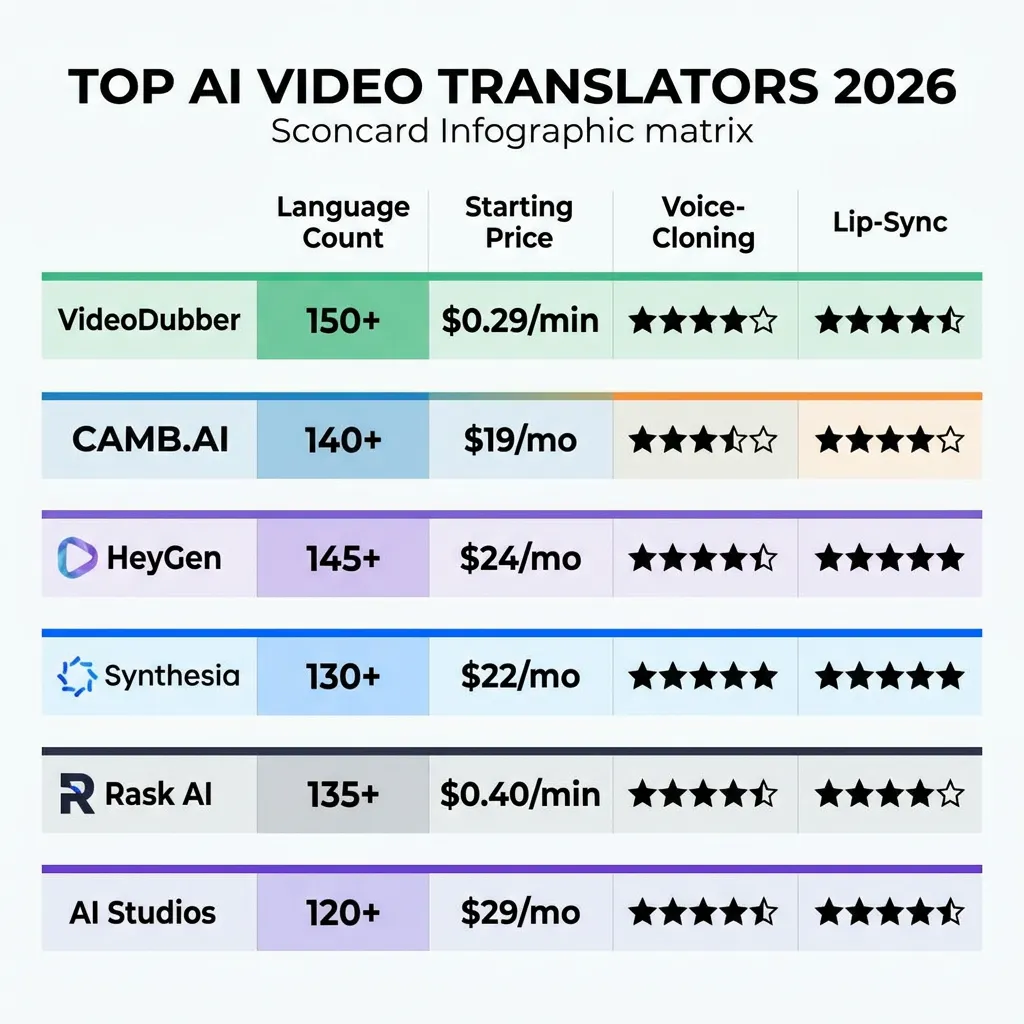
VideoDubber, CAMB.AI, HeyGen, Synthesia, Rask AI, and AI Studios compared on language support, pricing, voice cloning, and lip-sync quality.
| Tool | Languages | Starting Price | Voice Cloning | Lip-Sync | Live Dubbing | Best For |
|---|---|---|---|---|---|---|
| VideoDubber.ai | 150+ | $0.29/min | Yes | Advanced | No | Most users — best value overall |
| CAMB.AI | 140+ | Custom | Yes | Professional | Yes | Live events, enterprise broadcasting |
| HeyGen | 175+ | Free tier | Yes | Excellent (avatars) | No | AI avatars, marketing video |
| Synthesia | 120+ | ~$30/month | Yes (custom) | Avatar-optimized | No | Corporate training, L&D |
| Rask AI | 130+ | $19/month | Yes | Industry-leading | No | Small-medium businesses |
| AI Studios | 150+ | Free/$30+ | Yes | Good | No | All-in-one teams |
How to Choose the Right Video Translation Tool
1. Define Your Primary Use Case
| Use Case | Recommended Tool | Reason |
|---|---|---|
| YouTube / TikTok content creation | VideoDubber.ai | Voice cloning + lip-sync at lowest cost per minute |
| Live conferences, webinars | CAMB.AI | Only platform with real-time dubbing |
| Marketing explainer videos with avatars | HeyGen | Best avatar + lip-sync for presentation content |
| Corporate training and e-learning | Synthesia | Standardized avatar output, enterprise features |
| SMB on a tight budget | Rask AI | Affordable entry with context-aware translation |
| Full production suite in one browser tool | AI Studios | Avatar + dubbing + subtitle generation combined |
2. Language Support
Consider not only whether a tool supports your target language but also quality within that language. Most platforms perform best in Spanish, French, German, Japanese, and Portuguese — languages with the most training data. For less common languages (e.g., Swahili, Punjabi, Amharic), always test a sample clip before committing to a production run.
3. Voice Quality and Cloning
Voice cloning is the process of training an AI model on a sample of the original speaker's voice to generate new speech that matches the speaker's unique vocal characteristics, including tone, pace, and emotional range.
For content creators, voice cloning is non-negotiable. A dubbed video that sounds like a generic AI narrator loses audience trust instantly. Test voice cloning quality with a 2–3 minute sample clip before subscribing to any plan.
4. Lip-Sync Requirements
Face-to-camera content — vlogs, talking-head tutorials, product demos, interviews — requires high-quality lip-sync. Screen recordings, animations, and voiceover-only content do not. Budget accordingly: lip-sync processing adds cost and rendering time; if your content doesn't show a speaker's face, you can save on this feature.
5. Volume and Scalability
Estimate your monthly video volume in minutes. A creator publishing two 10-minute videos per week has approximately 80 minutes of monthly content. At VideoDubber's $0.10/min Scale plan rate, dubbing into 5 languages costs $40/month. Compare this against per-language studio dubbing at $50–$150/minute — the AI option is 50–150× cheaper at scale.
Best Practices for Video Translation
Pre-Translation Preparation
- Optimize source audio quality. Clear speech without background noise or music competing with vocals produces the best voice cloning and transcription results. Record in a quiet space or apply denoising before uploading.
- Speak at a moderate, consistent pace. Fast or highly variable speech patterns reduce voice cloning accuracy. Moderate pacing also makes translated audio easier to time-align.
- Avoid extreme reliance on idioms and cultural references. These often translate poorly. If they are central to your content, plan for a light review pass of the translation output.
- Use speaker identification markers for multi-speaker content — platforms with multi-speaker detection handle these automatically, but labeling helps if manual review is needed.
During Translation
- Test with a short sample first. Before translating a 30-minute video, run a 2-minute sample. Evaluate voice cloning fidelity, translation accuracy, and lip-sync quality before committing.
- Review the AI-generated transcript. Transcription errors compound through translation. A 5-minute transcript review before translation saves significant rework time.
- Request a native speaker spot-check for critical content. Marketing campaigns, compliance training, and medical content should always have a native speaker verify quality before distribution.
Post-Translation Quality Checklist
| Check | Method |
|---|---|
| Voice identity preserved? | Listen with eyes closed — does it sound like the original speaker? |
| Lip-sync accurate? | Watch at 0.5× speed; mismatch > 0.3 seconds is noticeable |
| Translation accurate? | Native speaker review or DeepL back-translation |
| Background music retained? | Compare audio levels to original |
| Subtitles/captions correct? | Export SRT and review in a text editor |
Frequently Asked Questions
What is the best video translator for YouTube in 2026?
For YouTube content creators, VideoDubber.ai is the strongest overall choice in 2026. It combines voice cloning that preserves creator personality, advanced lip-sync at $0.29–$0.33 per minute, and support for 150+ languages. Creators who dub their top-performing YouTube videos into Spanish, Portuguese, and Hindi routinely report reaching 3–5× their original total audience within six months, according to community case studies shared on creator forums.
How much does AI video translation cost per minute?
AI video translation costs range from $0.10–$0.33 per minute of video (at scale), depending on the platform and plan tier. VideoDubber's Scale plan offers $0.10/min for users processing 2,000 minutes per month, while entry-tier plans run $0.29–$0.33/min. Compare this to professional human dubbing, which typically costs $50–$150 per finished minute per language — making AI dubbing 50–150× more cost-effective at equivalent quality.
Is AI dubbing good enough for professional content in 2026?
Modern AI dubbing with voice cloning is professional-grade for most content types in 2026. Face-to-camera content, screen recordings, tutorials, and marketing videos all produce commercially viable output. Content with extreme background noise, multiple overlapping speakers, or highly localized cultural humor may require additional manual review. The gap between AI and studio dubbing has narrowed dramatically — most viewers cannot distinguish AI-dubbed content from human-dubbed content when source audio is clean.
Which video translator has the best voice cloning?
VideoDubber and CAMB.AI consistently produce the highest-fidelity voice cloning results across objective tests. VideoDubber's voice cloning preserves emotional energy and speech rhythm particularly well for conversational content; CAMB.AI's MARS engine leads for emotionally nuanced or dramatic content. HeyGen's voice cloning is excellent for avatar-synced delivery but may vary for complex emotional registers.
Can I translate a video into multiple languages at once?
Yes — most platforms, including VideoDubber, support batch multi-language dubbing. You upload the source video once, select all target languages, and the platform renders dubbed versions in parallel. This is significantly more efficient than processing one language at a time and enables simultaneous multilingual launches.
How long does AI video translation take?
Processing time depends on video length and platform. For a 10-minute video, AI dubbing typically takes 5–15 minutes on modern platforms including VideoDubber. Lip-sync rendering adds rendering time for longer videos. Compare this to traditional studio dubbing, which requires 2–5 days per language per video.
Do video translation tools work for subtitles as well as dubbing?
Yes. All platforms reviewed here export subtitles in addition to dubbed audio. Most generate SRT and VTT subtitle files automatically as part of the translation workflow. Offering both dubbed audio and optional subtitles in the target language is considered best practice for accessibility and viewer preference.
Summary: Choosing the Right Video Translation Tool in 2026
- AI video translation combines ASR, neural machine translation, voice cloning, and lip-sync to convert source video into professional dubbed content in 150+ languages.
- VideoDubber.ai leads for most content creators and businesses — the best combination of voice cloning quality, lip-sync, language breadth, and per-minute pricing starting at $0.29.
- CAMB.AI leads for live event dubbing and enterprise broadcast requirements.
- HeyGen is the strongest choice for AI avatar-based marketing and explainer content.
- Synthesia is purpose-built for corporate training and L&D teams.
- Rask AI provides the most accessible entry point for small businesses at $19/month.
- All modern tools offer free trials; always test a 2-minute sample before committing to production at scale.
For more on how to integrate video translation into your content strategy, see our guides on TikTok content repurposing and Instagram travel vlog repurposing.
Try VideoDubber free — translate your first video in minutes →
Further Reading
What is Video Translation? Complete Guide to AI Dubbing
Learn what video translation and AI dubbing are, how they work, and why VideoDubber.ai is the best solution for translating videos while preserving voice, tone, and emotion. Complete guide covering benefits, use cases, and best practices.
How to Translate Videos to Multiple Languages: The Complete 2026 Guide
How to translate videos to multiple languages with AI dubbing in minutes. Step-by-step workflow, cost data, voice cloning tips, and distribution strategy.
Manual vs AI Video Translation: Cost, Speed & Quality Compared (2026 Guide)
Manual vs AI video translation compared: AI costs $0.09/min vs $20–$180/min manually. Cost, speed, quality, and voice cloning breakdown for 2026.
Best SRT Translators for Video Translation in 2024
Explore the best SRT translators for video translation in 2024. Discover tools that help convert subtitles into multiple languages and learn how video dubbing solutions can elevate your content for global audiences.