Face swap tools went from novelty to mainstream in under five years. Today, creators use AI face swap for memes, personalized videos, and content that would have required a VFX studio a decade ago. This guide shows you exactly how to swap faces online—what to use, what to avoid, and how to get the best results in minutes.
Face swapping online means using a web-based tool or app to detect a face in a target image or video and replace it with another face (the "source face") while preserving lighting, expression, and motion. You upload a target file and a source face photo; the AI does the rest. The fastest way to do it is with a browser-based tool like VideoDubber: no install, no GPU required, and results in under a minute for most clips.
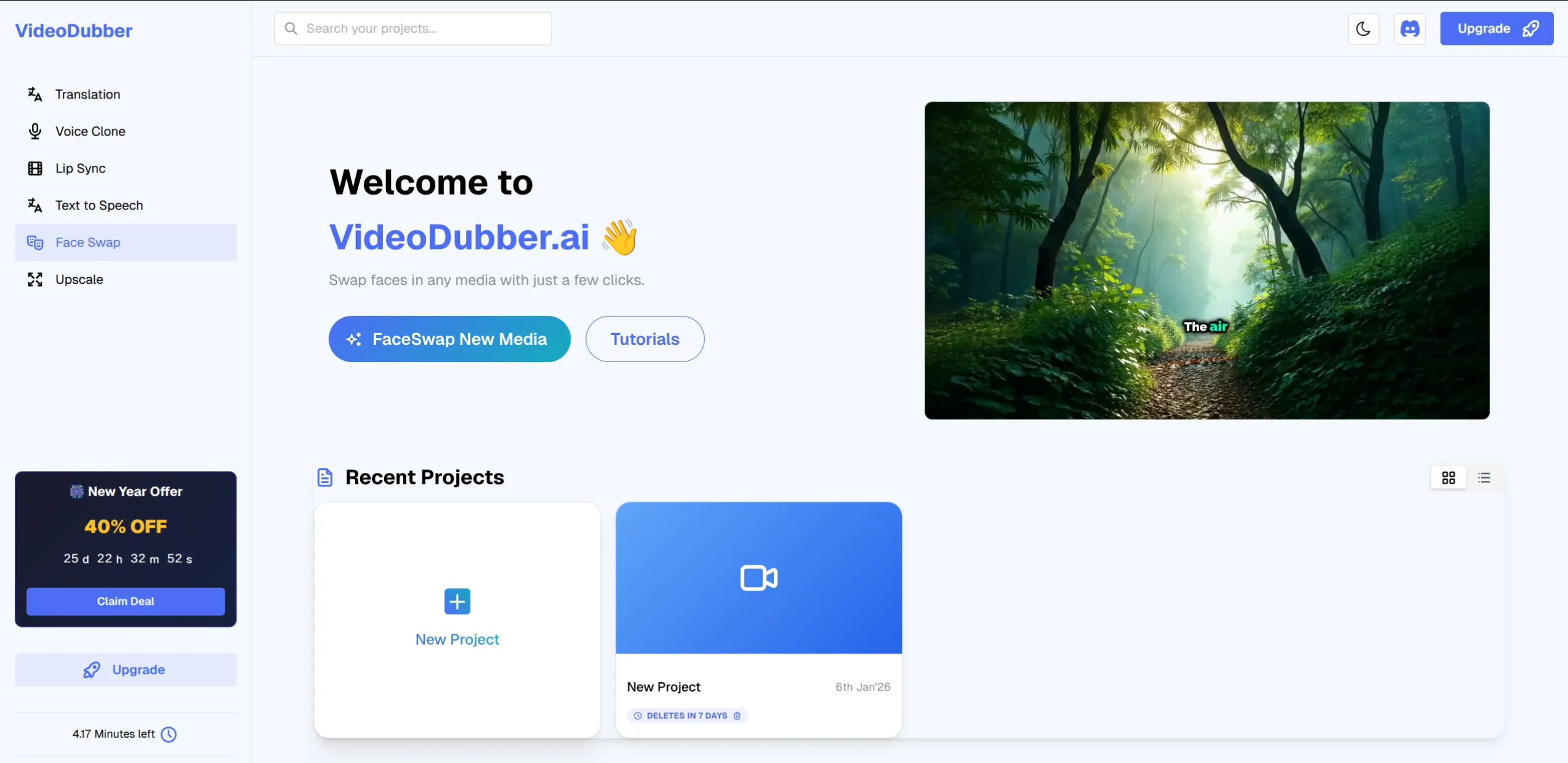
VideoDubber.ai Face Swap Dashboard — upload target and source, then generate.
What This Guide Covers
Whether you want to swap faces in a video for a skit, create a meme, or try AI face swap for the first time, this guide answers the questions that matter:
| Question | Where to find it |
|---|---|
| What is face swap and how does it work? | What Is Face Swap and How Does It Work? |
| Why would I use face swap online? | Why Use Face Swap? Use Cases and Benefits |
| Face swap online vs. desktop apps: which is better? | Face Swap Online vs. Desktop Apps |
| How do I swap faces online step-by-step? | How to Swap Faces Online with VideoDubber |
| What makes a good source face and target video? | What Makes a Good Source Face and Target Video? |
| Is face swap safe? What about ethics and consent? | Is Face Swap Safe? Ethics and Consent |
| Which face swap tools are best for video? | Best Face Swap Tools at a Glance |
| How much does it cost to swap faces online? | Cost of Face Swap Tools |
| Common questions about face swapping | Frequently Asked Questions |
What Is Face Swap and How Does It Work?
Face swap is the process of replacing a face in a target image or video with another face (the source face) while keeping the original pose, lighting, and expression. The source face is the reference photo of the person whose face you want to insert into the target; the target is the image or video frame(s) where the replacement happens. Modern tools use deep learning and face detection to find the face in each frame, warp and blend the source face onto it, and output a new image or video that looks coherent.
Technically, the pipeline is: (1) face detection to locate the face in the target, (2) facial landmark detection for alignment, (3) face embedding to capture identity and expression, and (4) blending so the swapped face matches skin tone, lighting, and motion. Online tools like VideoDubber hide this complexity—you only upload two files and click generate.
| Step in the pipeline | What it does |
|---|---|
| Face detection | Finds the face region in the target image or each video frame |
| Landmark detection | Identifies eyes, nose, mouth, jaw for alignment |
| Face embedding / swap | Maps the source face onto the target geometry |
| Blending | Adjusts color, lighting, and edges so the result looks natural |
Why Use Face Swap? Use Cases and Benefits
Face swap online is used for entertainment, marketing, and creative projects—not for deception. Common use cases:
| Use case | Why face swap helps |
|---|---|
| Memes and viral content | Put a friend's or celebrity's face on a known clip; shareable and fun. |
| Personalized video messages | E.g. put the recipient's face on a character in a short video for birthdays or campaigns. |
| Content creation | Skits, parodies, and short-form video without hiring a VFX team. |
| Marketing and ads | Test different "presenters" or create localized versions with different faces. |
| Accessibility and dubbing | Some workflows use face swap alongside video dubbing to keep a consistent on-screen speaker. |
67% of marketers use some form of personalized or custom video in campaigns, according to Wyzowl's Video Marketing Survey; face swap is one way to create that personalization at scale without reshoots. For creators, the benefit is speed: what used to take hours in After Effects or dedicated deepfake software can now be done in under a minute with a good online tool.
Face Swap Online vs. Desktop Apps
You can swap faces using browser-based tools (e.g. VideoDubber, Reface, some web apps) or desktop software (e.g. DeepFaceLab, FaceSwap, or plugin-based workflows in DaVinci Resolve or Adobe). Here’s how they compare.
| Factor | Online face swap | Desktop apps (e.g. DeepFaceLab, FaceSwap) |
|---|---|---|
| Setup | No install; works in browser | Install, often need GPU and dependencies |
| Speed to first result | Seconds to a couple of minutes | Often 30+ minutes (training + render) |
| Quality | Good for most social and short video | Can be higher with enough training data |
| Control | Preset models; limited tuning | Full control over models and parameters |
| Cost | Often freemium or subscription | Free (open source) but time-intensive |
| Best for | Quick memes, one-off videos, trying it out | Long-form or high-end projects, custom pipelines |
For quick, one-off face swaps in video or images—memes, personalized messages, short skits—online face swap is usually the better choice: no setup, instant results, and tools like VideoDubber handle both images and video in one workflow. For feature-length or highly custom deepfake-style work, desktop tools still offer more control, at the cost of time and technical skill.
How to Swap Faces Online with VideoDubber
VideoDubber’s Face Swap tool runs in the browser and works on both images and videos. You upload a target (the video or image you want to change) and a source face (a clear photo of the face to insert). The AI processes the frames and outputs the swapped result.
What you need before you start
- A VideoDubber.ai account.
- Target file: The video or image where the face will be replaced (MP4, MOV, or common image formats).
- Source face: A clear, front-facing photo of the face you want to use for the swap (one face, good lighting, minimal obstructions).
Step 1: Open the Face Swap tool
From the VideoDubber dashboard, open the Face Swap section from the main navigation. You’ll see upload areas for the target and the source face.
Select "Face Swap" to get started.
Step 2: Upload target and source face
- Upload target: Click the target area and choose the video or image you want to modify. This is the clip or picture that currently has the face you want to replace.
- Upload source face: Upload a single, clear photo of the face that should appear in the result. Front-facing, good lighting, and no hats or hands covering the face give the best results.
Upload Target
Upload Source
Step 3: Generate and download
- Click "Results" or "Generate".
- The AI processes each frame (or the image), aligns the source face, and blends it onto the target.
- Preview the output, then download the new video or image.
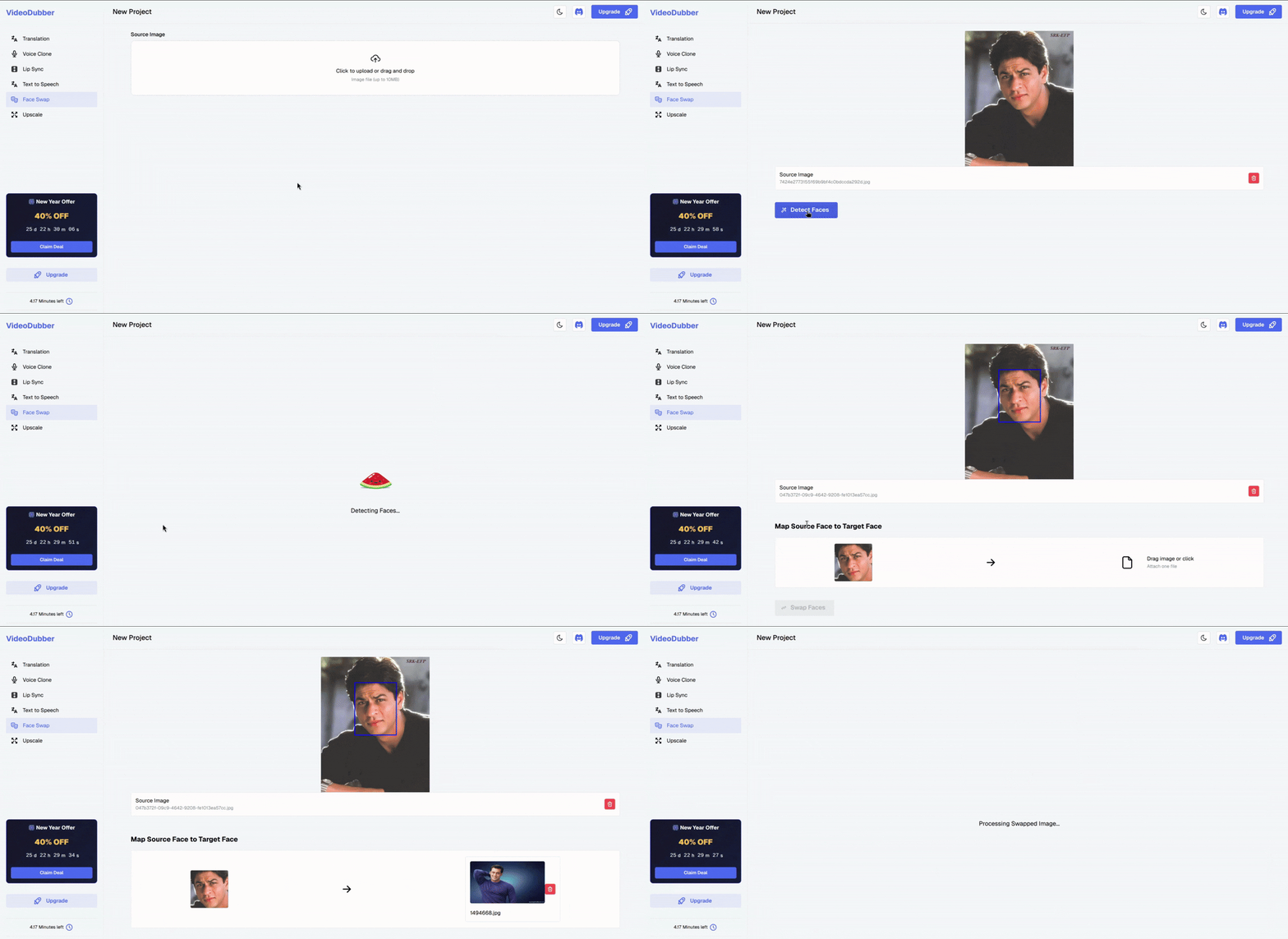
Face swap in action — target video plus source face produce the final result.
That’s the full workflow: upload target → upload source face → generate → download. No timeline editing or frame-by-frame work required. For more control over the final look of your video (e.g. after dubbing or translating), you can use how to edit translated videos online in combination with face swap.
What Makes a Good Source Face and Target Video?
Quality of the source face and target has a big impact on how natural the swap looks.
Source face (the face you’re inserting)
| Do | Don’t |
|---|---|
| Use a front-facing photo (or near front-facing) | Use profile shots or heavy angles |
| Ensure good, even lighting and clear features | Use dark, shadowed, or blurry photos |
| Use a single face per source image | Use group photos unless the tool supports face selection |
| Prefer neutral or matching expression to the target when possible | Use exaggerated expressions unless the target has the same |
Target video or image
| Do | Don’t |
|---|---|
| Use footage where the face is clearly visible and not too small | Use tiny faces in wide shots or heavily occluded faces |
| Prefer stable or moderately moving shots | Expect perfect results on fast motion or heavy motion blur |
| Use consistent lighting on the face across frames | Mix very different lighting within the same clip |
In practice, the best results come from a high-resolution source photo (at least 512×512 pixels for the face region) and a target where the face is in focus and well lit. Industry benchmarks for face recognition and swap quality (e.g. NIST FRVT and vendor documentation) consistently show that input resolution and frontal pose are the two biggest factors in output quality. Tools like VideoDubber handle alignment and blending automatically, but garbage in still means garbage out—invest a minute in picking good inputs.
Is Face Swap Safe? Ethics and Consent
Face swap technology itself is neutral—it’s a set of algorithms that replace one face with another. Safety and ethics depend on how and on whom you use it.
Consent and legal risk
- Always get consent from anyone whose face you use as the source or who appears in the target if you plan to publish or commercialize the result. Using someone’s likeness without permission can violate publicity and privacy laws in many jurisdictions.
- Deepfakes (realistic face-swapped or synthetic video used to mislead) are increasingly regulated. Several regions have laws or proposals that restrict creating or distributing deceptive synthetic media. Using face swap for parody, satire, or clearly fictional content is typically treated differently from impersonation or misinformation.
- Platform policies: Major platforms (YouTube, TikTok, Meta, etc.) have rules about synthetic media and misleading content. Labeling content as altered or parody, when applicable, reduces the risk of removal or penalties.
Best practices
| Practice | Why it matters |
|---|---|
| Get written consent for recognizable faces | Protects you and the person; required for many commercial uses. |
| Don’t use face swap to impersonate or deceive | Avoids legal and platform issues; preserves trust. |
| Label entertainment/parody content when appropriate | Aligns with platform policies and viewer expectations. |
| Don’t use face swap on minors without explicit guardian consent | Protects privacy and complies with child-safety norms. |
According to the 2025 Reuters Institute Digital News Report, over half of respondents had encountered synthetic or altered video content; awareness of face swap and deepfake tech is rising, which makes consent and clear labeling even more important. Face swap is safe to use when you have the right to use the faces and you don’t create misleading or harmful content. For memes, personalized gifts, and clearly fictional skits with consent, it’s a legitimate creative tool.
Best Face Swap Tools at a Glance
Not every tool supports video; many only do images. Below is a compact comparison for online or easy-access options that can handle video or are commonly used for face swap.
| Tool | Type | Video support | Typical use |
|---|---|---|---|
| VideoDubber | Online (browser) | Yes (image + video) | One workflow for both; part of dubbing/editing suite |
| Reface | App / web | Yes (short clips) | Memes, GIFs, celebrity templates |
| FaceSwap (open source) | Desktop | Yes | Self-hosted, full control, steeper learning curve |
| DeepFaceLab | Desktop | Yes | Research / high-end custom pipelines |
| Snapchat / social filters | App | Limited (real-time) | Quick selfie-style swaps, not full video export |
For swapping faces in videos online without installing software, VideoDubber is a strong option: it supports both image and video, runs in the browser, and fits into a broader workflow if you also translate or dub videos. If you need to improve image or frame quality before or after a swap, VideoDubber’s upscale tool can help. For mobile-first memes and template-based swaps, Reface and similar apps are popular. For maximum control and no vendor lock-in, open-source desktop tools like FaceSwap or DeepFaceLab are the go-to, at the cost of setup time and expertise.
Cost of Face Swap Tools
Pricing varies by tool and use case.
| Approach | Typical cost | Notes |
|---|---|---|
| VideoDubber (Face Swap) | Subscription or credit-based | Part of VideoDubber plan; check current pricing for video minutes/credits. |
| Reface | Freemium / subscription | Free tier with limits; paid for more swaps and HD. |
| Desktop (FaceSwap, DeepFaceLab) | Free (open source) | No license fee; you pay in time and possibly GPU hardware. |
| Pro VFX (e.g. studio) | $500–$5,000+ per project | For broadcast or film-grade work. |
Online face swap is usually cheaper and faster than pro VFX and easier than running desktop pipelines yourself. For most creators and marketers, a subscription or credit-based online tool (e.g. VideoDubber) is the most cost-effective way to swap faces in video at scale.
Frequently Asked Questions
How does face swap work technically?
Face swap uses face detection to find the face in the target image or each video frame, landmark detection to align geometry, and deep learning models to warp and blend the source face onto the target so it matches pose, lighting, and expression. Online tools run these steps in the cloud so you only upload two files and get a result.
Is it legal to use face swap?
Face swap is legal when you have the right to use the faces and you don’t create misleading or defamatory content. Using someone’s likeness without consent for commercial or public use can violate publicity and privacy laws. Creating deepfakes to deceive or harass can violate criminal or civil laws in many places. Use face swap for consented, clearly entertainment or editorial content to stay on the right side of the law.
What’s the best free face swap tool for video?
Reface offers a free tier for short video and GIF face swaps. VideoDubber includes Face Swap as part of its platform—check their plan for free tiers or trials. Desktop tools like FaceSwap and DeepFaceLab are free and open source but require installation and more technical use. For best balance of free access and video support, try Reface for quick clips or VideoDubber’s trial for image + video in one place.
How long does it take to swap a face in a video?
With an online tool like VideoDubber, a short clip (e.g. 10–30 seconds) typically processes in under a minute after upload. Longer videos or higher resolution can take a few minutes. Desktop tools like DeepFaceLab can take 30 minutes to several hours depending on training time and render length.
Can I use face swap for commercial or marketing content?
Yes, provided you have rights to all faces and you follow platform and local laws. Many brands use face swap for personalized or creative campaigns. Always get written consent from anyone whose face appears (as source or in the target) if you’re publishing or monetizing the result, and avoid creating misleading or deceptive commercial content.
Why does my face swap look blurry or misaligned?
Common causes: low-resolution or poorly lit source face, target face too small or at a sharp angle, or heavy motion blur in the target video. Use a clear, front-facing source photo (at least 512×512 for the face) and target footage where the face is clearly visible and well lit. If the tool allows, try a different source image or a shorter clip.
Does VideoDubber’s Face Swap work with dubbed or translated videos?
Yes. You can use Face Swap on any video you upload—including ones you’ve already translated or dubbed with VideoDubber. The order can be: translate/dub first, then face swap; or face swap first, then translate. Choose the order that best fits your creative pipeline.
Is face swap the same as a deepfake?
Face swap is one technique used in some deepfakes. A deepfake usually implies highly realistic, often deceptive, synthetic or altered video. Face swap can be used for harmless fun (memes, parodies) or for deceptive deepfakes. The technology is similar; the intent and context (consent, labeling, use case) determine whether it’s considered a “deepfake” in the negative sense. Use face swap with consent and clear labeling when appropriate.
Magic Hour: Alternative for Free Face Swapping
Besides VideoDubber, you can also explore Magic Hour as an alternative for free face swapping. It supports multi-face swap, allowing you to replace multiple faces within the same video or image in the same generation. This makes it useful for group scenes, crowd shots, team content, or cinematic sequences where more than one face needs to be swapped with consistent tracking and natural blending.
How to Do Face Swap in Magic Hour
Step 1: Access the Face Swap Tool
Navigate to the Face Swap section from Magic Hour's AI Video or AI Image dashboard navigation menu.
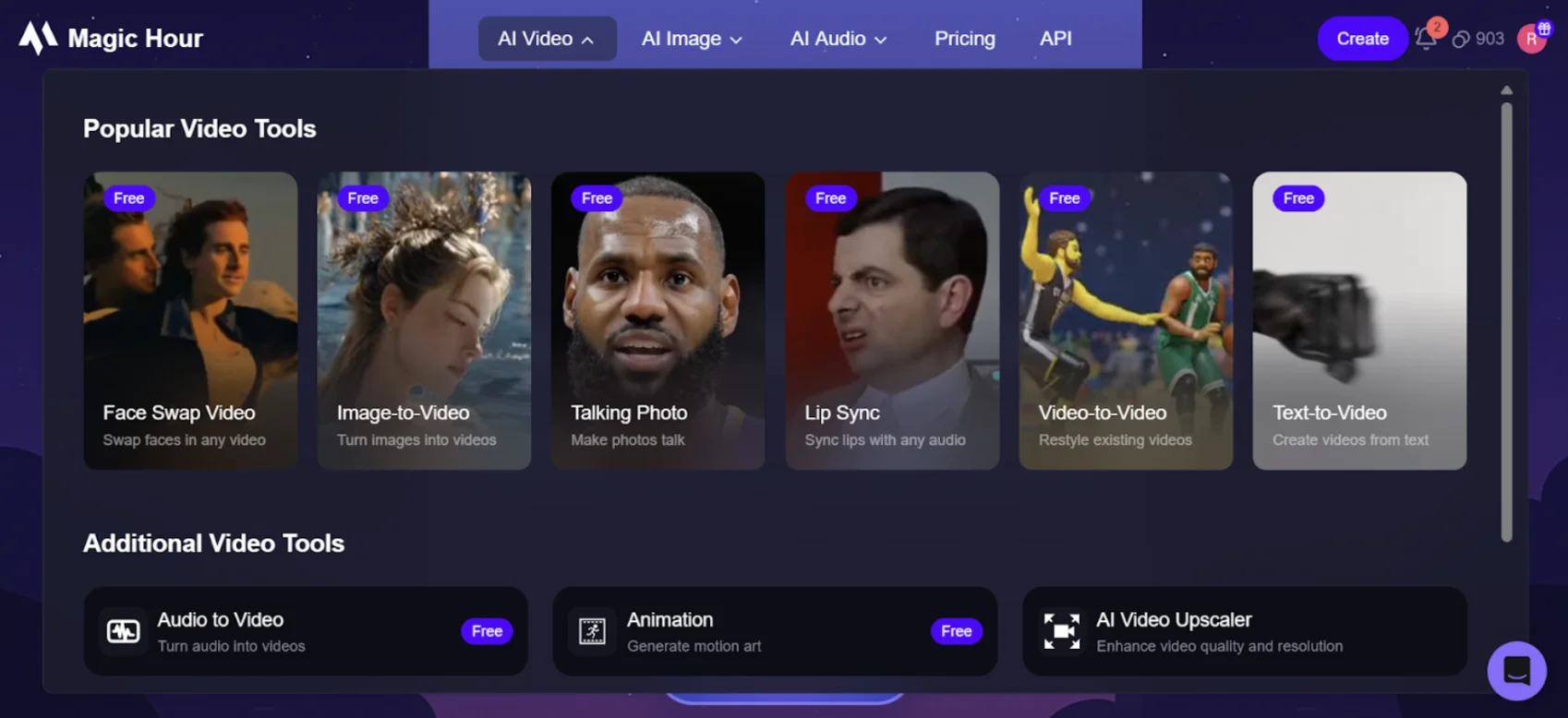
Access the Face Swap section from the AI Video or AI Image dashboard.
Step 2: Upload Your File
- Upload the photo with the face you want to replace (target photo).
- Upload the face you want to use or choose from the preset list.
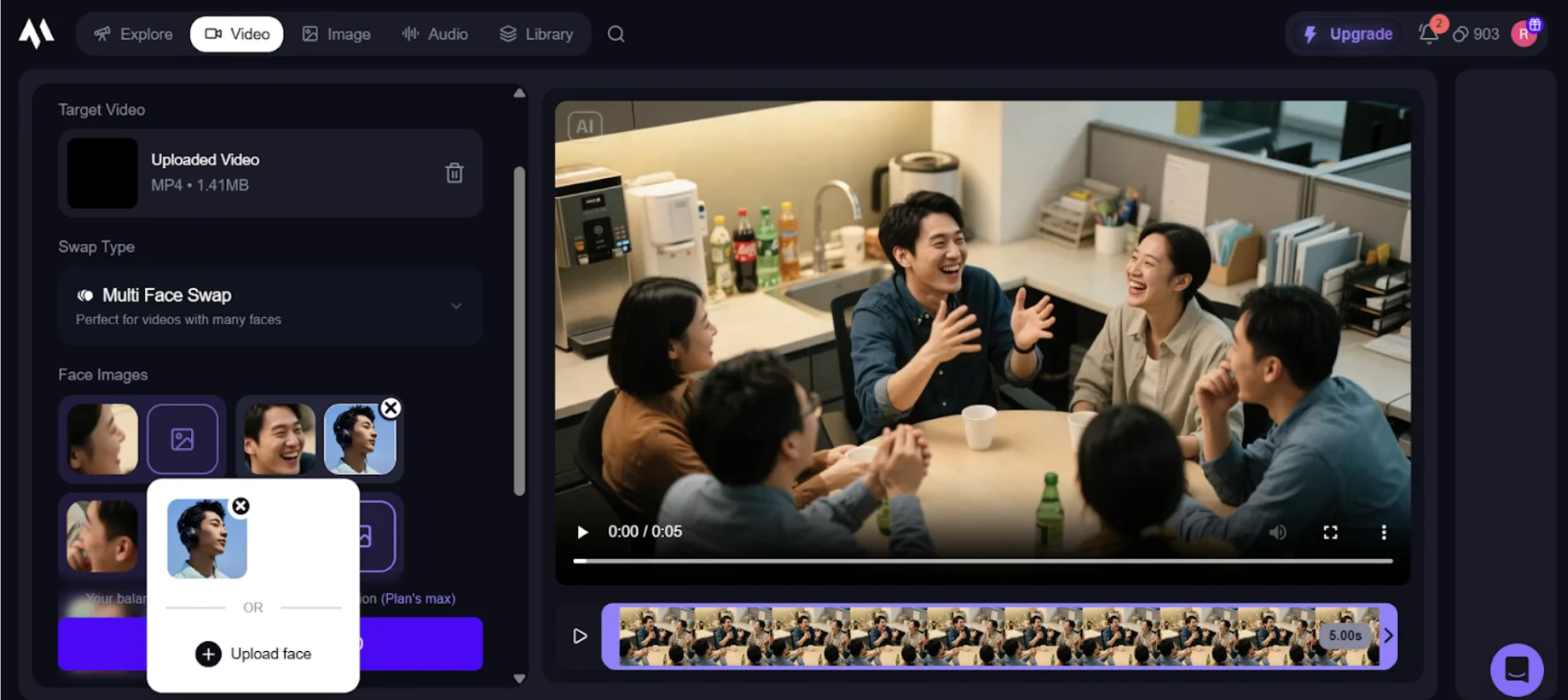
Upload your target photo and source face or pick from presets.
Step 3: Generate and Download
Once both files are uploaded:
- Click the "Swap Faces" button.
- The AI will process the frames and perform the face swap.
- Preview the final video/image and download it.
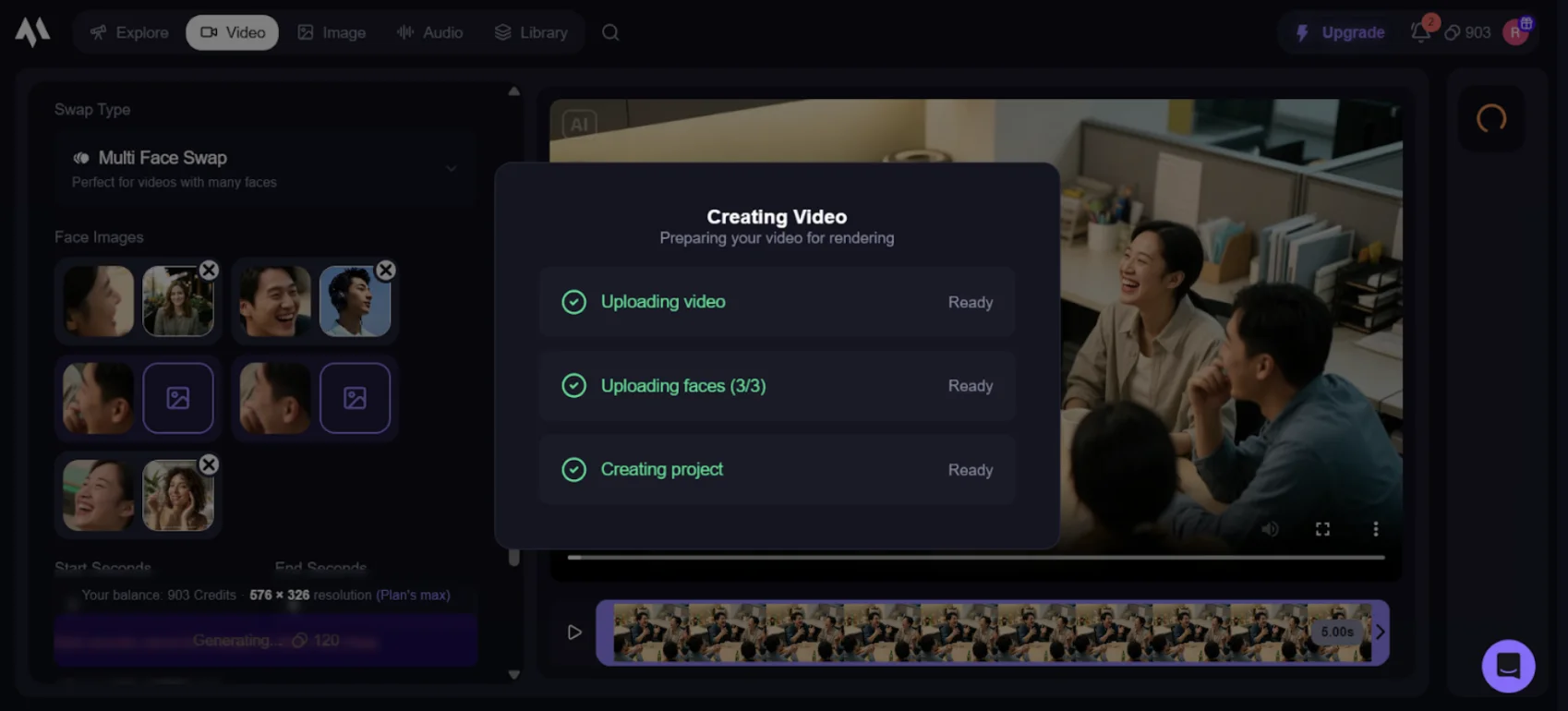
Preview the swapped result and download your video or image.
Summary: How to Swap Faces Online
- Face swap replaces a face in a target image or video with a source face using AI detection, alignment, and blending. Online tools let you do it in the browser with no install.
- Use it for memes, personalized videos, content creation, and marketing—always with consent and without creating misleading or harmful content.
- Online vs. desktop: For quick results on image and video, use an online tool like VideoDubber; for maximum control and custom pipelines, desktop tools (e.g. FaceSwap, DeepFaceLab) are free but time-intensive.
- Best results come from a clear, front-facing source photo and a target where the face is visible, well lit, and not too small or blurred.
- Ethics and safety: Get permission for recognizable faces, don’t impersonate or deceive, and label entertainment/parody where needed. Then face swap is a legitimate creative tool.
Further Reading
How to Upscale Image Quality Online: Complete 2026 Guide
Upscale image quality online with AI in seconds. Step-by-step guide, tool comparison, 2×/4× tips, and how to avoid blur. Free options, print & 4K covered. Try VideoDubber.
How to Edit Translated Videos Online: Complete Editing Guide
Complete guide to editing translated videos on VideoDubber.ai. Learn how to edit subtitles, fix translations, adjust timestamps, and change voice settings with unlimited free edits.
How to Translate Videos to Multiple Languages: Complete Step-by-Step Guide
Learn how to translate videos into 150+ languages using VideoDubber.ai. Complete step-by-step guide with voice cloning, lip-sync, and professional-quality dubbing.
Best Video Translator in 2024: My Honest Experience with the Top 10 Tools
Dive into my hands-on experience with the top 10 video translators of 2024. From speed and language options to usability, discover which tools truly deliver and why VideoDubber.ai stands out.
Best SRT Translators for Video Translation in 2024
Explore the best SRT translators for video translation in 2024. Discover tools that help convert subtitles into multiple languages and learn how video dubbing solutions can elevate your content for global audiences.