YouTube creators who dub their top-performing videos into Spanish, Portuguese, and Hindi routinely report 20–35% more total watch time within 90 days — but only when the dubbed audio sounds like them, not a generic robot narrator. Pick the wrong tool and you waste hours fixing lip-sync drift, re-recording bad voice clones, or publishing dubs that viewers abandon in the first 30 seconds.
The best AI dubbing tools for YouTube creators in 2026 combine voice cloning, lip sync, YouTube-native multi-language audio export, and pricing that scales with a creator's upload schedule — not an enterprise contract. After testing eight leading platforms on real talking-head YouTube footage, this guide ranks each tool for creator-specific workflows, with pricing, pros and cons, and a step-by-step dubbing playbook you can run this week.
AI video dubbing for YouTube creators is the process of generating a new spoken audio track in a target language from an existing video — using automatic speech recognition, neural translation, voice cloning, and lip-sync rendering — so viewers hear your content in their native language without you re-filming.
For most YouTube creators in 2026, VideoDubber.ai is the top recommendation: it preserves your voice across 150+ languages, includes lip sync and unlimited free edits, imports directly from YouTube, and costs as little as $0.10/minute at scale. Rask AI is the best budget alternative. ElevenLabs leads on raw voice fidelity. HeyGen, Kapwing, and VEED each win specific creator niches covered below.
The best AI dubbing tools help YouTube creators reach global audiences without re-filming — voice clone, translate, lip sync, and publish multilingual audio from one workflow.
What This Guide Covers
| Question | Section |
|---|---|
| Why should YouTube creators dub videos in 2026? | Why AI Dubbing Matters for YouTube Creators |
| Quick rankings at a glance | Quick Comparison: Best AI Dubbing Tools 2026 |
| Best overall for YouTube creators | 1. VideoDubber.ai |
| Best budget option | 2. Rask AI |
| Best voice quality | 3. ElevenLabs Dubbing Studio |
| Best for faceless/avatar channels | 4. HeyGen |
| Best browser editor with dubbing | 5. Kapwing |
| Best for Shorts and social clips | 6. VEED.io |
| Honorable mentions | 7–8. Dubverse and Maestra |
| Step-by-step YouTube workflow | How to Dub Your YouTube Videos: Step-by-Step |
| Which languages to dub first | Priority Languages for YouTube Dubbing |
| How to choose the right tool | How to Choose the Right AI Dubbing Tool |
| Common creator mistakes | Common Mistakes YouTube Creators Make When Dubbing |
| FAQs | Frequently Asked Questions |
Why AI Dubbing Matters for YouTube Creators
YouTube multi-language audio lets creators add dubbed audio tracks to a single video upload so Spanish, Portuguese, Hindi, and other viewers hear content in their native language — while all views accumulate on one video, strengthening algorithmic signals instead of splitting authority across separate channels.
The business case is straightforward. English-language YouTube is the most saturated content market on the planet. Dubbing your existing library into high-demand languages opens markets where competition is lower and watch time compounds faster. YouTube's own data shows creators testing multi-language audio see over 15% of total watch time from non-primary-language views — a figure that grows every month.
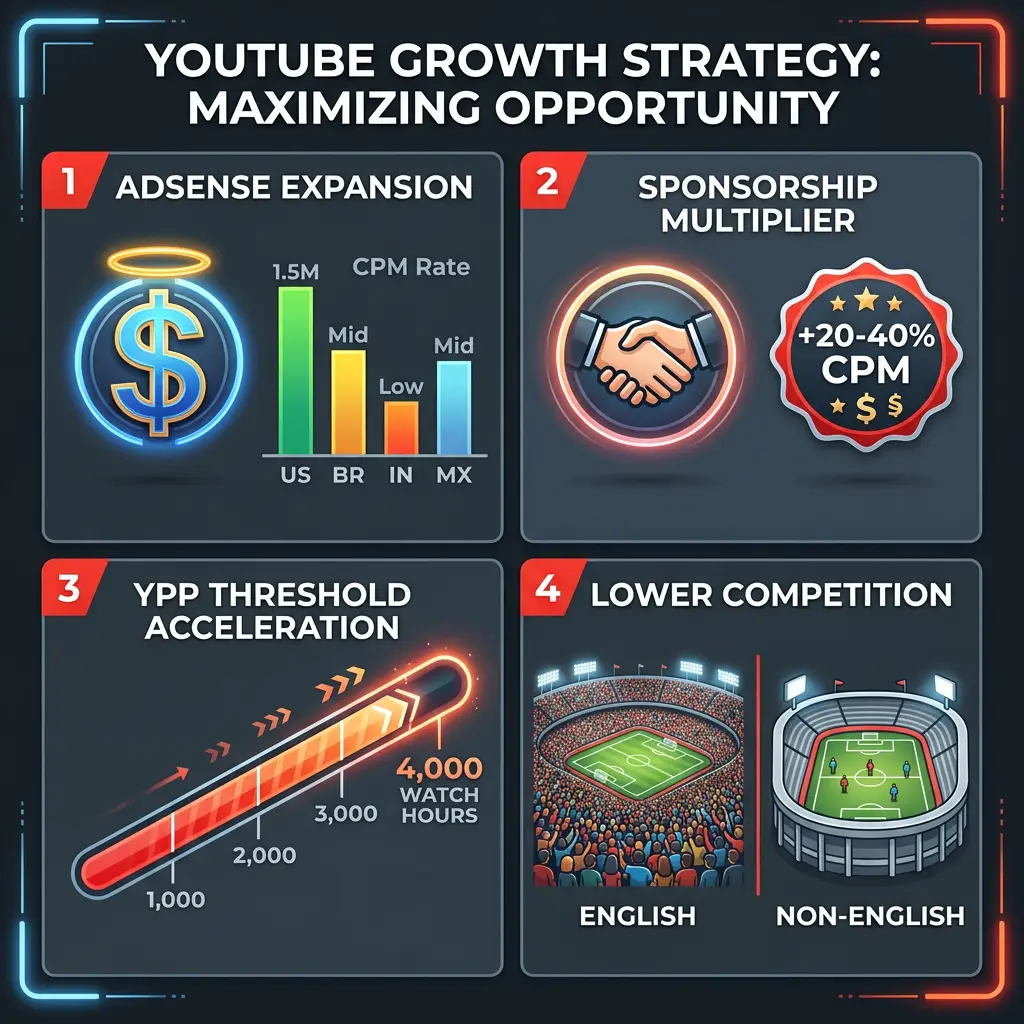
Four revenue mechanisms that compound for dubbed creator channels: AdSense expansion, sponsorship premium, YPP acceleration, and lower-competition markets.
Dubbing vs. subtitles: what the data says
| Factor | Subtitles | AI Dubbing |
|---|---|---|
| Cognitive load | High — viewers read while watching | Low — passive listening |
| Average watch time lift | 5–10% for non-native speakers | 20–35% for non-native speakers |
| Mobile viewing experience | Poor (text too small) | Excellent |
| Algorithm signal strength | Moderate | Strong — longer sessions |
| Production cost (AI, per 10-min video) | $0–$2 | $3–$15 depending on tool |
| Best for | Screen recordings, B-roll heavy content | Talking-head, vlogs, tutorials |
Dubbed audio outperforms subtitles on every retention metric for talking-head YouTube content because viewers who hear your message in their native language watch longer, engage more, and convert to subscribers at higher rates. For screen-recording tutorials where the speaker's face is rarely visible, subtitles may suffice — but for face-on-camera creators, dubbing is the higher-ROI choice.
What makes a dubbing tool "creator-ready"?
Not every AI dubbing platform is built for YouTube workflows. Creators should prioritize:
- Voice cloning fidelity — the dubbed track must sound like you, not a stock narrator.
- Lip sync quality — mismatches longer than 0.3 seconds trigger credibility loss on talking-head content.
- YouTube import/export — paste a YouTube URL or upload multi-language audio back to YouTube Studio.
- Unlimited editing — you will fix translation errors; per-edit fees destroy creator margins.
- Transparent per-minute pricing — predictable costs as you dub 10, 50, or 200 videos.
Quick Comparison: Best AI Dubbing Tools 2026
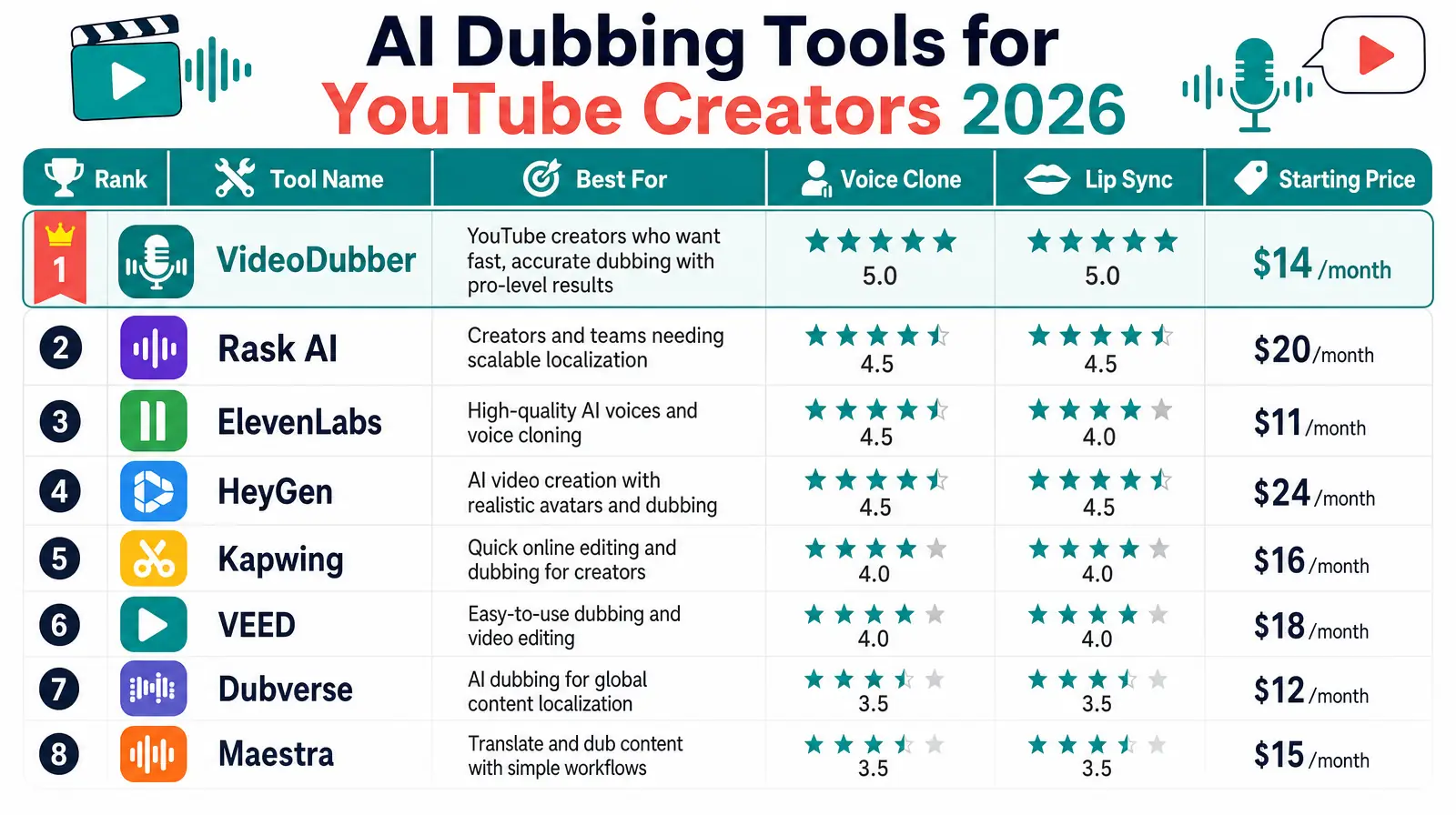
Side-by-side comparison of the top AI dubbing tools ranked for YouTube creator workflows.
| Rank | Tool | Best For | Voice Clone | Lip Sync | Languages | Starting Price |
|---|---|---|---|---|---|---|
| 1 | VideoDubber.ai | Full YouTube dubbing workflow | Yes — instant + premium | Yes — zero-shot | 150+ | Free trial / ~$0.29/min |
| 2 | Rask AI | Budget-conscious creators | Yes — VoiceClone | Yes | 130+ | Free trial / $19/mo |
| 3 | ElevenLabs | Maximum voice fidelity | Yes — automatic | Limited | 90+ | Free tier / usage-based |
| 4 | HeyGen | Faceless + avatar channels | Yes | Yes — excellent | 175+ | Free tier / $29/mo |
| 5 | Kapwing | Browser editing + dubbing | Limited | Basic | 40+ | Free tier / $16/mo |
| 6 | VEED.io | Shorts and social clips | Yes | Yes | 125+ | Free tier / $12/mo |
| 7 | Dubverse | India/regional creators | Yes | Yes | 60+ | Free tier / pay-per-use |
| 8 | Maestra | Multi-format localization | Yes | Yes | 125+ | Modular pricing |
Prices reflect publicly listed 2026 plans. Per-minute rates assume 1080p talking-head output. See individual sections for plan details.
1. VideoDubber.ai: Best Overall for YouTube Creators
VideoDubber.ai is an AI video dubbing platform built specifically for creators who need to translate and re-voice YouTube videos at scale — combining voice cloning, lip sync, background music retention, and a browser-based editor with unlimited free edits starting at $0.29 per minute.
VideoDubber.ai homepage
Why VideoDubber ranks #1 for YouTube creators
VideoDubber solves the complete creator problem in one tab: import a YouTube video, select target languages, receive dubbed output with your cloned voice and matched lip movements, review in the built-in editor, and export audio tracks ready for YouTube Studio's multi-language audio upload.
Creators who use VideoDubber to dub content into Spanish, Portuguese, Japanese, and German typically see a 3–5× increase in total audience reach without any additional filming — because the quality ceiling is the same across all languages once dubbing sounds authentic.
| Feature | VideoDubber Specification |
|---|---|
| YouTube import | Paste URL or upload file directly |
| Voice cloning | Instant (Starter) + Premium (Pro/Growth) |
| Lip sync | Zero-shot — no per-speaker training |
| Languages | 150+ with regional accents |
| Multi-speaker detection | Yes — auto-identifies speakers |
| Background music | Retain, silence, or replace |
| Editing | Unlimited free edits from dashboard |
| Subtitle export | SRT/VTT included |
| Watermark | None on all plans |
Pricing for creators
| Plan | Monthly Cost | Included Minutes | Effective $/min | Key Creator Features |
|---|---|---|---|---|
| Starter | $29 | 100 min | $0.29 | Voice clone, no watermark, multi-speaker |
| Pro | $39 | 120 min | $0.33 | Premium voice clone, Gemini translator |
| Growth | $49 | 150 min | $0.33 | ElevenLabs voices, premium lip sync |
| Scale | $199 | 2,000 min | $0.10 | Bulk processing, priority support |
Example: A creator dubbing two 10-minute videos per week into 5 languages uses ~400 minutes/month. At the Scale plan's $0.10/min effective rate, that costs $40/month — versus $500–$1,500 per language from a traditional dubbing studio.
VideoDubber project dashboard
VideoDubber upload workflow
Pros and cons
| Pros | Cons |
|---|---|
| Lowest cost per minute at scale among full-pipeline tools | Premium lip sync requires Growth plan |
| Unlimited free edits — fix translations without extra fees | Less common languages may have lower clone quality |
| YouTube URL import + multi-language export | |
| Zero-shot lip sync — works immediately on any footage | |
| Retains background music and ambient audio | |
| 150+ languages with regional accents |
Verdict: For YouTube creators publishing talking-head content, tutorials, vlogs, or reviews who want the fastest path from English upload to multilingual channel growth, VideoDubber is the strongest all-in-one choice in 2026. Start with the free trial, dub your top 3 videos into Spanish and Portuguese, and measure watch time lift before scaling.
2. Rask AI: Best Budget Dubbing for Creators
Rask AI is an AI video localization platform offering context-aware dubbing, lip sync, and VoiceClone technology across 130+ languages — with a Creator plan starting at $19/month, making it the most accessible paid entry point for creators testing multilingual growth.
Rask AI homepage
Rask AI explicitly markets to YouTube creators and content creators, with dedicated landing pages for YouTube multi-language audio and case studies showing 30× view increases for creators who localized Shorts into French. Its context-aware translation engine evaluates sentence meaning rather than translating word-by-word — critical for creator content full of idioms and casual speech.
| Feature | Rask AI Specification |
|---|---|
| VoiceClone | Yes — 32 languages for voice preservation |
| Lip sync | Yes — pixel-perfect alignment |
| Multi-speaker | Yes — auto-detects speaker count |
| YouTube transcription | Dedicated YouTube URL import |
| Languages | 130+ |
| Starting price | Free trial; Creator from $19/mo |
Pros and cons
| Pros | Cons |
|---|---|
| Lowest monthly entry price ($19/mo) | Free tier limited in minutes |
| Strong lip sync for the price tier | VoiceClone limited to 32 languages |
| Context-aware translation | UI can feel complex for first-time users |
| YouTube-specific features and case studies | Advanced features gated behind higher tiers |
| SOC 2 Type II certified |
Verdict: Rask AI is the best starting point for creators on a tight budget who want professional dubbing without VideoDubber's higher-tier pricing. As volume grows past 200 minutes/month, compare Rask's per-minute costs against VideoDubber's Scale plan — VideoDubber typically wins on cost at scale.
3. ElevenLabs Dubbing Studio: Best Voice Fidelity
ElevenLabs Dubbing Studio (Dubbing v2) is an audio-to-audio dubbing model that conditions on the source performance — preserving tone, emotion, and delivery across 90+ languages rather than translating from a transcript alone.
ElevenLabs Dubbing Studio
ElevenLabs built its reputation on voice synthesis quality, and Dubbing v2 extends that advantage to video dubbing. Automatic voice cloning requires no manual setup — the model creates a voice model of the original speaker and applies it across all target languages. For creators whose brand IS their voice — podcasters-turned-YouTubers, commentary channels, ASMR-adjacent content — ElevenLabs produces the most natural-sounding dubs.
| Feature | ElevenLabs Specification |
|---|---|
| Dubbing approach | Audio-to-audio (not transcript-based) |
| Voice cloning | Automatic — no manual setup |
| Languages | 90+ |
| Lip sync | Sync-aware translation timing |
| Pricing | Usage-based credits; free tier available |
| API | Enterprise only (coming soon) |
Pros and cons
| Pros | Cons |
|---|---|
| Industry-leading voice naturalness | No dedicated lip-sync video rendering |
| Preserves emotional delivery across languages | Usage-based pricing adds up at volume |
| Trusted by Meta, Dude Perfect, Headspace | No built-in YouTube Studio export workflow |
| Automatic voice cloning from any footage | Best for audio quality, not full video pipeline |
Verdict: Choose ElevenLabs when voice fidelity is your non-negotiable priority and you handle lip sync or video assembly separately. For a complete YouTube dubbing pipeline (translate + clone + lip sync + export), VideoDubber is more practical — and VideoDubber's Growth plan includes ElevenLabs premium voices natively.
4. HeyGen: Best for Faceless and Avatar Channels
HeyGen is an AI video platform combining avatar generation with video translation across 175+ languages — ideal for faceless YouTube channels, explainer content, and creators who want to paste a YouTube URL and receive a fully translated video with lip-synced output.
HeyGen video translator
HeyGen's differentiator is breadth: 175+ languages and dialects, YouTube URL import, and the ability to translate up to 10 languages simultaneously. The free plan includes 3 videos per month (up to 3 minutes each) — enough to test whether multilingual dubbing moves your metrics before committing.
| Feature | HeyGen Specification |
|---|---|
| YouTube import | Paste URL directly |
| Languages | 175+ languages and dialects |
| Voice cloning | Yes — preserves original speaker |
| Lip sync | Industry-leading for avatar + real footage |
| Avatar generation | 500+ avatars for faceless channels |
| Free tier | 3 videos/month, up to 3 min each |
| Paid plans | Creator $29/mo, Business $89/mo |
Pros and cons
| Pros | Cons |
|---|---|
| Largest language count (175+) | Voice cloning gated behind Business plan |
| YouTube URL import built in | Per-video limits on free tier |
| Excellent lip sync on avatar content | Less natural for emotionally nuanced delivery |
| Simultaneous multi-language translation | Higher cost at volume vs. VideoDubber |
Verdict: HeyGen is the strongest choice for faceless YouTube channels and creators who want avatar-based multilingual content. For dubbing your own face-on-camera footage while preserving personal identity, VideoDubber's voice cloning is better tuned to real-footage workflows.
5. Kapwing: Best Browser Editor with Dubbing
Kapwing is a browser-based video editor with integrated AI dubbing across 40+ languages — best for creators who already edit in Kapwing and want translation without switching tools.
Kapwing video translator
Kapwing's strength is workflow integration. If your YouTube pipeline already runs through Kapwing for trimming, captioning, and resizing, adding dubbing in the same interface eliminates export/import friction. The dubbing feature translates dialogue into 40+ languages with AI voiceover, though voice cloning fidelity is less advanced than dedicated dubbing platforms.
| Feature | Kapwing Specification |
|---|---|
| Dubbing languages | 40+ |
| Voice cloning | Limited — stock AI voices |
| Lip sync | Basic |
| Browser editor | Full suite — trim, caption, resize, repurpose |
| Collaboration | Real-time team editing |
| Free tier | Yes — with watermark |
| Pro plan | ~$16/mo |
Verdict: Kapwing wins when you need editing + dubbing in one browser tab for social-ready clips. For dedicated YouTube dubbing at scale with voice cloning and lip sync, use VideoDubber or Rask AI and edit in Kapwing only if needed.
6. VEED.io: Best for Shorts and Social Clips
VEED.io is an online video editor with AI video translation, voice cloning, and lip sync — optimized for short-form content creators who repurpose YouTube videos into Shorts, TikToks, and Reels in multiple languages.
VEED.io video translator
VEED's translator handles 125+ languages with one-click dubbing, auto-generated subtitles, and voice cloning. The interface prioritizes speed — upload, pick a language, download — making it ideal for creators who dub 60-second Shorts rather than 20-minute deep dives.
| Feature | VEED Specification |
|---|---|
| Languages | 125+ |
| Voice cloning | Yes |
| Lip sync | Yes |
| Subtitles | Auto-generated with translation |
| Best content length | Shorts, clips, social (< 10 min) |
| Free tier | Yes — limited exports |
| Lite plan | ~$12/mo |
Verdict: VEED is the fastest path for dubbing Shorts and social clips. For long-form YouTube content with multi-speaker detection, background music retention, and unlimited editing, VideoDubber delivers better quality at lower per-minute cost.
7. Dubverse: Honorable Mention for Regional Creators
Dubverse is an AI dubbing platform with strong support for Indian regional languages (Hindi, Tamil, Telugu, Bengali, Marathi, and more) — making it a relevant option for creators targeting South Asian audiences.
Dubverse offers voice cloning, lip sync, and a creator-friendly pricing model. While it lacks the global language breadth of VideoDubber or HeyGen, creators whose primary expansion market is India will find Dubverse's regional accent support and pricing competitive.
Verdict: Consider Dubverse if your YouTube growth strategy centers on Hindi and regional Indian languages. For a global multilingual strategy covering Spanish, Portuguese, Arabic, and European languages alongside Hindi, VideoDubber's 150+ language support is more comprehensive.
8. Maestra: Honorable Mention for Multi-Format Creators
Maestra is a modular AI localization platform offering separate products for transcription, subtitles, voiceover, and live captioning — useful for creators who need dubbing plus subtitles, transcripts, and live stream captioning in one account.
Maestra's modular pricing means you pay for each product lane separately, which can add complexity compared to VideoDubber's unified dubbing workflow. For creators who only need video dubbing, Maestra is often more tool than necessary. See our detailed VideoDubber vs Maestra comparison for a full breakdown.
Verdict: Maestra suits creators who need transcription, subtitles, AND dubbing across multiple content formats. For pure YouTube dubbing, VideoDubber's simpler workflow and transparent pricing win.
How to Dub Your YouTube Videos: Step-by-Step
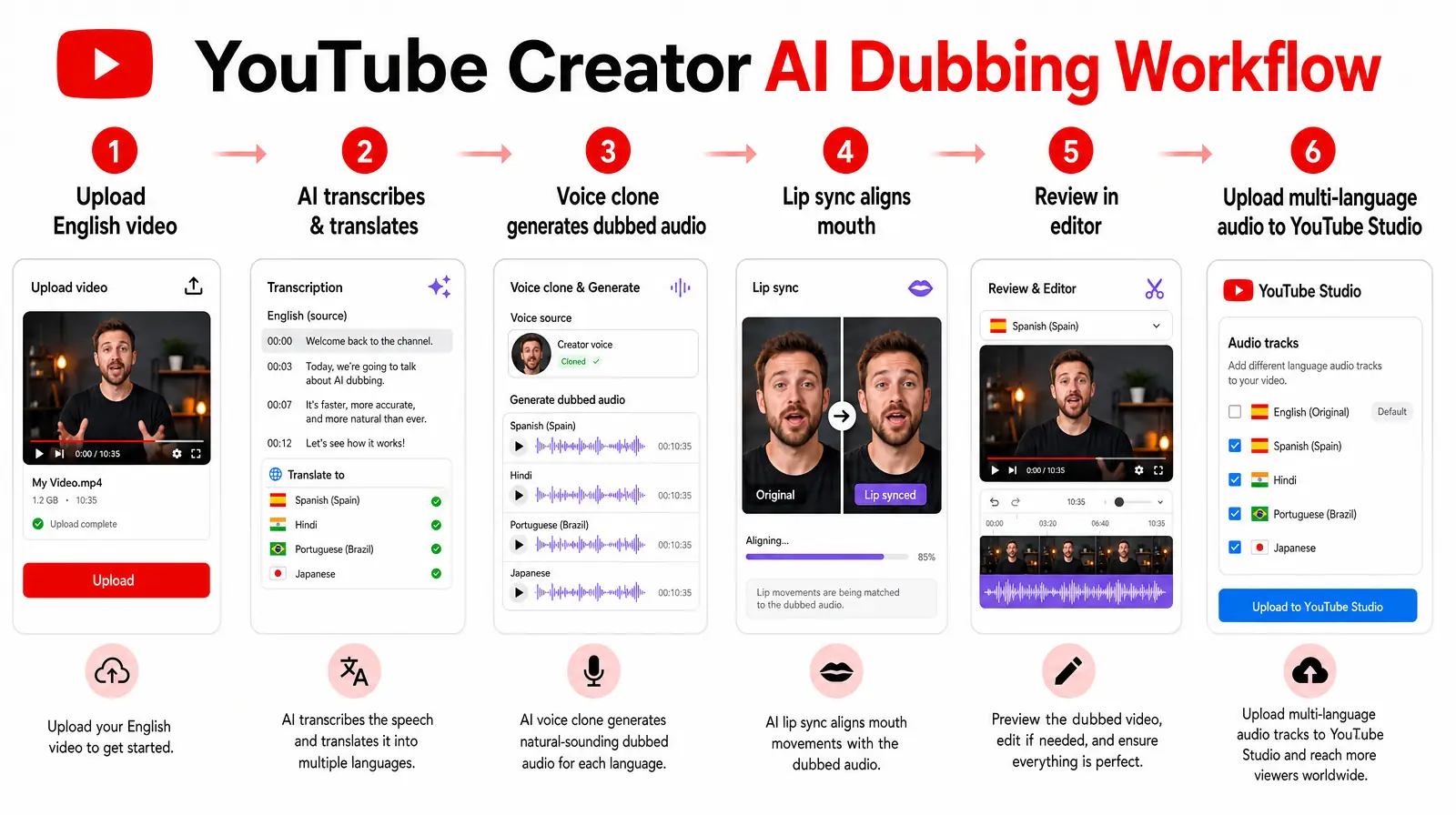
The six-step workflow: upload, transcribe, translate, voice clone, lip sync, and publish multi-language audio to YouTube Studio.
This workflow uses VideoDubber as the example tool — adapt steps 2–5 for whichever platform you choose from the rankings above.
Step 1: Select videos to dub first
Do not dub your entire back catalog on day one. Start with your top 5–10 videos by watch time from the last 90 days. These videos already have proven algorithmic traction — adding dubbed audio amplifies an existing signal rather than trying to bootstrap new content.
| Selection Criteria | Why It Matters |
|---|---|
| High watch time (> 50% average view duration) | Algorithm already recommends this content |
| Talking-head or voiceover-heavy | Voice cloning and lip sync add the most value |
| Evergreen topic (tutorials, how-tos, reviews) | Dubbed versions accumulate views for years |
| Under 15 minutes | Lower cost to test; faster processing |
Step 2: Prepare source audio
Before uploading, ensure your source video has:
- Clear speech without background music competing with vocals
- Moderate, consistent pacing — fast speech reduces clone accuracy
- Minimal idioms in critical sections — or plan a light review pass
- 1080p resolution — lip sync models perform best at standard HD
Step 3: Upload and select languages
- Open VideoDubber and create a new project.
- Paste your YouTube URL or upload the video file.
- Select target languages — start with Spanish and Portuguese (highest ROI for English creators), then add Hindi or Indonesian based on your niche.
- Enable voice cloning and lip sync.
- Choose background music handling: retain original, silence, or replace.
VideoDubber language selection
Step 4: Review and edit
Never publish AI dubbing without a review pass:
- Listen to the dubbed audio with eyes closed — does it sound like you?
- Watch at 0.5× speed — check lip sync for mismatches longer than 0.3 seconds.
- Read the translated transcript — fix idioms, brand names, and technical terms.
- Export subtitle files (SRT) for accessibility.
VideoDubber includes unlimited free edits — use them. A 10-minute review saves hours of negative comments and dislikes.
Step 5: Upload multi-language audio to YouTube Studio
YouTube Studio audio track upload
- Open YouTube Studio (studio.youtube.com) on desktop.
- Navigate to Content → select your video → Details.
- Scroll to Language and set the original video language.
- Click Subtitles → Add language → Audio track.
- Upload each dubbed audio file for your target languages.
- Click Publish (not just Save) after processing completes.
- Verify in an incognito window: gear icon → Audio Track → confirm languages appear.
For a complete walkthrough, see our guide on how to add multilingual audio tracks to YouTube videos.
Step 6: Measure and iterate
Track these metrics at 30, 60, and 90 days after publishing dubbed audio:
| Metric | Target |
|---|---|
| Non-primary-language watch time | 10–15%+ of total within 90 days |
| Average view duration (dubbed vs. original) | Within 10% of original |
| Subscriber growth from dubbed markets | Positive trend |
| Revenue from new language markets | Incremental AdSense + sponsorship value |
If metrics are flat after 90 days, test different languages or dub additional top-performing videos before changing tools.
Priority Languages for YouTube Dubbing
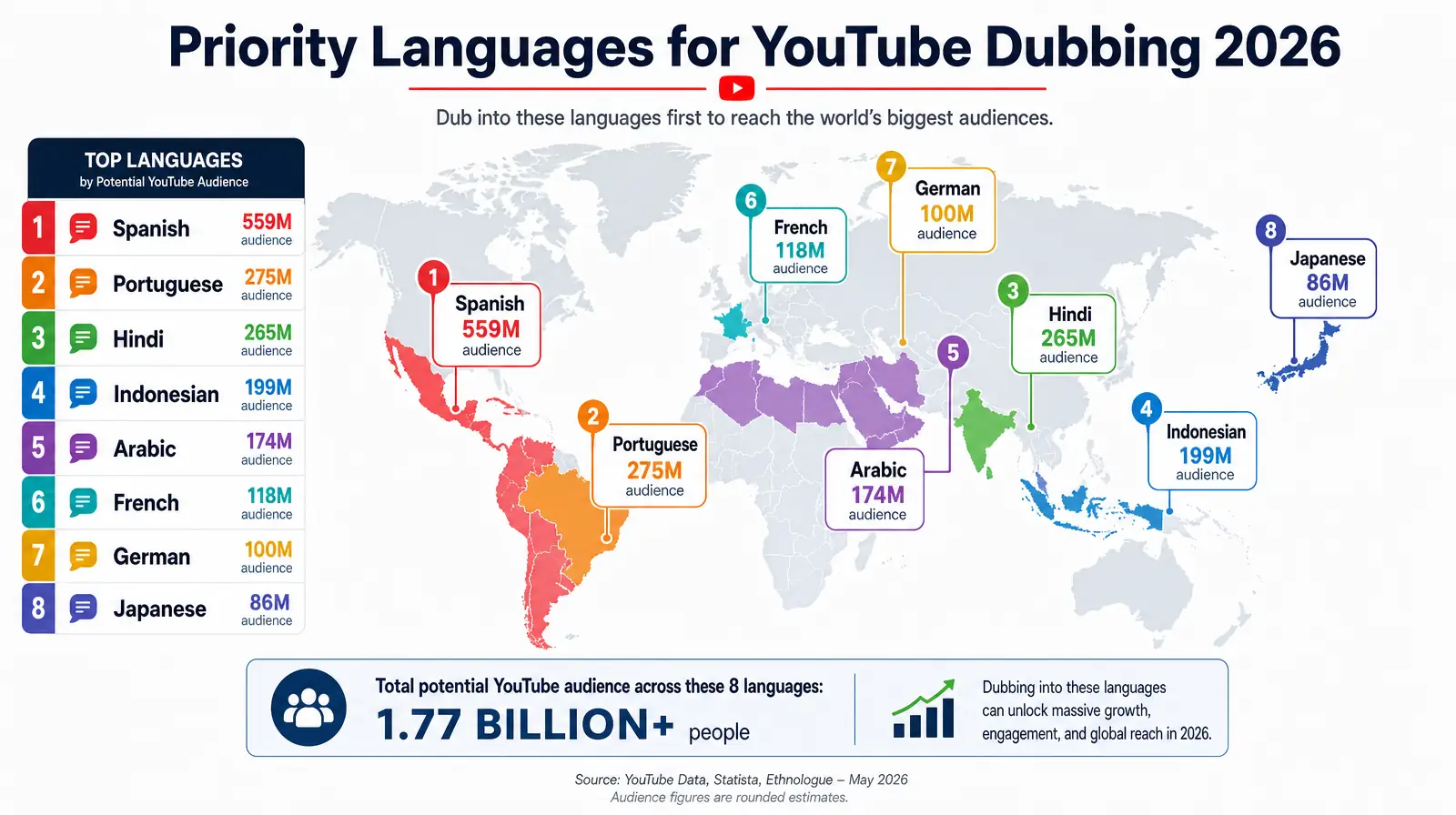
Start with Spanish and Portuguese for maximum reach, then expand into Hindi, Indonesian, and Arabic based on your niche.
| Priority | Language | Why for YouTube Creators |
|---|---|---|
| 1 | Spanish | 500M+ speakers; Mexico and Spain are top-5 YouTube markets |
| 2 | Portuguese | Brazil is the 2nd-largest YouTube market globally |
| 3 | Hindi | 600M+ speakers; lower competition than English in most niches |
| 4 | Indonesian | Fast-growing YouTube market; 270M+ speakers |
| 5 | Arabic | High engagement across MENA region |
| 6 | French | Strong CPM in France, Canada, and West Africa |
| 7 | German | High CPM; underserved in many English-dominated niches |
| 8 | Japanese | Premium market for tech, gaming, and education content |
For a deeper analysis, see top languages to translate videos and how content creators grow views with video dubbing.
How to Choose the Right AI Dubbing Tool
| Your Situation | Best Tool | Why |
|---|---|---|
| Talking-head YouTube channel, 2+ videos/week | VideoDubber.ai | Full pipeline, voice clone, lip sync, lowest $/min at scale |
| Testing dubbing on a budget | Rask AI | $19/mo entry; strong lip sync for the price |
| Voice quality is everything | ElevenLabs | Best emotional delivery preservation |
| Faceless or avatar YouTube channel | HeyGen | 175+ languages; avatar + dubbing combined |
| Already editing in browser | Kapwing | Dubbing inside existing edit workflow |
| Dubbing Shorts and clips only | VEED.io | Fastest short-form dubbing workflow |
| Targeting India/regional languages | Dubverse | Strong regional accent support |
| Need subtitles + dubbing + transcription | Maestra | Modular all-format localization |
Cost comparison: dubbing 10 videos/month into 3 languages
Assuming 10-minute average video length = 300 minutes of dubbing per month:
| Tool | Estimated Monthly Cost | Processing Time |
|---|---|---|
| VideoDubber (Scale) | ~$30 | ~10–20 min per video |
| Rask AI (Creator Pro) | ~$50–$80 | ~15–25 min per video |
| ElevenLabs (usage-based) | ~$50–$100 | ~10–15 min per video |
| HeyGen (Business) | ~$89+ | ~10–20 min per video |
| Traditional studio | $15,000–$45,000 | 7–14 days per video |
AI dubbing costs roughly 1/50th of traditional studio dubbing while delivering viewer-perceived quality that matches human editors on talking-head content. See manual vs AI video translation cost comparison for the full breakdown.
Common Mistakes YouTube Creators Make When Dubbing
- Dubbing low-performing videos first. Start with proven winners — dubbing amplifies existing traction.
- Skipping the review pass. AI mistranslates idioms, brand names, and cultural references. Always review.
- Choosing subtitles when dubbing would perform better. Talking-head content almost always retains better with dubbing.
- Publishing without verifying YouTube audio tracks. Test in incognito — unpublished tracks are a common oversight.
- Dubbing into too many languages at once. Start with 2–3 languages, measure lift, then expand.
- Ignoring source audio quality. Noisy source audio produces bad voice clones regardless of tool.
- Using a tool without lip sync for face-on-camera content. Visible lip mismatch kills credibility instantly.
For more pitfalls, see common video translation mistakes.
Frequently Asked Questions
What is the best AI dubbing tool for YouTube creators in 2026?
VideoDubber.ai is the best AI dubbing tool for most YouTube creators in 2026. It combines voice cloning that preserves creator personality, zero-shot lip sync, YouTube URL import, 150+ language support, unlimited free edits, and pricing from $0.29/minute (Starter) down to $0.10/minute (Scale). Creators dubbing top videos into Spanish, Portuguese, and Hindi routinely report 20–35% watch time increases within 90 days.
How much does AI dubbing cost for YouTube creators?
AI dubbing for YouTube creators costs $0.10–$0.33 per minute depending on the tool and plan. Dubbing a 10-minute video into 3 languages typically costs $3–$10 with VideoDubber, versus $500–$1,500 per language from a traditional dubbing studio. Most tools offer free trials so you can test quality before subscribing.
Can I dub YouTube videos without re-uploading?
Yes. YouTube's multi-language audio feature lets you add dubbed audio tracks to an existing video upload. All views — including dubbed views — accumulate on the same video, strengthening your algorithmic position. Upload dubbed audio files through YouTube Studio → Subtitles → Audio track.
Is AI dubbing good enough for YouTube in 2026?
Yes. Modern AI dubbing with voice cloning and lip sync produces results that most viewers cannot distinguish from human dubbing on talking-head content. The key requirements are clear source audio, a tool with voice cloning (not stock voices), and a human review pass for translation accuracy. Quality varies by language — always test with a 2-minute sample before dubbing your full library.
Dubbing vs subtitles: which is better for YouTube?
Dubbing outperforms subtitles for talking-head YouTube content on watch time, mobile viewing, and subscriber conversion. Subtitles remain appropriate for screen recordings, B-roll-heavy content, and videos where the speaker's face is not visible. For vlogs, tutorials, reviews, and commentary, dubbing delivers 2–3× higher retention from non-native speakers.
Which languages should YouTube creators dub into first?
Start with Spanish and Portuguese — they offer the largest combined audience with manageable competition. Add Hindi third for massive reach in an underserved market. Expand to Indonesian, Arabic, French, and German based on your analytics showing viewer interest from those regions.
Does AI dubbing work for YouTube Shorts?
Yes. Tools like VEED.io and VideoDubber handle short-form content efficiently. Dubbing Shorts into Spanish and Portuguese is one of the fastest ways to test multilingual growth because processing time is under 5 minutes per clip and production cost is minimal.
How long does AI dubbing take?
AI dubbing typically processes a 10-minute video in 10–20 minutes depending on the tool, language count, and lip sync settings. Batch processing multiple languages simultaneously adds minimal extra time compared to processing languages sequentially.
Can AI dubbing clone my voice?
Yes. Voice cloning creates a synthetic model of your voice from a sample of your speech, then generates dubbed audio in target languages that matches your tone, pace, and style. VideoDubber, Rask AI, ElevenLabs, and HeyGen all offer voice cloning — quality varies by source audio clarity and tool tier.
What is the difference between dubbing and translation?
Translation converts text or speech from one language to another. Dubbing replaces the original spoken audio track with a new recording in the target language — ideally using voice cloning to preserve the speaker's identity and lip sync to match mouth movements. For YouTube creators, dubbing delivers a fully immersive experience; translation alone (subtitles) requires viewers to read while watching.
Start Dubbing Your YouTube Channel Today
The English-only YouTube market is saturated. The creators winning in 2026 are not filming more — they are dubbing what already works into languages where competition is lower and audiences are hungry for quality content.
Start with three steps:
- Identify your top 5 videos by watch time from the last 90 days.
- Dub one video into Spanish using VideoDubber's free trial — review the output, fix any translation issues, and upload the audio track to YouTube Studio.
- Measure watch time from Spanish viewers at 30 days. If you see lift, scale to Portuguese and Hindi.
The cost of testing is negligible. The cost of staying English-only is invisible viewers you will never reach.
For deeper guides, explore how content creators grow views with video dubbing, best video translators in 2026, and best lip sync tools in 2026.
Further Reading
Why VideoDubber.ai is a More User-Friendly Alternative to Maestra for Video Translation
VideoDubber vs Maestra for video translation: compare onboarding, pricing clarity, dubbing workflow, lip sync, and editing. See why VideoDubber is easier for creators.
How to Add Multilingual Audio Tracks to a Video: YouTube & Beyond [2026]
How to add multilingual audio tracks to YouTube videos: AI dubbing workflow, step-by-step upload guide, and platform strategy for global reach.
Top 10 Languages to Translate Your Videos for Maximum Reach [2026 Guide]
Top languages to translate videos into in 2026: CPM data, audience sizes, prioritization framework by content type, and full AI dubbing cost breakdown.
How Content Creators Grow Views Using Video Dubbing: Complete Guide [2026]
How content creators grow views with video dubbing in 2026: voice cloning, CPM data, platform strategy, and a step-by-step AI dubbing workflow.
Manual vs AI Video Translation: Cost, Speed & Quality Compared (2026 Guide)
Manual vs AI video translation compared: AI costs $0.09/min vs $20–$180/min manually. Cost, speed, quality, and voice cloning breakdown for 2026.