Customer Support Videos: Why Multilingual Dubbing Reduces Tickets
March 15, 2026 14 mins read
The most expensive support ticket is the one that could have been avoided.
Customers prefer self-help. They would rather watch a 2-minute video on "How to Reset Password" than wait 24 hours for an email reply. But if that video isn't in their language, they will open that ticket. This guide explains why multilingual dubbing for customer support videos is one of the highest-ROI investments you can make—and how to do it at scale.
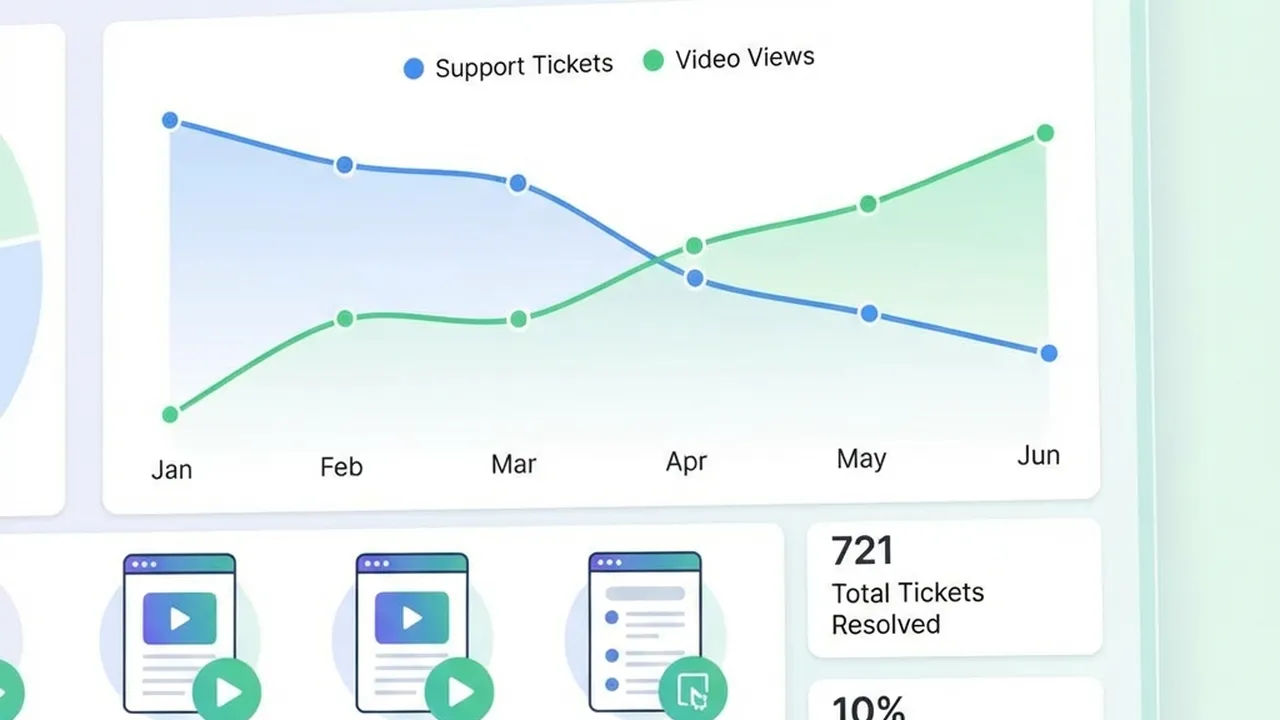
Customer Support Analytics
Whether you're a support lead, a head of CX, or a founder scaling globally, you likely have one or more of these questions:
| Question | Where to find it |
|---|---|
| Does multilingual support video really reduce tickets? | The ROI of Localized Support |
| How much does a support ticket cost vs. self-service? | Cost of Support: By the Numbers |
| Why video instead of translated text articles? | Why Text Articles Aren't Enough |
| Dubbing vs. subtitles—which should I use? | Dubbing vs. Subtitles: Why Full Dubbing Wins for Support |
| How do I scale support videos to many languages? | How to Scale Video Support Without Burning Budget |
| What’s the step-by-step workflow? | Step-by-Step: Implementing Multilingual Support Videos |
| Which languages should I prioritize? | Which Languages Should You Prioritize? |
| What tools or software do I need? | Tools for Multilingual Support Video |
| Any best practices or pitfalls? | Best Practices for Support Video Localization |
Localizing your support videos into your customers’ languages delivers measurable returns in three main areas.
Every time a user watches a localized support video and solves their issue, you avoid the cost of an agent-handled ticket. That cost varies by industry and channel:
| Channel | Typical cost per contact |
|---|---|
| Self-service (e.g. video/article) | ~$0.50–$2.37 per resolved issue |
| Email / chat / phone (assisted) | ~$5–$60+ per ticket (industry-dependent) |
Shifting even a portion of volume to self-service has a dramatic impact. Studies suggest that 30–50% of incoming support tickets can be deflected with effective self-service documentation. For companies with thousands of tickets per month, that translates to six- or seven-figure annual savings.
Users feel valued when help is available in their language. Video-based support is linked to:
Satisfied customers are more likely to renew and recommend; localized video support directly supports both.
Frustration drives churn. When customers can’t find answers in a language they’re comfortable with, they open tickets, wait longer, and often leave. Quick, accessible, localized answers keep customers in the product and reduce involuntary churn.
Understanding cost per ticket makes the ROI of deflection obvious. Below are ballpark figures; your actual numbers may differ by region, tooling, and labor costs.
| Industry | Typical cost per ticket (assisted) |
|---|---|
| Retail e-commerce | $2.70–$5.60 |
| SaaS support | $18–$35 |
| High-tech product support | $28–$35 |
| B2B enterprise support | $30–$60 |
| Telecom and utilities | $20–$30 |
Sources: industry benchmarks and analyst reports (e.g. Gartner: median ~$13.50 per contact for assisted channels; ~$1.84 for self-service).
The real cost is often higher than a single ticket. With an average of about 2.3 contacts per issue, the cost per resolved issue can be 2.3× the cost per contact. First-contact resolution rate is therefore a critical lever—and localized video self-service improves it.
| Resolution type | Typical cost per resolved issue |
|---|---|
| Self-service (e.g. video + KB) | $0.50–$2.37 |
| Agent-handled (email, chat, phone) | $5–$60+ (by industry) |
Shifting a meaningful share of volume to self-service (e.g. 30–50%) can yield $240K–$1.7M+ in annual savings depending on volume and mix. Multilingual dubbing ensures that self-service works for all your key markets, not just English.
You may already have a knowledge base in multiple languages. That’s valuable—but video is superior for many of the issues that generate the most tickets and the most frustration.
| Use case | Why video wins |
|---|---|
| Software walkthroughs | Users see exactly where to click and in what order; no ambiguity. |
| Physical product assembly | Steps are shown visually; fewer wrong assemblies and returns. |
| Troubleshooting hardware | “Do it like this” is clearer than long paragraphs. |
| Complex or multi-step flows | Retention and comprehension are higher with video than with text. |
So even with translated articles, adding localized support videos (and especially dubbed ones) addresses preference, comprehension, and deflection in a way text alone cannot.
You have two main options for making support videos understandable in other languages: subtitles (translated text on screen) or dubbing (replacing the spoken track with a new language).
| Factor | Subtitles | Dubbing |
|---|---|---|
| Eyes on screen | Viewer reads text, may miss UI details | Viewer watches the screen and listens |
| Literacy / accessibility | Requires reading fluency | Better for low literacy or “listen while doing” |
| Tone and clarity | Original tone in voice; translation in text | Full control of tone and pacing in local language |
| Support context | User may pause to read and lose place in steps | User can follow steps without breaking focus |
For support and how-to content, the goal is “follow along and do it.” Dubbing lets users listen in their language while watching the screen. That’s especially important for:
Best practice: Where possible, offer both dubbed audio and optional subtitles/captions for accessibility and preference.
The mechanism is straightforward:
More users can use self-service
English-only (or subtitle-only) content leaves non-English speakers with no good option. They open tickets instead.
Higher completion and success
When the narration is in the viewer’s language, they’re more likely to watch to the end and succeed, so fewer “I tried the article but it didn’t work” tickets.
Fewer repeats
Better comprehension means fewer repeat contacts for the same issue, cutting the 2.3× multiplier effect on cost.
Consistent quality at scale
AI-powered dubbing (with voice cloning and lip-sync) lets you turn one master video into many languages without re-shooting or hiring a studio per language—so you can afford to cover all priority locales.
You can’t film a new support agent or hire a studio for every language. The scalable approach is:
Record once
Create a single, high-quality screencast or talking-head video per topic (in your primary language).
Translate and dub with AI
Use a platform that handles translation, voiceover (ideally with voice cloning), and lip-sync so the speaker appears to speak the target language.
Publish everywhere
Embed or link these dubbed videos in your Help Center, in-app help, and community—per language.
That’s a one-time production cost per topic, then marginal cost per language. No need for native speakers in front of the camera for each locale.
A practical workflow:
| Step | Action |
|---|---|
| 1. Audit | List top 20–50 support topics by ticket volume or search. Identify which are best solved by video (flows, UI, assembly). |
| 2. Script and record | Write a short script, record one clear screencast (or talking-head) per topic. Keep pacing moderate; avoid jargon. |
| 3. Choose languages | Start with 3–5 languages that match your user base and revenue (see Which Languages Should You Prioritize?). |
| 4. Dub at scale | Upload the master video to your dubbing tool; select target languages; get back dubbed versions (with voice clone + lip-sync if the tool supports it). |
| 5. Publish and link | Upload each version to your help platform; embed or link from the relevant KB articles and in-app help. |
| 6. Measure | Track deflection (tickets per topic before/after), video completion rates, and CSAT by locale. Double down on high-impact topics and languages. |
| Approach | Pros | Cons |
|---|---|---|
| Manual dubbing (studio) | Highest quality, full creative control | Very expensive and slow; doesn’t scale to many languages. |
| Subtitles only | Cheaper and faster than dubbing | Viewers must read; less ideal for follow-along support. |
| AI dubbing (e.g. VideoDubber) | One master → many languages; voice clone + lip-sync; scalable | Quality can vary by source audio and language pair; best with clear speech. |
| AI avatar + script | No need to film; generate from text | Less “real” feel; may not match your existing brand presenter. |
For scaling support videos across many languages while keeping a human, on-brand feel, AI dubbing with voice cloning and lip-sync (e.g. VideoDubber) is the most practical: record once, dub into Spanish, Portuguese, French, Japanese, and 150+ other languages, and embed in your Help Center.
There’s no universal list; it depends on your user base, revenue, and support volume by locale. A common starting set for global B2B/consumer products:
| Priority | Often included | Rationale |
|---|---|---|
| Tier 1 | Spanish, French, German, Portuguese (BR), Japanese | Large markets and/or high support volume. |
| Tier 2 | Italian, Dutch, Korean, Simplified Chinese | Growth or enterprise-heavy regions. |
| Tier 3 | Arabic, Hindi, Indonesian, Thai, etc. | Expand once Tier 1–2 are live and measured. |
Use your support ticket data: which locales or languages generate the most tickets? Those are your best candidates for localized video first.
Yes. Effective self-service (including video) can deflect 30–50% of incoming tickets. When that content is in the customer’s language (especially dubbed), more users succeed without contacting support, so deflection and first-contact resolution both improve.
Manual dubbing can be $50–$150+ per minute per language (studio, voice talent, sync). AI dubbing is a fraction of that—often a few dollars per minute per language—and scales to many languages from one master, so total cost per language drops sharply.
For support and how-to content, dubbing is usually better: users can watch the screen and listen in their language without reading. Use subtitles as a complement for accessibility and for users who prefer them. Where possible, offer both.
Record one master video per topic, then use AI dubbing (e.g. VideoDubber) to generate translated, dubbed versions with voice cloning and lip-sync. Publish each version in your Help Center and in-app help. No need for native presenters or studios per language.
Start with topics that (1) drive the most tickets and (2) are visual or procedural: password reset, checkout flow, account settings, installation, assembly, or returns. Use your ticket and search data to pick the top 20–50.
Modern AI dubbing with voice cloning keeps the original speaker’s tone and style, so the result sounds like the same person speaking the target language. Quality is best with clear source audio and supported language pairs; always spot-check a sample before rolling out.
Start with your highest-volume topics and top 3–5 languages, measure deflection and CSAT, then expand. One-time production plus scalable dubbing pays off in reduced support volume and happier customers—in every language you serve.
Step-by-step guide to adding multilingual audio tracks to your YouTube videos using VideoDubber for massive global reach.
Discover the Top 10 languages to translate your videos into for 2026. Unlock global growth with Spanish, Hindi, German, and more.
Learn how to translate videos into 150+ languages using VideoDubber.ai. Complete step-by-step guide with voice cloning, lip-sync, and professional-quality dubbing.
Understand the key differences between video localization, translation, and dubbing. Learn which strategy is best for your global content goals.
Learn how to translate videos without subtitles using voice-only dubbing. Step-by-step guide for 2026: when to use it, best tools, and how to turn off subs for a clean, professional look.