YouTube's multi-language audio feature is one of the most underused growth levers available to creators today — and its impact is quantifiable. Creators who add multilingual audio tracks to their videos see over 15% of total watch time come from non-primary-language viewers, according to YouTube's own early beta data.
Multilingual audio tracks are separate dubbed audio files attached to a single video upload, enabling viewers in different countries to hear the content in their preferred language without the creator publishing separate videos. A Brazilian viewer hears Portuguese; a Hindi speaker hears Hindi; a French viewer hears French — all from one URL, one view counter, and one set of algorithmic signals.
This guide covers the complete workflow: generating dubbed audio tracks with AI, uploading them to YouTube, and extending the strategy to other platforms — with practical tips on quality, language selection, and measuring results.
YouTube Import
What This Guide Covers
| Question | Section |
|---|---|
| Why add multilingual audio tracks to your videos? | Why Multilingual Audio Tracks Are a Growth Multiplier |
| How does YouTube's multi-language audio feature work? | How YouTube's Multi-Language Audio Feature Works |
| Step 1: How do I generate dubbed audio tracks? | Step 1: Generate Dubbed Audio Tracks with AI |
| Step 2: How do I review and export audio? | Step 2: Review, Edit, and Export Audio Files |
| Step 3: How do I upload audio tracks to YouTube? | Step 3: Upload Multilingual Audio Tracks to YouTube |
| How do I add multilingual audio to other platforms? | Adding Multilingual Audio to Platforms Beyond YouTube |
| Which languages should I add first? | Which Languages to Prioritize for Maximum Impact |
| How does this affect YouTube SEO? | Multilingual Audio and YouTube SEO |
| Troubleshooting and common issues | Troubleshooting: Common Issues with Multi-Language Audio |
| Frequently asked questions | Frequently Asked Questions |
Why Multilingual Audio Tracks Are a Growth Multiplier
Adding multilingual audio tracks is a structural growth move — it extends the reach of existing content without creating new content or splitting your audience across multiple uploads.
Video with multilingual audio outperforms subtitles on every retention metric: viewers who hear content in their native language watch longer, engage more, and convert to subscribers at higher rates than viewers who read subtitles. The difference in watch time compounds into better algorithmic placement, which means dubbed videos accumulate views faster over time in target language markets.
Here is the growth mechanics breakdown:
| Factor | English-only video | Video with Spanish audio track |
|---|---|---|
| Spanish viewer average watch time | ~35% (subtitle reading overhead) | ~65–80% (native audio, no reading overhead) |
| Algorithm signal sent | Weak for Spanish-speaking market | Strong — high watch time signals quality |
| Recommendation frequency | Low in LATAM | High in LATAM — algorithm pushes it to more Spanish speakers |
| Subscriber conversion (Spanish viewers) | Low — generic, no personal connection | Higher — voice clone preserves creator personality |
English speakers represent fewer than 20% of the global internet population, according to Internet World Stats 2025 data. Every video you publish without multilingual audio is leaving 80%+ of potential reach untapped. Adding two or three audio tracks multiplies that reach without any new content production.
For a broader view of how this fits into a creator growth strategy, see How Content Creators Grow Views Using Video Dubbing.
How YouTube's Multi-Language Audio Feature Works
YouTube's multi-language audio is a content feature that allows video creators to attach additional dubbed audio tracks to an existing video in YouTube Studio. When a viewer watches the video, YouTube automatically selects the audio track matching their device language settings — or allows them to manually switch tracks via the settings gear icon.
Key technical details
- All audio tracks are attached to the same video URL and upload.
- All views from all language versions count toward the same view total.
- All watch time from all language tracks contributes to a single video's watch time ranking signals.
- Viewers can switch audio language manually via the player settings gear.
- YouTube labels audio tracks by language in the player menu.
Why this consolidation matters algorithmically
Before this feature existed, creators who wanted multilingual reach had to either add subtitles (inferior for retention) or upload separate dubbed videos (which split views across multiple URLs). Splitting views across separate uploads means each video accumulates algorithmic signals independently — and neither benefits from the combined engagement.
Multi-language audio consolidates all engagement onto a single video. A video with 100,000 English views and 50,000 Spanish views from an added audio track has 150,000 views and the combined watch time — dramatically stronger algorithmic signals than two separate videos with 100,000 and 50,000 views respectively.
Availability
YouTube is progressively rolling out multi-language audio upload to all creators. As of 2026, it is available to most channels through YouTube Studio. If you do not see the audio upload option, check that your channel is enrolled in the latest YouTube Studio features, or check YouTube's Help Center for current availability status.
Step 1: Generate Dubbed Audio Tracks with AI
Before uploading audio tracks to YouTube, you need to create them. Manually recording a dubbed version of a video requires a native speaker, a recording setup, and hours of post-production work — per language, per video. AI dubbing compresses this to minutes.
How to generate dubbed audio with VideoDubber
- Go to VideoDubber.ai and create an account (free to start).
- Click New Project and upload your video file (MP4, MOV, or WebM) — or paste your existing YouTube video URL to import directly.
- Select Target Languages: choose from 30+ supported languages. For most creators, starting with Spanish, Hindi, and Portuguese (BR) covers the three largest non-English opportunity markets.
- Enable Voice Clone: this is the critical setting that makes the dubbed audio sound like you in the target language rather than a generic AI voice. It preserves your pitch, pace, and personality across all dubbed versions.
- Optionally add a Custom Glossary: specify terms that should not be translated (channel name, product names, technical jargon, recurring catchphrases).
- Click Translate Video. Processing time is typically 5–15 minutes for a 10-minute video.
Language Selection
What the AI does during processing
- Transcription: Speech-to-text converts your original audio to a transcript using automatic speech recognition (ASR).
- Translation: Neural machine translation (NMT) converts the transcript to the target language, preserving sentence meaning and pacing markers.
- Voice synthesis: Your voice clone model generates the translated speech in your voice characteristics.
- Timing alignment: The dubbed audio is aligned to the video timeline so speech matches on-screen action timing.
Step 2: Review, Edit, and Export Audio Files
AI translation accuracy is consistently 90–97% for well-supported language pairs. However, review before publishing is important for two types of content:
What to review
- Technical terms: Verify that channel-specific or industry-specific terms are handled correctly (e.g., "React hooks" should not be translated to the generic verb "react").
- Branded phrases: Check that your channel name, recurring phrases, and catchphrases are either preserved in the original language or appropriately adapted.
- Cultural references: Idioms, country-specific jokes, or locally specific examples may need adaptation.
- Numbers and statistics: Verify currency amounts, percentages, and statistics are accurately translated (number formats differ by locale).
How to edit in VideoDubber
The platform provides an interactive timeline editor that shows:
- Original transcript (left column)
- Translated transcript (right column, editable)
- Audio waveform with timing markers
Click any segment to edit the translated text, then click Regenerate to re-synthesize that segment. This allows surgical correction without re-processing the entire video.
Exporting for YouTube multi-language audio upload
YouTube requires a standalone audio file (separate from the video) in MP3 or WAV format for multi-language audio uploads. In VideoDubber:
- After completing your review, click Export.
- Select Audio Only as the export type.
- Choose MP3 format (compatible with all YouTube audio track uploads).
- Download one MP3 file per language (e.g.,
video_spanish.mp3,video_hindi.mp3).
Output Interface
Step 3: Upload Multilingual Audio Tracks to YouTube
With your MP3 audio files ready, follow these steps in YouTube Studio to attach them to your existing video.
Detailed upload walkthrough
- Open YouTube Studio (studio.youtube.com) on a desktop browser.
- Click Content in the left sidebar.
- Find the video you want to add audio tracks to and click the pencil icon (Details).
- In the video details editor, click Subtitles in the left navigation panel.
- Click Add Language and select your first target language (e.g., Spanish).
- A row for Spanish appears. Under the Audio column, click Add.
- Select Upload file and choose your
video_spanish.mp3file. - YouTube will process and attach the audio. This typically takes 5–30 minutes depending on video length.
- Once processing is complete, click Publish to make the Spanish audio track live.
- Repeat steps 5–9 for each additional language.
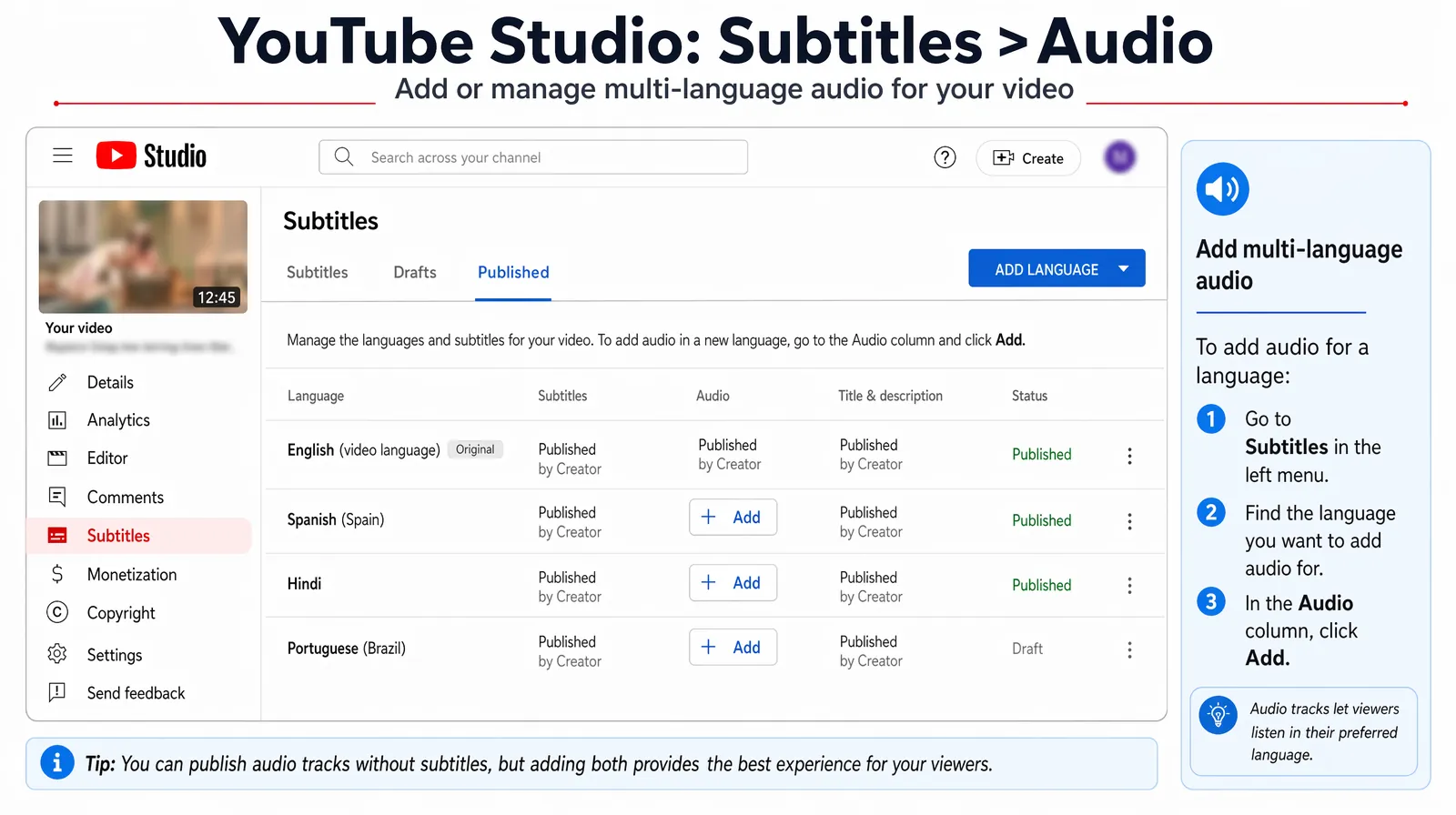
Inside YouTube Studio Subtitles, each added language shows a dedicated Audio column where you attach the dubbed MP3 before publishing.
YouTube multi-language audio: best practices
- Upload audio tracks for all languages simultaneously rather than one at a time — it is more time-efficient and ensures all markets go live together.
- After upload, verify by playing the video in an incognito browser window: click the gear icon → Audio Track to confirm your languages appear in the menu.
- YouTube may take 24–48 hours after upload before the audio track is served to regional viewers through the recommendation algorithm.
What if I do not see the Audio column in YouTube Studio?
YouTube is rolling this feature out progressively. If the Audio column is not visible under your Subtitles section, your channel may not yet have access. Check YouTube's Creator Insider channel or Help Center for the latest rollout status. The alternative while waiting is to upload the dubbed video as a separate video with a localized title and description — a viable but less algorithmically optimal approach.
Adding Multilingual Audio to Platforms Beyond YouTube
YouTube multi-language audio is the most powerful platform mechanism, but other major platforms have their own multilingual content strategies.
TikTok
TikTok does not support multi-language audio tracks on a single video as of 2026. For TikTok multilingual distribution:
- Upload the fully dubbed video (video + audio combined) as a separate post.
- Use a translated caption and language-specific hashtags.
- TikTok's algorithm distributes content by region based on user preferences and engagement patterns — a Spanish-dubbed TikTok will reach Spanish-speaking audiences organically.
Instagram Reels
Instagram Reels follow the same approach as TikTok: upload the complete dubbed video as a separate post with a translated caption. Use location-specific hashtags and tag relevant regional accounts to accelerate initial distribution to your target language audience.
Facebook Watch
Facebook does support multiple audio tracks on video uploads for Pages with access to the Creator Studio audio track feature. Upload process is similar to YouTube: navigate to your video in Creator Studio, select Edit → Audio, and upload the additional language audio file.
Website and LMS embeds
For embedded videos (on landing pages, help centers, or LMS platforms), the cleanest approach is to use a video player that supports multiple audio tracks natively — such as Vimeo or JW Player — or to use a language toggle that swaps between separate video embeds per language.
Cross-platform workflow summary
| Platform | Method | Notes |
|---|---|---|
| YouTube | Multi-language audio track in Studio | Best for consolidating views and watch time |
| TikTok | Separate video upload per language | Use localized caption and hashtags |
| Instagram Reels | Separate Reel per language | Use translated caption and regional hashtags |
| Facebook Watch | Audio track upload via Creator Studio | Available to most Pages |
| Website / LMS | Player with multi-track support or language toggle | Use Vimeo or JW Player for native multi-audio |
Which Languages to Prioritize for Maximum Impact
The optimal language selection depends on your existing audience data, but a general framework applies to most creators.
Data-driven selection process
- Open YouTube Studio → Analytics → Audience → Top Geographies (or Geography filter in the advanced mode).
- Identify your top 5 countries by watch time that are not English-speaking.
- Check if those countries have lower-than-average subscriber conversion rates — a gap between views and subscriptions often signals language friction.
- Those countries' languages are your highest-ROI first audio tracks.
Common first-choice languages by creator type
| Creator type | Recommended first language | Rationale |
|---|---|---|
| Technology and tutorial | Hindi or Portuguese (BR) | India and Brazil dominate non-English tech content demand |
| Entertainment and gaming | Spanish | 500M+ Spanish speakers, enormous YouTube gaming audience |
| Finance and business | Spanish or German | LATAM finance content is underserved; DACH has high CPM |
| Fitness and lifestyle | Hindi or Spanish | India and LATAM have massive fitness content audiences |
| Cooking and food | Spanish, Hindi, or Japanese | High cross-cultural interest in food content |
The five languages that deliver the broadest initial reach for most creators: Spanish, Hindi, Portuguese (BR), French, Arabic. These five cover roughly 2.5 billion native speakers across the most digitally active growth markets.
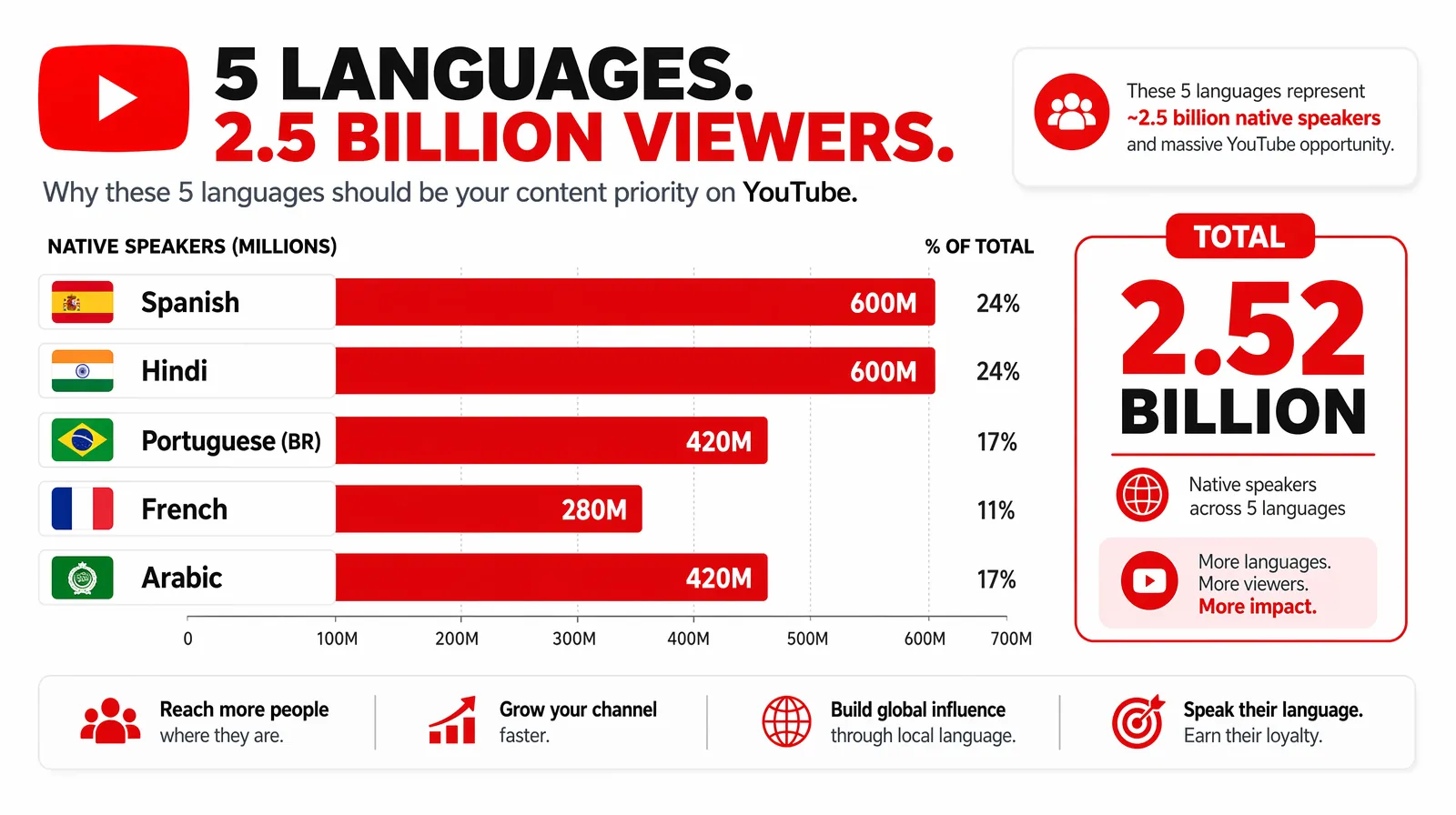
Spanish, Hindi, Portuguese (BR), French, and Arabic together unlock roughly 2.5 billion native speakers — the highest-ROI starting set for most channels.
Multilingual Audio and YouTube SEO
Adding multilingual audio tracks directly improves your video's SEO performance in target language markets through several mechanisms.
Watch time accumulation in target regions
YouTube's ranking algorithm for regional search results is heavily influenced by watch time from viewers in that region. A video with a Portuguese audio track accumulates watch time from Brazilian viewers at a higher rate than the same video with English audio only — because Brazilian viewers watch longer when they hear Portuguese. That regional watch time accumulation improves the video's ranking in Brazilian YouTube search results over time.
Metadata localization amplifies audio track benefit
Adding a Portuguese audio track without Portuguese metadata (title, description, tags) captures the retention benefit but misses the search discoverability benefit. For maximum SEO impact:
- Add Portuguese audio track (for retention and algorithmic recommendation)
- Add Portuguese title and description (for search indexing in Portuguese)
- Add Portuguese-language tags (for discovery in Portuguese category browsing)
For creator SEO strategy that combines dubbing with metadata translation, see How Brands Expand Globally Using Video Translation for the complete framework.
Lower competition in non-English search results
English-language search results on YouTube for most topics are extremely competitive. The equivalent Portuguese, Hindi, or Spanish search results for the same topic are frequently much less crowded. A video ranking #3 for "como aprender Python" (how to learn Python in Portuguese) may generate as many views as ranking #1 for "learn Python" in English — from a much smaller competitive field.
Troubleshooting: Common Issues with Multi-Language Audio
Audio track upload fails or is rejected
Cause: YouTube requires the audio file to be the same duration (within a few milliseconds) as the original video audio.
Fix: If your dubbed audio has timing drift, use VideoDubber's timing adjustment tools to align the audio length to within ±0.5 seconds of the original. Re-export and re-upload.
Audio track appears in Studio but is not visible to viewers
Cause: Audio tracks typically require 24–48 hours of YouTube processing before they are served to viewers.
Fix: Wait 48 hours, then test in an incognito browser window. If still not visible, check that you clicked Publish (not just Save) after the audio track was processed.
Audio track sounds out of sync with speaker mouth movement
Cause: The dubbed audio timing does not align with the original video frames, creating a visual mismatch between lip movement and speech.
Fix: Use an AI dubbing platform with integrated lip-sync (such as VideoDubber) which adjusts video frames to match dubbed audio timing — rather than only replacing audio without visual adjustment.
Voice quality sounds robotic or unnatural
Cause: Voice cloning was not enabled, so the platform used generic text-to-speech instead of the creator's voice model.
Fix: Re-process the video with voice cloning enabled. Ensure the source audio is clean and at least 30 seconds of the original speaker's speech is available for the voice model.
Frequently Asked Questions
How long does it take to add multilingual audio tracks to a YouTube video?
The complete workflow — generating dubbed audio with AI, reviewing the translation, and uploading to YouTube — takes 45–90 minutes per language for a 10-minute video. Most of that time is YouTube's processing after upload (typically 15–30 minutes). The AI generation step itself takes 5–15 minutes per language for a 10-minute video using a platform like VideoDubber.
Does adding multilingual audio tracks affect my video's current rankings?
No, adding audio tracks does not change how your video ranks for existing English-language queries. It adds a new layer of regional discoverability: the video becomes eligible for recommendation and search ranking in the languages of added audio tracks. This is additive, not competitive with your existing English performance.
Can I add multilingual audio to videos I uploaded years ago?
Yes. YouTube's multi-language audio feature can be applied to any existing video in your YouTube Studio content library, regardless of upload date. Many creators start by adding audio tracks to their all-time highest-performing videos first — these have the strongest existing algorithmic signals and are most likely to achieve organic reach in new language markets.
How many audio tracks can I add to one YouTube video?
YouTube does not publish a hard limit, but in practice, creators add between 2 and 10 audio tracks per video. Adding 5 languages (e.g., Spanish, Hindi, Portuguese, French, Arabic) alongside the English original gives a single video audience reach across most major global markets.
Is voice cloning required, or can I use a generic AI voice?
Voice cloning is not required — a generic AI voice will complete the translation and dubbing. However, voice cloning produces meaningfully better audience response: viewers form stronger parasocial bonds with the creator's actual voice personality, leading to higher subscriber conversion rates and better long-term retention. For external audience-facing content, voice cloning is strongly recommended.
Will viewers know which audio track they are hearing?
YouTube labels each audio track in the player's settings gear menu (e.g., "Spanish — translated" or "Hindi — translated"). Viewers can see that the track is a dubbed version, not the original. YouTube's transparency here is intentional — it does not mislead viewers about language track origins.
How accurate is AI-generated dubbed audio?
For well-supported language pairs (English to Spanish, French, Portuguese, Hindi, German), AI translation accuracy is 90–97% for clear, conversational speech. Accuracy varies for:
- Technical jargon or domain-specific vocabulary (improved by using custom glossaries)
- Cultural idioms and humor (require human review and adaptation)
- Less common language pairs (lower accuracy; require more thorough review)
Summary: Multilingual Audio Tracks — The Highest-ROI YouTube Growth Action
- Multilingual audio tracks let a single YouTube video serve viewers in any language — consolidating watch time and algorithmic signals that would otherwise be split across separate uploads.
- AI dubbing with voice cloning generates ready-to-upload audio tracks in minutes, at a cost that makes multilingual distribution practical for creators at any size.
- Platform impact: YouTube's algorithm rewards the additional watch time generated by native-language audio with increased recommendation frequency in target language markets — a self-reinforcing growth loop.
- Start with 1–2 languages from your analytics data, validate results in 30–60 days, then scale to 5+ languages for your highest-performing videos.
- Translate metadata alongside audio — without localized titles and descriptions, you capture retention benefits but miss SEO discoverability.
Multilingual audio is not a future strategy — YouTube's infrastructure is already built for it. The creators building multilingual audiences now will compound that advantage over the next several years as global audiences grow.
Further Reading
How to Use GPT-5.2 for Video Translation [2026 Guide]
How to use GPT-5.2 for video translation in VideoDubber: step-by-step, model comparison, context box tips, cost guide, and best practices for European languages. 2026.
How to Use Gemini for Video Translation [2026 Guide]
How to use Gemini for video translation: complete 2026 guide. Step-by-step in VideoDubber, Asian-language strength (Japanese, Korean, Hindi), multimodal context, and when to pick Gemini vs GPT or DeepSeek.
How to Add Subtitles to YouTube Videos: Complete Guide
How to add subtitles to YouTube videos: step-by-step guide for YouTube Studio, SRT uploads, auto-captions, and third-party tools. Boost SEO and accessibility.
How to Change Speaker Voices in Video Translation: Complete Guide [2026]
Change speaker voices in video translation with step-by-step workflows for voice assignment, instant cloning, and Pro+ voice cloning. Full 2026 guide.
How to Use DeepSeek for Video Translation: Complete 2026 Guide
How to use DeepSeek for video translation: step-by-step guide, 50-70% cost savings vs GPT, Technical Mode, model comparison, and best practices for 2026.