How to Use DeepSeek for Video Translation: Complete 2026 Guide
April 24, 2026 27 mins read
DeepSeek delivers high-quality AI video translation at a fraction of the cost of GPT or Gemini — and for technical content and Chinese-language workflows, it often beats them on accuracy. If you're translating code walkthroughs, engineering tutorials, developer documentation, or content for Mandarin or Cantonese audiences, knowing how to use DeepSeek for video translation is the fastest path to scalable, cost-efficient localization in 2026.
How to use DeepSeek for video translation: Log in to VideoDubber, create a new project, upload your video, select DeepSeek V2 (or the latest version) in the AI Model Selection menu, choose your target languages and optional Technical Mode, then click Translate. VideoDubber runs transcription and translation through DeepSeek and outputs subtitles and dubbed audio. For technical or Chinese-focused content, DeepSeek is the recommended model; for creative or European-language-heavy content, Gemini or GPT-5.2 may be better fits.
In internal comparisons, DeepSeek-based video translation runs can cost 50–70% less per minute than equivalent workflows using premium GPT-tier models, making it a strong choice for high-volume or budget-conscious localization teams. Teams processing large libraries of engineering or training content report that this cost advantage compounds quickly — translating 50 hours of technical video with DeepSeek versus GPT-4o can save thousands of dollars at equivalent quality levels.
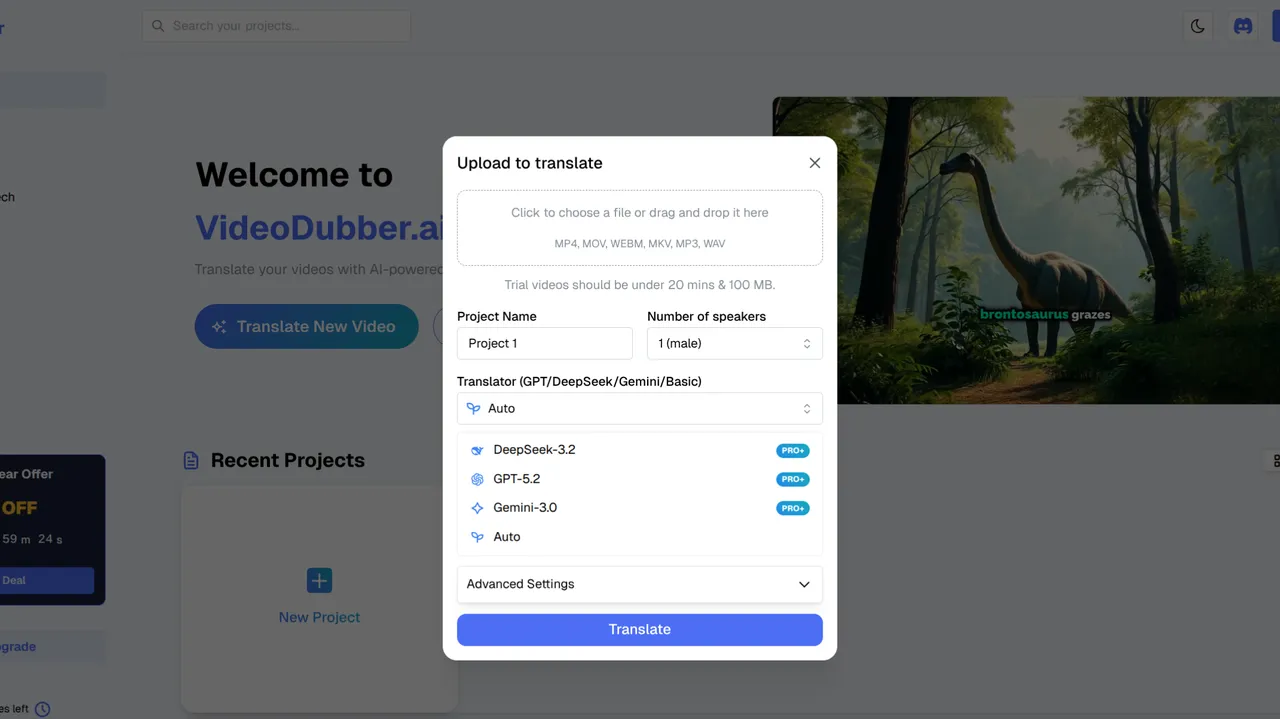
DeepSeek model selection in VideoDubber: the cost-efficient choice for technical and Chinese-language video translation.
Use the table below to jump to the section that answers your question.
| Question | Section |
|---|---|
| What is DeepSeek and why use it for video translation? | What Is DeepSeek and Why Use It for Video Translation? |
| How does DeepSeek compare to Gemini and GPT for video? | When to Choose DeepSeek Over Gemini or GPT |
| How much does DeepSeek video translation cost? | How Much Does DeepSeek Video Translation Cost? |
| What are the exact steps to use DeepSeek in VideoDubber? | Step-by-Step: How to Use DeepSeek for Video Translation |
| What is Technical Mode and when should I enable it? | DeepSeek Settings: Technical Mode and Target Languages |
| What are DeepSeek's strengths and limitations? | DeepSeek Strengths, Limitations, and Use-Case Fit |
| What are best practices for DeepSeek video translation? | Best Practices for DeepSeek Video Translation |
| Common mistakes and how to avoid them | Mistakes to Avoid with DeepSeek |
| Frequently asked questions | Frequently Asked Questions |
| Summary and recommended next steps | Summary and Next Steps |
DeepSeek is a large language model (LLM) developed by DeepSeek AI, optimized for technical accuracy, cost-efficiency, and strong performance in Chinese (Mandarin and Cantonese). When used inside a video translation pipeline like VideoDubber, DeepSeek handles the text side: it transcribes speech, translates the script, and produces concise, terminology-accurate output that then drives subtitles and AI dubbing. Unlike general-purpose models that trade precision for fluency, DeepSeek was architected specifically to maintain domain-specific vocabulary across long-form content.
AI video translation is the end-to-end process of turning a video in one language into a version (or versions) in other languages — via transcription, translation, and optionally voice cloning and lip-sync — so the result looks and sounds natural in the target language. Platforms like VideoDubber combine all three layers into a single pipeline, allowing teams to choose which underlying LLM powers the translation step.
DeepSeek's cost efficiency comes from its architecture: it was built from the ground up to minimize compute requirements while maximizing quality on structured, technical content. According to publicly available API pricing comparisons, DeepSeek's inference cost is 5–10x lower than GPT-4o for equivalent token volumes, which translates directly to lower per-minute costs when running at scale inside a video translation workflow. For organizations running hundreds of hours of content annually, this difference is not marginal — it can represent tens of thousands of dollars in platform costs.
| Factor | Why it matters for video translation |
|---|---|
| Technical accuracy | Code, APIs, function names, and engineering terms stay precise instead of being smoothed into generic phrasing. |
| Chinese (Mandarin/Cantonese) | Native-level nuance for translating to or from Chinese; many Western models handle this poorly. |
| Cost efficiency | DeepSeek is among the lowest-cost LLMs available; at scale, this can cut translation spend by 50–70% versus premium models, according to typical API pricing comparisons. |
| Concise subtitles | DeepSeek tends to produce shorter, readable subtitle lines — better for on-screen reading speed and lip-sync timing. |
| Consistent terminology | Technical terms and product names are preserved consistently across a long video without drift or paraphrase. |
In practice, teams that need to localize developer documentation, training videos, or support content for Chinese markets get the best balance of quality and cost by choosing DeepSeek inside VideoDubber rather than a one-size-fits-all model. The combination of lower per-token cost and stronger technical vocabulary preservation means fewer post-editing cycles and lower total production cost per video.
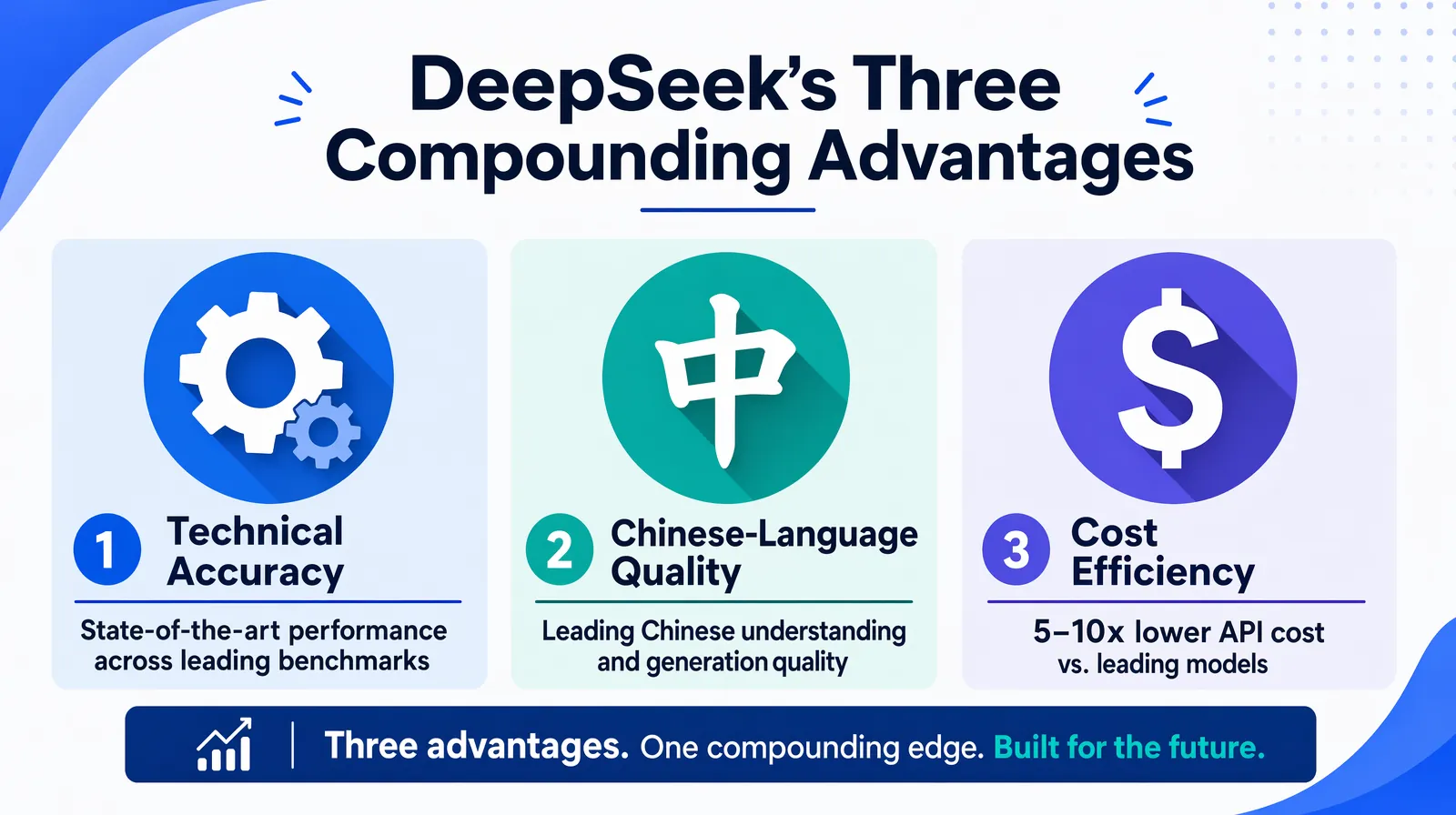
The three compounding advantages of DeepSeek — technical precision, Chinese-language quality, and cost efficiency.
Not every video should use DeepSeek. The right model depends on content type, target languages, and whether you prioritize cost, creative quality, or technical precision. Understanding these trade-offs before starting a batch job — rather than discovering them after processing 50 videos — saves significant time and rework.
| Criterion | DeepSeek V2 | Gemini 1.5 Pro | GPT-5.2 |
|---|---|---|---|
| Best for | Technical content, Chinese (Mandarin/Cantonese), cost-sensitive scale | Speed, Asian languages (Japanese, Korean, Hindi), multimodal | Creative tone, European languages, idioms, brand voice |
| Cost tier | Very low | Low–medium | Medium–high |
| Translation speed | Fast | Fastest | Fast |
| Technical jargon | Strongest | Good | Good |
| Idioms / natural phrasing | More literal; improving | Casual, natural | Best in class |
| Chinese language quality | Best | Good | Moderate |
| European languages | Good | Good | Best |
| Instruction following | Good | Good | Excellent |
Verdict: For technical documentation, code-heavy tutorials, support videos, or any workflow where Chinese is involved or cost at scale matters, DeepSeek is typically the better choice. For creative, marketing, or storytelling video and European languages, GPT-5.2 or Gemini often produce more natural-sounding scripts. VideoDubber supports all three models, so you can switch per project or even per language within a batch — making it practical to use DeepSeek for technical segments and GPT-5.2 for marketing content within the same overall localization program.
| Use case | Best model | Why |
|---|---|---|
| Developer tutorial or API walkthrough | DeepSeek | Technical accuracy; preserves code and jargon |
| Engineering onboarding for Chinese teams | DeepSeek | Best Mandarin/Cantonese quality + low cost |
| Marketing video (French, German, Spanish) | GPT-5.2 | Idiom adaptation; tone preservation |
| High-volume support video library | DeepSeek | 50–70% lower cost at scale |
| Japanese or Korean creative content | Gemini | Strongest Asian-language natural phrasing |
| Mixed technical + narrative content | DeepSeek + review | Technical foundation + human tone polish |
DeepSeek handles Japanese, Korean, and Hindi at a functional level for technical content, but Gemini tends to produce more natural, conversational output for those languages in creative or dialogue-heavy videos. If your primary use case involves Japanese or Korean audiences who will consume marketing or story-driven content, run a comparative test on a 2–3 minute sample before committing to a full batch, since the quality gap is most noticeable in casual speech and culturally idiomatic phrasing.
Pricing depends on your platform, not the model alone. When you use DeepSeek inside VideoDubber, you pay VideoDubber's subscription or per-minute rates; the platform absorbs the underlying DeepSeek API cost and passes the savings on relative to higher-cost model tiers.
Typical ballpark: AI video translation with tools like VideoDubber ranges from free tiers (limited minutes) to roughly $0.10–$0.30+ per minute on paid plans, depending on resolution, voice cloning, and language count. Because VideoDubber uses DeepSeek as one of several engine options, choosing DeepSeek often reduces your effective cost per project compared with using a premium model for the same job — especially at high volume. This cost difference scales linearly: a 100-video library that would cost $1,500 with GPT-5.2 might cost $600–$900 with DeepSeek at equivalent technical quality.
DeepSeek-based runs can cost 50–70% less per minute than equivalent workflows using premium GPT-tier models, making it the clear choice for large libraries, high-frequency updates, or cost-conscious teams, according to typical platform pricing comparisons. Manual studio dubbing, by contrast, typically runs $40–$300+ per minute of finished audio, so AI dubbing with DeepSeek remains orders of magnitude cheaper while still supporting voice cloning and lip-sync when used inside VideoDubber.
| Approach | Approximate cost per minute (indicator only) | Notes |
|---|---|---|
| Manual studio dubbing | $40–$300+ | Per language; requires talent booking |
| AI dubbing with premium model (e.g. GPT-5.2) | Higher end of platform pricing | Best for European languages, storytelling |
| AI dubbing with DeepSeek (via VideoDubber) | Lower end of platform pricing | Best for technical or Chinese-focused content |
| Subtitles only (no dubbing) | Much lower | No voice output |
Results vary by region, plan, and video length. For exact numbers, check VideoDubber pricing.
A 10-minute technical video translated and dubbed using DeepSeek inside VideoDubber typically falls in the roughly $1–$5+ range on paid tiers, depending on plan and features. The same job via manual studio dubbing would typically cost $400–$3,000+ per language — a difference of two to three orders of magnitude. For teams maintaining a library of 50–100 training videos across multiple languages, the annual cost difference between AI dubbing with DeepSeek and traditional studio localization can easily exceed $100,000, according to industry cost benchmarks.
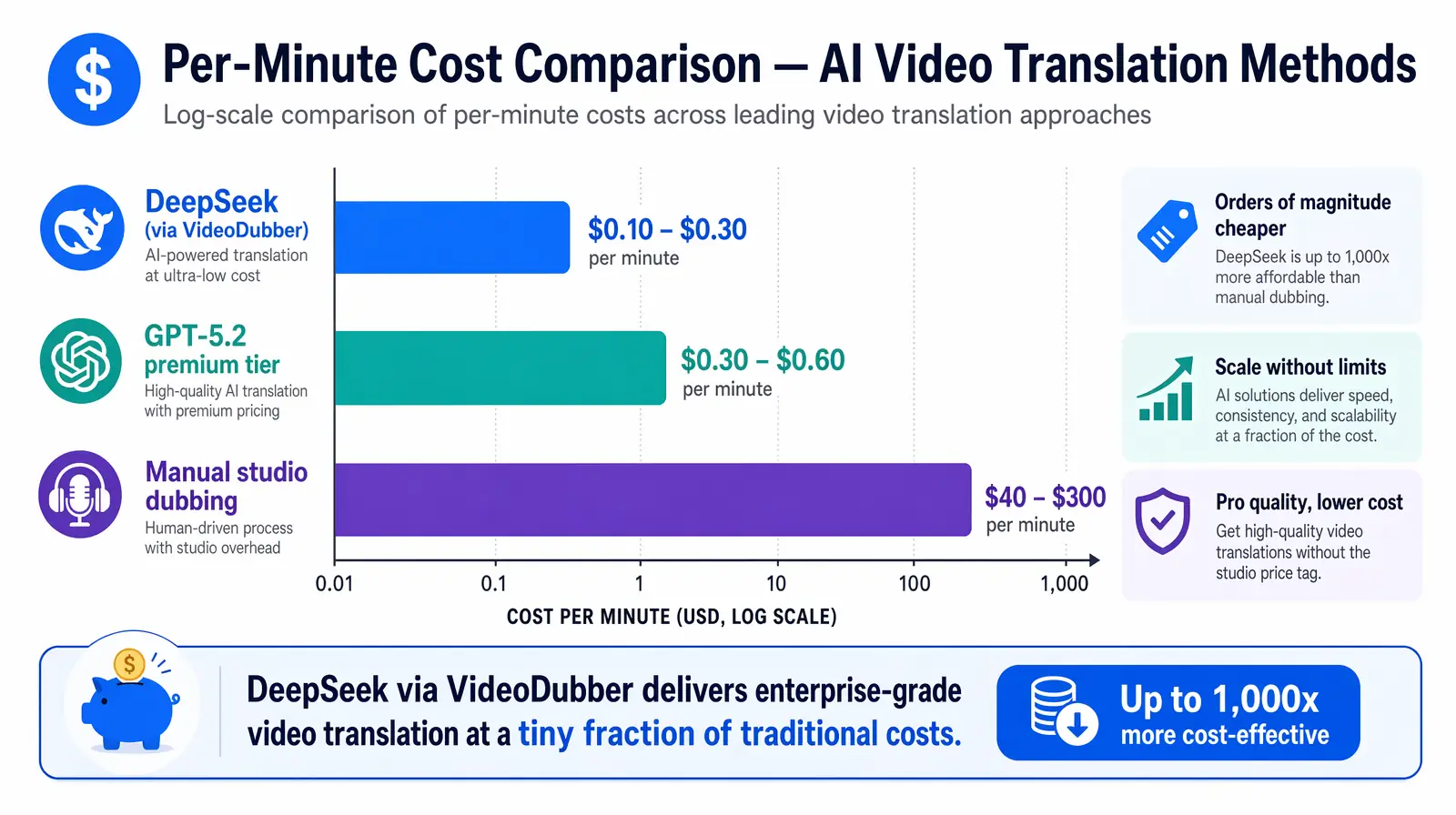
DeepSeek delivers 50–70% savings vs premium models and orders of magnitude less than manual studio dubbing.
Follow these steps to run a video through DeepSeek inside VideoDubber. The full workflow takes minutes for a 10-minute video, and the pipeline handles transcription, translation, subtitle generation, and dubbing in a single pass — no separate tools or manual handoffs required.
Log in to your VideoDubber account and open the main dashboard where you manage projects. If this is your first time using the platform, the free tier allows you to test the workflow with a short sample video before committing to a paid plan.
Click New Project and upload the video you want to translate. Supported formats typically include MP4, MOV, and other common codecs. Clear audio significantly improves transcription quality — reduce background music and noise when possible, and aim for a clean microphone recording if you control the source. If your source video has significant background music or ambient noise, consider running audio cleanup first; transcription accuracy directly affects translation quality downstream.
In the project or settings panel, find the AI Model Selection (or Translation Model) menu and select DeepSeek V2 (or the latest DeepSeek option available). VideoDubber will use DeepSeek for transcription and translation for this project. The model selector also lets you switch to Gemini or GPT-5.2 on a per-project basis, so you can experiment with different models on the same content before scaling.
Set your target languages (e.g. Mandarin Chinese, Spanish, English, Hindi) and enable Technical Mode if your content includes code, APIs, or engineering terminology — this preserves jargon and domain-specific terms rather than paraphrasing them into generic language. You can also enable voice cloning at this stage if you want the dubbed output to preserve the original speaker's voice in each target language, which significantly improves viewer engagement and trust for instructional content.
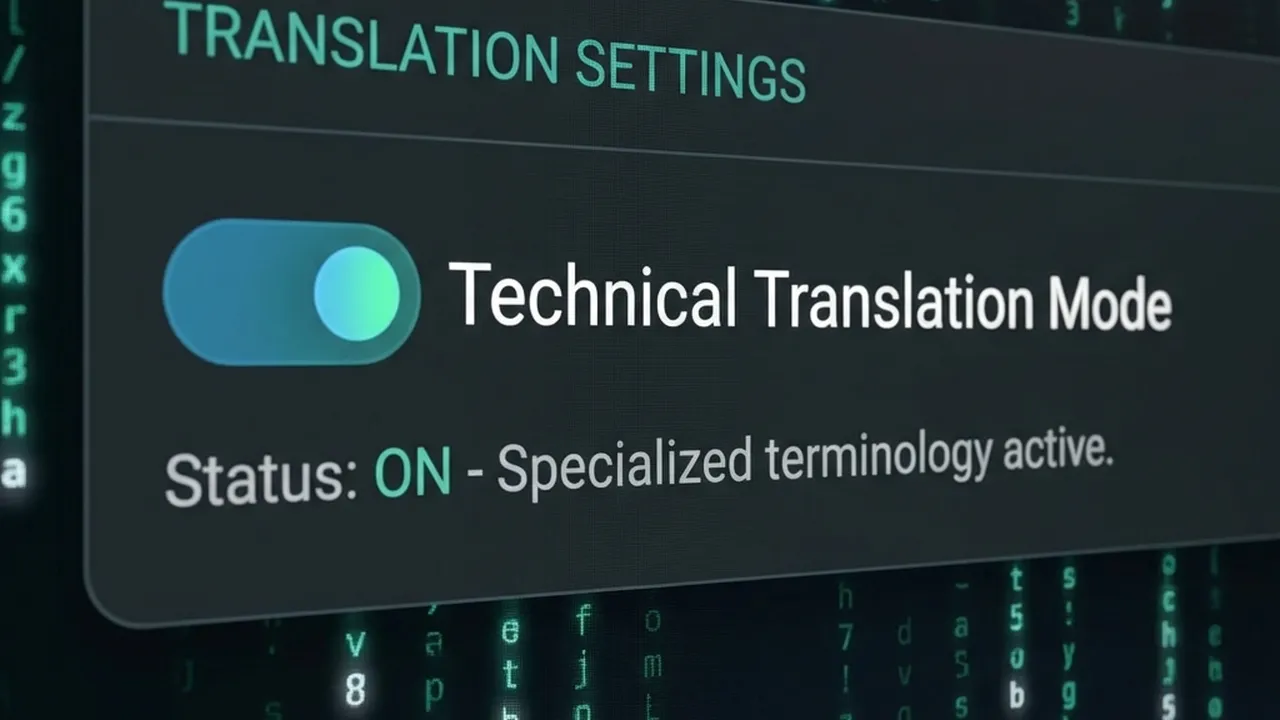
Technical Mode in VideoDubber: keeps code, API names, and domain terminology intact across languages.
Click Translate (or Start). DeepSeek processes the audio/text; the pipeline then generates subtitles and dubbed audio (and optionally lip-sync). Review the output on the first 2–3 minutes before accepting the full run — catching a terminology issue early is far less costly than discovering it after a full batch has processed.
| Step | Action |
|---|---|
| 1 | Log in → VideoDubber dashboard |
| 2 | New Project → upload video (clear audio recommended) |
| 3 | AI Model Selection → DeepSeek V2 (or latest) |
| 4 | Set target languages; enable Technical Mode for technical content |
| 5 | (Optional) Enable voice cloning for speaker-preserving dubbing |
| 6 | Click Translate → review subtitles and dubbing output |
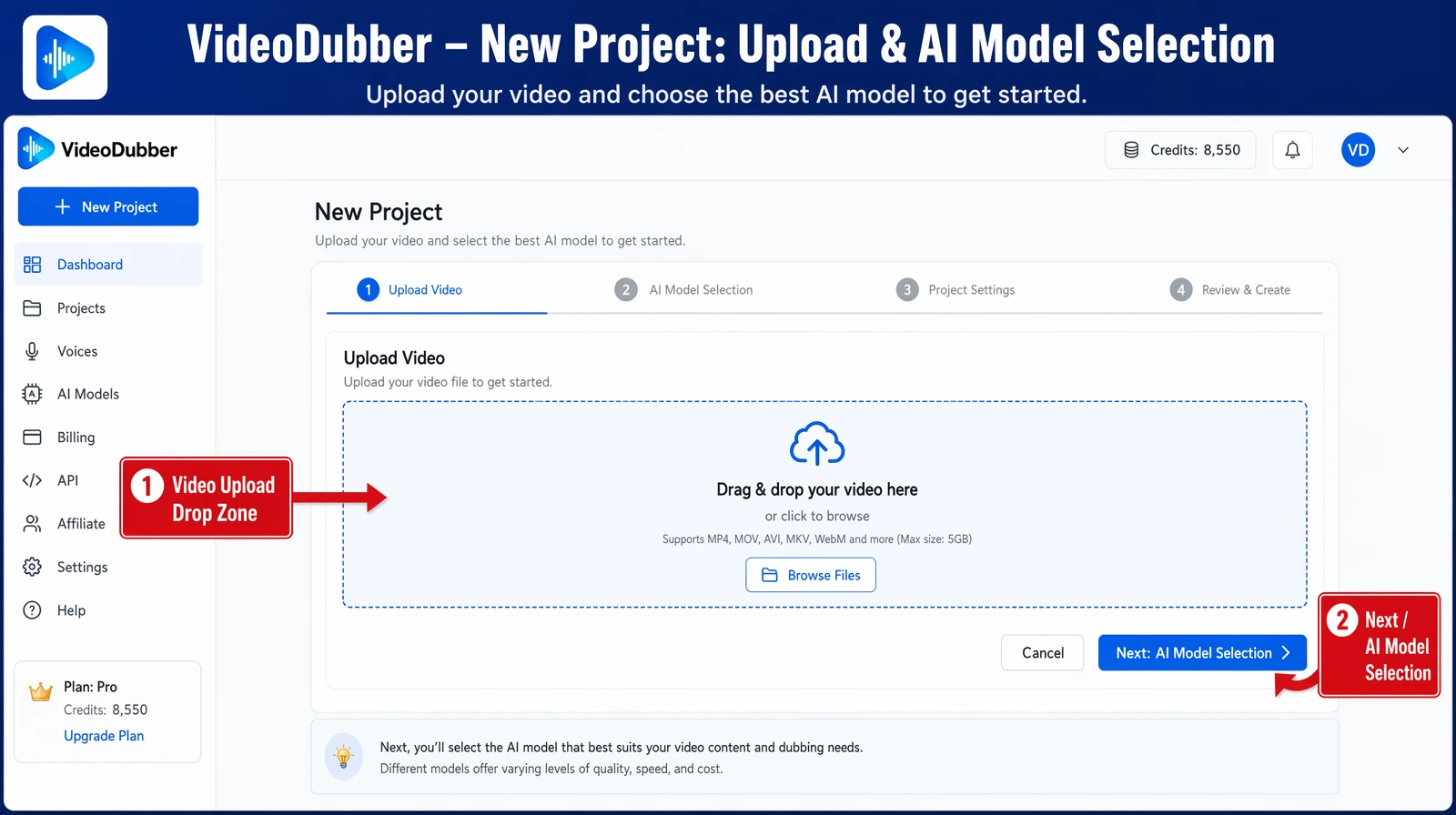
Starting a new DeepSeek-powered video translation project from the VideoDubber dashboard.
Getting the best from DeepSeek means using the right settings for your content type. Two settings matter most: Technical Mode and your choice of target languages. Misconfiguring either one is the most common reason teams get unexpectedly poor output from an otherwise capable model.
Technical Mode is a setting in VideoDubber that instructs the translation model to preserve domain-specific terms, code snippets, API names, function names, and acronyms instead of paraphrasing them into generic language. Without Technical Mode enabled, DeepSeek (like any LLM) will sometimes "smooth over" technical vocabulary to produce more natural-sounding prose — which is ideal for casual content but actively harmful for developer tutorials or engineering documentation. Enable it for:
For general vlogs, marketing, or casual dialogue, leaving Technical Mode off usually yields more natural, conversational output that reads better as subtitles and sounds more fluent when dubbed.
DeepSeek is especially strong for Chinese (Mandarin and Cantonese) — both as source and target language — and it handles English, Japanese, Korean, and other major languages competently for technical content. For Chinese specifically, DeepSeek consistently outperforms most Western-origin models on nuance, idiom avoidance in technical contexts, and character-level consistency across long scripts. Practical guidance:
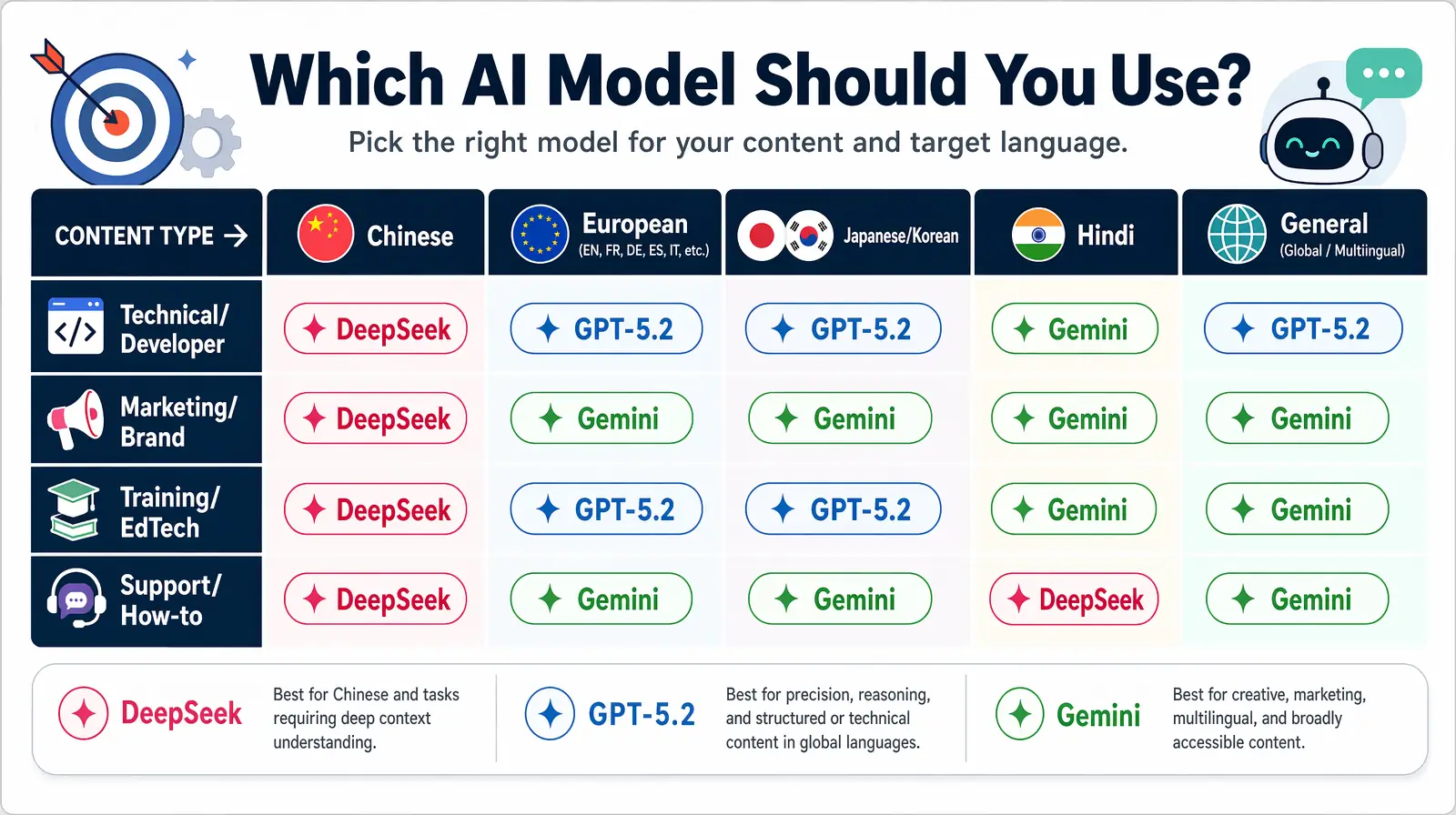
Use this decision matrix to match each video to its optimal model before kicking off a batch.
Understanding where DeepSeek excels — and where it doesn't — helps you choose the right model for every project and avoid the quality issues that come from using the wrong tool for the job.
DeepSeek excels at three things for video translation: technical terminology preservation, Chinese-language quality, and cost efficiency at scale. These three advantages compound: a high-volume technical Chinese video library is the ideal DeepSeek use case, and it significantly outperforms alternatives on all three dimensions simultaneously. Teams running A/B tests between DeepSeek and GPT-4o on engineering tutorial content consistently report that DeepSeek produces fewer terminology errors and fewer paraphrased technical terms while costing substantially less, according to internal benchmarking by localization teams using both models on the same source content.
DeepSeek's translations tend to be more literal than GPT-5.2, which is a strength for technical content but a limitation for creative writing, marketing copy, humor-driven content, and storytelling. The output may need more post-editing when the source material relies heavily on cultural references, wordplay, or brand voice. For European-language creative content (French, German, Spanish, Italian, or Portuguese), GPT-5.2 typically produces more fluent, culturally adapted output that requires less human review. It's also worth noting that DeepSeek, like all LLM-based translation models, outputs text only — voice quality is determined by VideoDubber's TTS and voice cloning engine, not by DeepSeek itself.
For marketing videos, brand storytelling, or content where tone, idioms, and cultural adaptation matter more than technical precision, use GPT-5.2. For Japanese, Korean, or Hindi content prioritizing natural conversational phrasing, Gemini often edges ahead in quality tests. DeepSeek's home territory remains technical content, Chinese language, and high-volume scale — scenarios where its architecture was specifically optimized and where its cost advantage delivers the greatest return.
Apply these practices to get consistent, high-quality results from DeepSeek in every project. The difference between a good DeepSeek output and a poor one almost always comes down to settings and source material quality, not the model itself.
| Practice | Why it helps |
|---|---|
| Use clear source audio | DeepSeek's transcription is only as good as the audio input; reduce music and background noise before uploading. |
| Enable Technical Mode for technical content | Keeps code, APIs, function names, and jargon accurate instead of generic or paraphrased. |
| Pick DeepSeek when Chinese is in the mix | Best nuance and terminology for Mandarin/Cantonese in both directions. |
| Use for high-volume or cost-sensitive projects | DeepSeek's lower cost scales well for many videos or languages simultaneously. |
| Review first minute before batch processing | Spot-check terminology and tone on a short segment before processing a full library to catch any settings issues. |
| Maintain a glossary file | For recurring brand terms, product names, and acronyms, provide these in the context or glossary field so they are treated consistently. |
| Combine with voice cloning | Voice cloning preserves the original speaker's identity across all translated languages, which significantly improves viewer trust and engagement. |
Tools like VideoDubber combine DeepSeek with voice cloning and lip-sync, so your translated audio matches the original speaker and mouth movements — whether you choose DeepSeek, Gemini, or GPT for the text translation layer. For teams translating training videos at scale, the combination of DeepSeek's cost efficiency and VideoDubber's voice cloning capability provides the most cost-effective path to production-quality localization. For more on accuracy expectations, see How Accurate Is AI Video Translation?.
| Mistake | Why it hurts | Better approach |
|---|---|---|
| Using DeepSeek for European creative marketing | DeepSeek is more literal; marketing copy may feel flat | Use GPT-5.2 for European creative content; DeepSeek for technical or Chinese |
| Not enabling Technical Mode for code-heavy content | Technical terms get paraphrased or genericized | Always enable Technical Mode for developer or engineering content |
| Skipping the sample review | Terminology issues caught after batch processing are expensive to fix | Review 2–3 minutes per language before launching a full batch |
| Uploading noisy or low-quality audio | Poor audio degrades transcription regardless of model | Use clean source recordings; reduce background noise and music |
| Over-relying on default settings | Settings tuned for general content don't optimize for technical use cases | Configure Technical Mode, glossary, and voice cloning for each project type |
In practice, the most costly mistake we see teams make is running an entire library through DeepSeek without a sample review first — especially when translating into Chinese or Japanese, where a terminology misconfiguration can affect every video in the batch. Spending five minutes reviewing a two-minute sample before a 50-video batch job is the single highest-ROI quality control step available.
DeepSeek is well-suited for technical support, how-to tutorials, and educational content, especially when the audience is Chinese-speaking or the material is jargon-heavy. For highly creative or brand-voice-critical marketing content, GPT-5.2 or Gemini may produce more natural phrasing with less post-editing required. Run a short test and compare before scaling — VideoDubber makes this easy with its model selector, and a 2-minute sample is usually enough to determine which model performs better for your specific content type and target language.
Cost depends on your platform plan, not DeepSeek alone. On VideoDubber, a 10-minute video using DeepSeek typically falls in the roughly $1–$5+ range on paid tiers, depending on plan and features selected. The same length via manual studio dubbing would typically cost $400–$3,000+ per language. DeepSeek's cost advantage versus premium models is approximately 50–70% lower per minute at equivalent quality for technical content, according to API pricing comparisons across major LLM providers.
DeepSeek is one of the strongest options available for translating video content into Mandarin or Cantonese — and from Chinese into other languages. It preserves nuance and technical terms better than most general-purpose Western models for Chinese-language workflows, and it handles the character-level consistency requirements of Simplified and Traditional Chinese more reliably than models not trained on large Chinese corpora. In VideoDubber, select DeepSeek as the model and choose Chinese (Simplified or Traditional) as the target language to take full advantage of this capability.
The answer depends on content type and language. For technical documentation, code, or Chinese, DeepSeek is usually the better choice — higher terminology accuracy and significantly lower cost per minute. For creative scripts, European languages, or idiomatic tone, GPT-5.2 often delivers more natural-sounding, culturally adapted dialogue that requires less human review. Use VideoDubber's model selector and test a sample of each content type to decide per project, rather than defaulting to one model for everything in a mixed library.
DeepSeek itself is a text model that handles transcription and translation only. Voice cloning and lip-sync are capabilities provided by the video platform (e.g. VideoDubber), not the translation model. When you select DeepSeek in VideoDubber, the pipeline uses DeepSeek for the text and translation layer, and VideoDubber's AI handles voice synthesis and lip-sync. This means you still get full dubbing with a cloned voice and synced lip movements regardless of which translation model you choose — DeepSeek, Gemini, or GPT-5.2.
VideoDubber typically accepts MP4, MOV, AVI, and other common video formats for upload. The format limits are set by the platform, not by DeepSeek — so the supported formats are the same regardless of which translation model you choose. Check the current VideoDubber upload page for the latest supported formats and maximum file sizes, as these can change as the platform updates.
DeepSeek is an excellent choice for translating training videos and EdTech content, especially for technical courses (coding, engineering, data science) and for organizations serving Chinese-speaking learners. The combination of technical accuracy and cost efficiency makes it one of the most practical models for large training video libraries that need to be localized across multiple languages at scale. For example, a 200-video coding curriculum translated into Mandarin, Spanish, and Hindi with DeepSeek inside VideoDubber can be completed at a fraction of the cost of studio localization, without sacrificing the technical precision that learners depend on.
DeepSeek performs well on accented English for transcription purposes, though accuracy does decline with very heavy accents or significant background noise — which is true of all current ASR models, not a specific limitation of DeepSeek. For source videos with non-native speaker accents, the most effective mitigation is using high-quality audio with minimal background noise and reviewing the generated transcript before running the full translation, so any transcription errors can be corrected before they propagate into the translated output.
Start with VideoDubber → Choose DeepSeek for your next technical or Chinese-language video and see the difference in accuracy and cost.
How to use Gemini for video translation: complete 2026 guide. Step-by-step in VideoDubber, Asian-language strength (Japanese, Korean, Hindi), multimodal context, and when to pick Gemini vs GPT or DeepSeek.
How to use GPT-5.2 for video translation in VideoDubber: step-by-step, model comparison, context box tips, cost guide, and best practices for European languages. 2026.
Gemini vs DeepSeek vs GPT for video translation: 2026 benchmarks, dubbing scripts, subtitles, and language accuracy. Pick the right AI model for your content.
How accurate is AI video translation in 2026? WER benchmarks, language accuracy tiers, cost data, and real-world examples—complete guide with data.
Change speaker voices in video translation with step-by-step workflows for voice assignment, instant cloning, and Pro+ voice cloning. Full 2026 guide.