When your workforce spans Berlin, Tokyo, Mumbai, and New York, uniform training quality is not a logistical aspiration—it is a legal and operational requirement. "Safety First" implies "Safety Understood First." If your manufacturing safety video is only in English, you are not just limiting comprehension—you are creating real liability.
Translating training videos is the process of converting training or instructional video content from one language into one or more target languages—via subtitles, voiceover, AI dubbing, or a combination—so that employees in every region receive the same quality of instruction in a language they understand. Modern AI dubbing platforms can turn a 60-minute training video into five languages in under two hours at a fraction of the cost of traditional studio dubbing. Companies that translate training content into employees' native languages report 76% higher training effectiveness scores and up to 40% better knowledge retention compared to subtitle-only delivery, according to industry benchmarks from the Association for Talent Development (ATD).
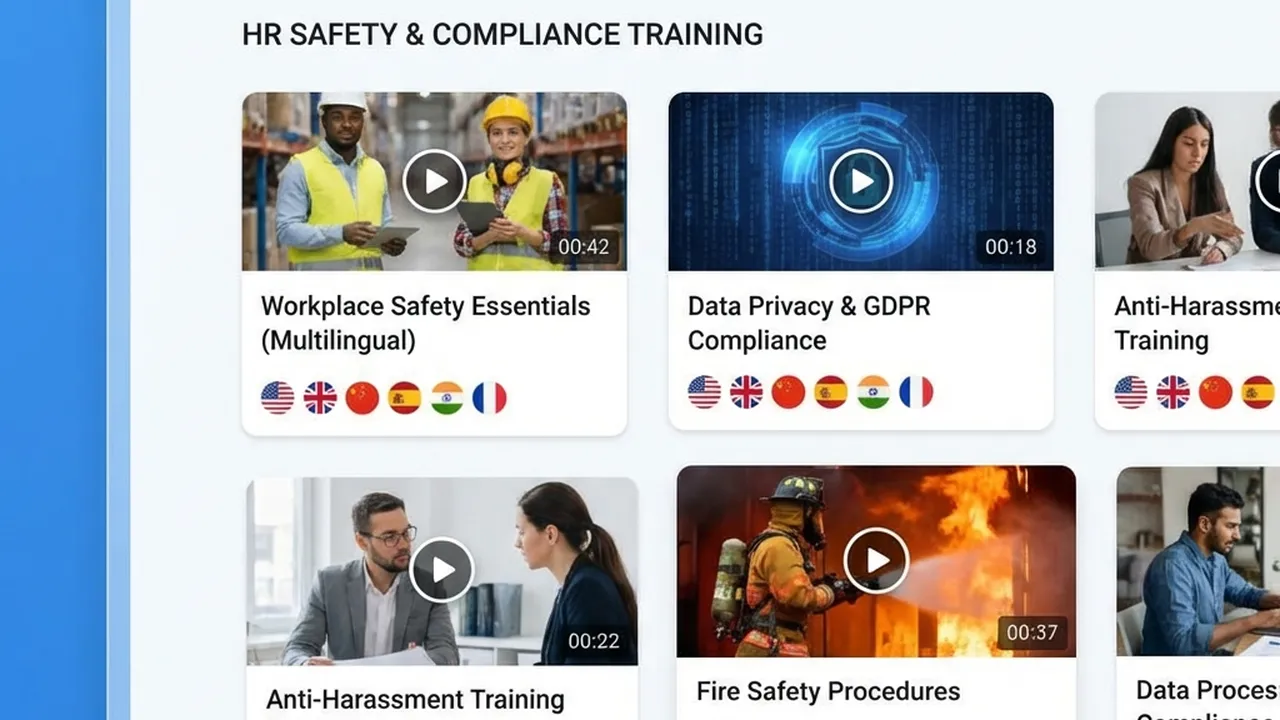
AI-powered training video translation: scale your global L&D library without re-recording or studio bookings.
What This Guide Covers
| Question | Section |
|---|---|
| Why does translating training videos matter for compliance and performance? | Why Translating Training Videos Matters |
| What methods are available—subtitles, dubbing, AI? | Translation Methods Compared: Subtitles vs. Dubbing vs. AI |
| What are the exact steps to translate a training video? | Step-by-Step: How to Translate Training Videos |
| How much does it cost and how long does it take? | Cost and Time: What to Expect |
| What compliance and legal requirements apply? | Compliance and Legal Requirements |
| How do I maintain quality and consistency across languages? | Best Practices for Quality and Consistency |
| How do I build a scalable multi-language training program? | Building a Scalable Multi-Language Training Program |
| Which languages should I prioritize for global training? | Language Prioritization for Global L&D |
| What tools and platforms are available? | Tools for Training Video Translation |
| Frequently asked questions | Frequently Asked Questions |
Why Translating Training Videos Matters
Compliance Requires Comprehension, Not Just Exposure
Legal compliance in training requires that employees actually understand company policies—not merely that they were exposed to a video. Delivering training in a language employees do not fully grasp can expose your organization to regulatory liability and put people at risk. This distinction—exposure vs. comprehension—is the foundation of every OSHA and HR compliance standard.
| Training type | Why translation is required |
|---|---|
| Safety protocols | Misunderstanding a safety video can be fatal. Lockout/tagout, PPE, and emergency procedures must be understood in the worker's primary language. OSHA explicitly requires training in a manner employees can understand. |
| HR policies | Anti-harassment, code of conduct, and diversity training require comprehension for legal defensibility. Nuance is lost when employees struggle with language. |
| Cybersecurity | Phishing awareness, password policies, and incident reporting procedures require accurate localized terminology so no critical instruction is misunderstood. |
| Onboarding | New hires in every region should receive equal quality of onboarding. Retention and 90-day performance both improve when training is delivered in the employee's language. |
The Scale of the Problem in 2026
- 73% of global enterprises are now localizing training content, and about half plan to increase localization investment in the next 12 months, per ATD's 2025 Global Talent Development Report.
- 76% of L&D professionals report meaningfully higher training effectiveness from localizing e-learning and video content.
- 88% of L&D teams complete single training videos in under four hours with AI (vs. a week or more with traditional methods); over 50% report improved localization quality and expanded language coverage since adopting AI dubbing.
- Companies with multilingual training programs show 34% lower safety incident rates in non-English-speaking facilities compared to those relying solely on English content with subtitles, according to industry safety research cited in Occupational Health & Safety journal.
Without systematic translation, non-English-speaking employees are at a disadvantage on safety, performance, compliance, and engagement—and your organization carries the associated legal and operational risk.
Translation Methods Compared: Subtitles vs. Dubbing vs. AI
Choosing the right method affects cost, speed, engagement, and compliance. For internal and compliance training—where clarity, scale, and consistency matter more than Hollywood polish—AI dubbing with voice cloning is typically the best balance of cost, speed, and engagement. Here is a clear, side-by-side comparison of all three approaches.
Quick Comparison Table
| Method | Cost per minute (typical) | Time to delivery | Engagement | Best for |
|---|---|---|---|---|
| Traditional dubbing | $50–$200+ | 2–4 weeks | High (full audio replacement) | High-stakes, one-off flagship content |
| Subtitles only | $5–$15 | 3–5 days | Medium (requires reading while watching) | Budget-constrained, quick turnaround |
| AI dubbing with lip-sync | Less than $1–$10 | Minutes to hours | High (native voice + lip-sync) | Scale, internal, compliance, frequent updates |
Subtitles are the cheapest and fastest option, but viewers must read while watching the screen—a significant cognitive burden for procedural or safety-critical content. OSHA has indicated that subtitles alone may not satisfy requirements for workers with limited reading ability. Traditional dubbing delivers the highest emotional nuance with native-speaking voice actors, but costs $50–$500 per minute and takes days to weeks, making it essentially impossible to scale for dozens of languages and frequent content updates. AI dubbing with voice cloning and lip-sync delivers the same speaker voice across all languages, reduces costs by 60–80% vs. traditional dubbing, and turns around results in minutes to hours—scaling to 150+ languages from a single master video. Tools like VideoDubber enable organizations to batch-upload a training video library and receive dubbed versions with voice cloning and lip-sync across all required languages, often within the same day.
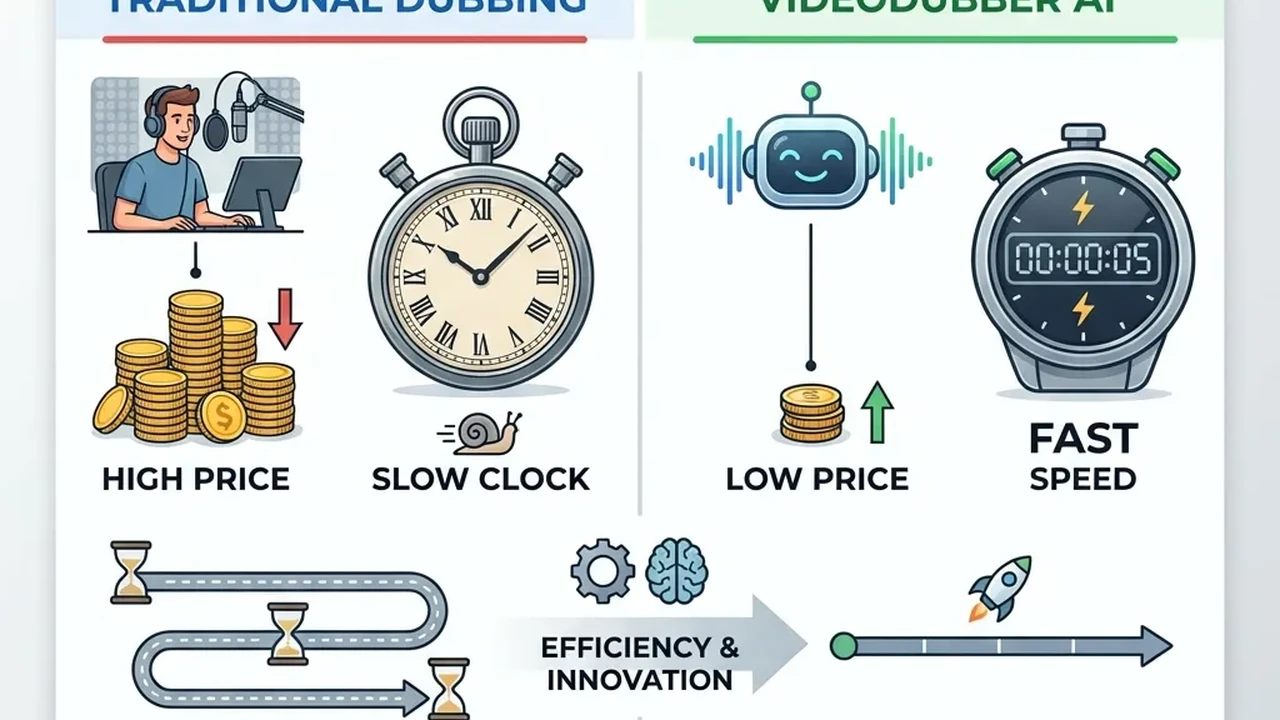
Cost comparison: traditional studio dubbing vs. AI dubbing for training video translation.
Step-by-Step: How to Translate Training Videos
Prerequisites
Before you start, gather:
- Source video: Clear picture (720p or better), supported format (MP4 or MOV recommended), file size within platform limits (often up to 4–5 GB).
- Source audio: Clear speech, minimal background music or noise. Better audio = significantly better AI transcription and dubbing output.
- Target languages: A complete list of all languages (and dialects where relevant—e.g. Latin American vs. Castilian Spanish, Brazilian vs. European Portuguese).
- Glossary (strongly recommended): Company-specific terms, acronyms (OKRs, KPIs, LOTO, SDS), product names, and safety or legal terms so translations stay consistent across all videos and languages.
Step 1: Prepare and Upload Your Video
Export your training video in MP4 format and ensure the speaker is clearly audible with minimal background noise—audio quality is the single biggest factor in AI output quality. Upload to your chosen platform (e.g. VideoDubber), which supports batch upload for processing multiple training modules simultaneously.
Step 2: Select Target Languages and Options
Choose one or multiple target languages, then enable voice cloning (so the same trainer or CEO "speaks" in every language) and lip-sync (so mouth movements match the dubbed audio for a natural viewing experience). If translating technical safety content, enable Technical Mode if available to preserve acronyms, procedure names, and regulatory terminology.
Step 3: Process and Generate
Start the job. The AI pipeline transcribes the audio, translates the script, generates dubbed audio using the cloned voice, and applies lip-sync to the video. For a 10-minute video, expect results in roughly 10–20 minutes; for a 60-minute module, expect 45 minutes to 2 hours depending on platform load.
Step 4: Review and Edit (Critical for Compliance Content)
Preview each language version fully before publishing. For safety, legal, or compliance content, always plan for human review by a native speaker or L&D professional familiar with the subject matter—use in-editor controls to fix any mispronounced terms, incorrect subtitles, or timing issues. Document the review process for regulated content, since showing that you reviewed and approved each language version is important for legal defensibility.
Step 5: Export and Deploy
Download the translated videos or use platform-integrated delivery if supported. Publish to your LMS (Workday Learning, Cornerstone, TalentLMS, etc.) so the correct language version is surfaced to each employee automatically based on their region or language preference. Archive the original source master separately from translated versions for easy re-dubbing when content is updated.
| Step | Action | Key consideration |
|---|---|---|
| 1. Prepare | Export in MP4; ensure clear audio | Audio quality is the biggest factor in output quality |
| 2. Upload | Batch upload all modules | Use glossary file for terminology consistency |
| 3. Select | Choose languages + voice cloning + lip-sync | Enable Technical Mode for safety/compliance content |
| 4. Generate | Launch the job; check estimated time | 10-min video typically takes 10–30 minutes |
| 5. Review | Human review for compliance content | Document the review for legal defensibility |
| 6. Deploy | Publish to LMS in per-language channels | Auto-route by employee region/language profile |
VideoDubber workflow for training video translation: secure upload, multi-language output in one batch, lip-synced dubbing.
Cost and Time: What to Expect
Understanding the full cost picture helps you build a business case for localization and choose the right method for each content type.
| Method | Cost per minute | 60-min training video | Turnaround |
|---|---|---|---|
| Traditional dubbing | $50–$200+ | $3,000–$12,000+ per language | 2–4 weeks per language |
| Subtitles only | $5–$15 | $300–$900 per language | 3–5 days |
| AI dubbing (e.g. VideoDubber) | Less than $1–$10 | Less than $60–$600 per language | Minutes to hours |
For a typical 60-minute compliance training module in five languages: traditional dubbing runs $15,000–$60,000+; subtitles only cost $1,500–$4,500; AI dubbing costs $300–$3,000. The AI option delivers high engagement (native audio with lip-sync) at subtitle-comparable cost, which is why it has become the standard for internal corporate training at organizations that need scale without a Hollywood budget. Use traditional dubbing for one-off, high-profile external-facing content where maximum emotional quality justifies the premium, and subtitles for very tight deadlines, minimal budgets, or when the organization prefers to keep the original audio for authenticity.
Compliance and Legal Requirements
OSHA and Safety Training (U.S.)
OSHA (Occupational Safety and Health Administration) expects training to be provided "in a manner that the employee is able to understand"—which explicitly includes language and vocabulary level (29 CFR 1910.132, and multiple OSHA General Industry standards). If workers do not speak or read English well, training must be provided in their language—translated video with dubbed voiceover or accurate subtitles, not English-only content. OSHA penalties for inadequate training can reach $13,000+ per violation for serious violations, with willful or repeat violations reaching $145,027+ per violation as of 2026 penalty schedules. Video alone may not satisfy every OSHA standard; some require interactive Q&A or instructor-led elements. Use translated video as part of a broader, verifiable training program where employees demonstrate comprehension.
HR and Conduct Training
Anti-harassment, code of conduct, and diversity training often must be legally defensible—which requires training delivered in the employee's primary language, clear and accurate wording where no nuance is lost, and verification of comprehension (quizzes, knowledge checks, digital sign-off). Courts and regulatory bodies have consistently held that training conducted in a language the employee did not understand does not constitute adequate training for legal defense purposes.
Practical Compliance Checklist
- [ ] Identify all languages and literacy levels present in your workforce.
- [ ] Translate safety-critical and legally sensitive training into all applicable languages.
- [ ] Prefer dubbing or professional-grade subtitles over unreviewed machine-only subtitles for high-risk topics.
- [ ] Add human review for regulated content (safety, legal, HR) before publishing.
- [ ] Document delivery method, date, language, and (where applicable) comprehension verification for each employee.
- [ ] Establish a re-dubbing process so localized versions stay in sync when content is updated.
Best Practices for Quality and Consistency
-
Maintain a glossary. Define company-specific terms, product names, acronyms, and safety/legal terms so translations stay consistent across all videos and all languages. Provide this as a glossary file or context input to your AI dubbing platform—this is the single highest-leverage quality improvement you can make before processing.
-
Optimize source quality. Clear speech, a good microphone, and minimal background noise are the biggest factors in AI transcription and dubbing output quality. Invest in source recording quality before worrying about post-processing fixes.
-
Choose dialects deliberately. For Spanish, Portuguese, French, and Arabic, select the specific variant that matches your regional workforce (e.g. Latin American Spanish, not Castilian; Brazilian Portuguese, not European). Dialect mismatches are a common source of engagement issues in localized training and easy to avoid with deliberate selection at setup.
-
Preview before rollout and layer in human review for regulated content. Watch at least a representative sample (3–5 minutes) of each language version to catch tone, terminology, or sync issues before it reaches employees. For safety, legal, and compliance modules, use native-speaking L&D professionals or safety SMEs to verify output—AI handles 95–99% accuracy for business content; human review addresses the edge cases that matter most in high-stakes material.
-
Verify data security before upload. For internal-only training, confirm your platform encrypts data in transit and at rest, does not repurpose your content for model training, and complies with your organization's data residency requirements (GDPR, CCPA, SOC 2). VideoDubber processes internal training videos with enterprise data privacy standards in mind, making it suitable for regulated-industry customers.
Building a Scalable Multi-Language Training Program
Moving from ad-hoc translation to a systematic program requires a framework. Here is how leading L&D teams structure it.
Phase 1: Audit and Prioritize (Weeks 1–2)
Inventory your training library and classify each video by risk level (safety-critical, compliance-required, general development), audience size per language (how many employees need it in each language), and update frequency (how often the content changes). High risk + large audience + frequent updates = highest priority for AI dubbing with a repeatable process. Low risk + small audience + static content = subtitles or defer.
Phase 2: Establish Infrastructure (Weeks 2–4)
Choose an AI dubbing platform that integrates with your LMS (e.g. VideoDubber's export formats compatible with Workday, Cornerstone, TalentLMS). Build your glossary file for the first priority content type, define your human review process for regulated content (who reviews, how long, how results are documented), and set up language-based content routing in your LMS so employees automatically receive the correct language version.
Phase 3: Launch, Measure, and Scale (Month 1 Onward)
Process your highest-priority content batch first, then collect baseline metrics: completion rates, assessment scores, and support/HR tickets per region. Re-measure at 30 and 90 days to quantify improvement. Expand to lower-priority content based on that data, and establish a trigger for re-dubbing—any update to the source video that changes safety instructions, compliance requirements, or key process steps should automatically trigger localized version updates. Re-dubbing a 10-minute module takes under an hour with AI versus weeks with traditional methods.
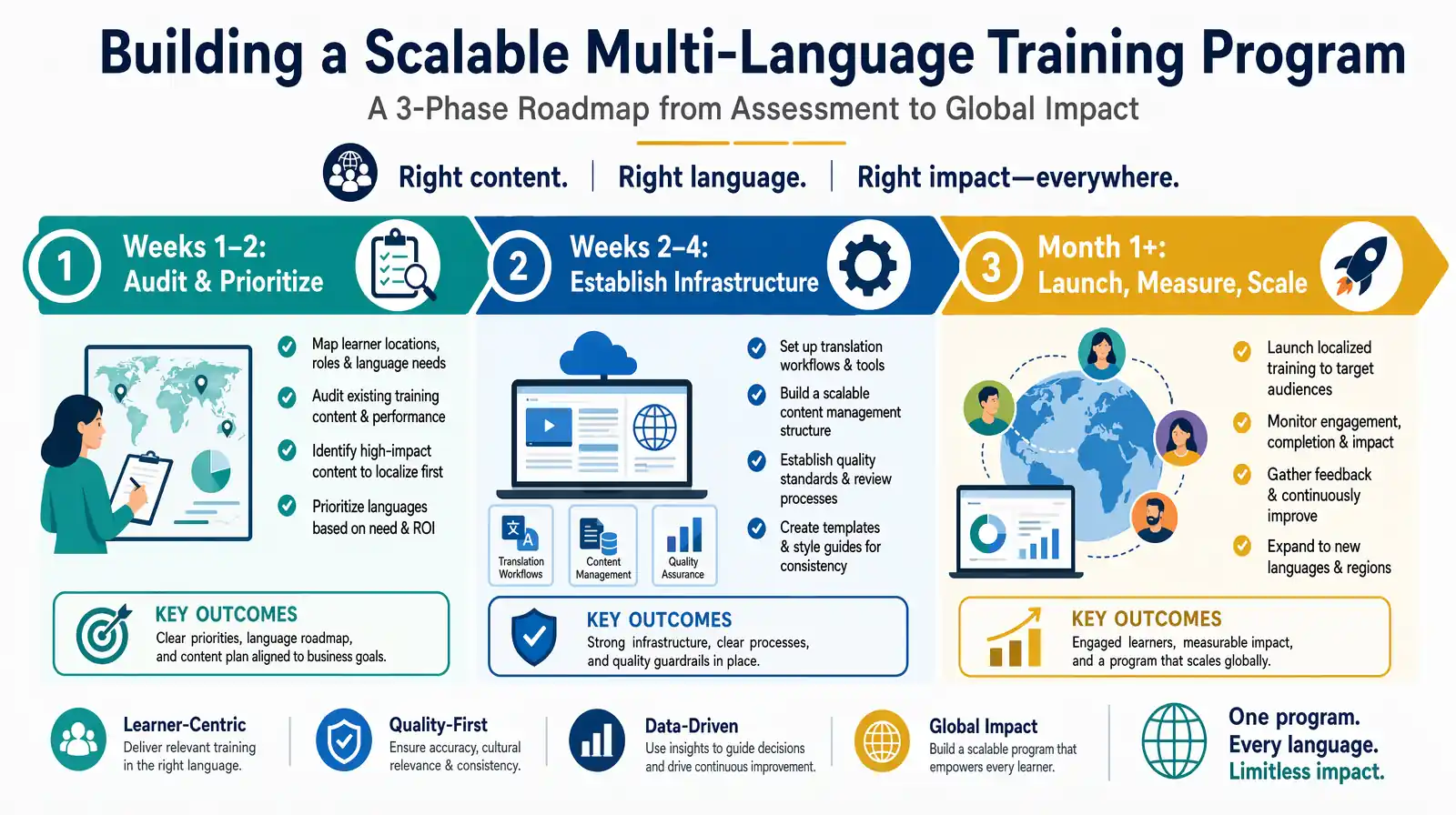
Three-phase rollout: audit and prioritize (weeks 1–2), establish infrastructure (weeks 2–4), then launch, measure, and scale from month one onward.
Language Prioritization for Global L&D
Not all languages need to be launched simultaneously. A phased approach based on your workforce data is more effective than trying to cover everything at once.
| Priority | Languages | Rationale |
|---|---|---|
| Tier 1 | Spanish, Mandarin Chinese, Portuguese (BR), French, Arabic | Largest non-English speaking workforces globally; highest safety incident risk from language barriers. |
| Tier 2 | German, Japanese, Hindi, Vietnamese, Korean | Growing manufacturing and tech workforces; strong compliance culture that values native-language training. |
| Tier 3 | Thai, Indonesian, Turkish, Polish, Ukrainian | Expand once Tier 1–2 are live and measured; significant workforces in specific industries. |
Use your HR data to guide prioritization: which locations have the highest incident rates? Which regions show low training completion? Where are employees flagging language barriers in exit interviews or engagement surveys? Those are your highest-priority targets.
Tools for Training Video Translation
| Approach | Pros | Cons | Best for |
|---|---|---|---|
| AI dubbing (e.g. VideoDubber) | Fast; voice cloning; lip-sync; 150+ languages; scalable; integrates with LMS | Needs human review for safety/compliance content | Internal training at scale; frequent update cycles |
| Traditional studio dubbing | Highest quality; professional actors | Expensive ($50–$200+/min); slow (weeks); hard to maintain at scale | One-off executive or external-facing content |
| Subtitles only | Cheapest; fastest | Cognitive load; may not satisfy OSHA for limited-literacy workers | Tight budgets; non-critical content |
| Hybrid (AI + human review) | Quality + scalability | More expensive than pure AI alone | Safety, legal, and regulated compliance training |
| Translation management system (TMS) | Centralized glossary; translation memory | Typically text-focused; requires separate video workflow | Organizations with large text L&D libraries alongside video |
For most global L&D programs, the practical recommendation is: use AI dubbing as the default, with human review layered in for safety, compliance, and legal content. This gives you the cost and speed advantages of AI while maintaining the quality standard that regulated content requires. VideoDubber supports this hybrid workflow—AI dubbing at scale with reviewer-ready exports that can be spot-checked and approved before LMS publication. For related workflows, see how customer support videos benefit from the same multilingual dubbing approach and how video localization for EdTech applies similar techniques to course content.
Frequently Asked Questions
Do I need to translate all training videos?
Not necessarily. Must translate: safety, compliance, legal, HR, and onboarding content for any region where employees do not primarily work in the source language. Strong candidate: product training, process training, and soft skills content where language barriers reduce effectiveness. Can defer: internal culture content or low-stakes optional modules until higher-priority content is complete. Prioritize based on risk level and audience size per language.
Are subtitles enough for compliance training?
Subtitles can meet compliance requirements if they are accurate and the employee can read and process them in real time. For safety-critical or legal training, dubbed audio is generally safer because it does not rely on reading ability or the ability to read while performing a physical task. OSHA has noted that for workers with limited literacy, subtitles alone may not constitute adequate training. Check with your legal or HR team for your specific regulatory context and jurisdiction.
Is AI translation accurate enough for compliance and safety content?
Modern AI translation reaches 95–99% accuracy for business content, especially with a subject-matter glossary and clear source audio. For regulated or safety-critical content, use AI plus human review by a native-speaking subject-matter expert before rollout. Many organizations use AI for speed and scale and add human review only for safety, legal, and compliance modules—capturing the efficiency of AI while maintaining the quality standard that regulated content demands.
How long does it take to translate a training video?
With AI dubbing, expect roughly equivalent time to the video's viewing duration: a 10-minute video in 10–30 minutes, a 60-minute module in 1–3 hours. AI-assisted subtitles typically take 1–3 hours for a 60-minute video with brief review. Traditional studio dubbing requires 2–4 weeks per language per video. The AI speed advantage compounds when re-dubbing updated content—what once took weeks now takes hours.
What about different dialects—Spanish, Portuguese, French, Arabic?
Most AI dubbing platforms and professional services support dialect selection. In VideoDubber, you can select Latin American Spanish vs. Castilian Spanish, Brazilian vs. European Portuguese, and regional French variants. Choose the variant that matches your specific workforce and apply it consistently within a region—dialect mismatches (e.g. using Castilian Spanish for a Latin American workforce) are a common source of engagement issues in localized training.
Is our internal training content secure when we use an AI translation tool?
Only with the right vendor. For sensitive internal content, verify that the platform encrypts data in transit and at rest, does not use your content for model training, and complies with your data residency requirements (GDPR, CCPA, SOC 2, etc.). VideoDubber processes internal training videos with enterprise data privacy standards, making it suitable for organizations with strict information security policies.
Can we preserve the original trainer's or CEO's voice in every language?
Yes. Voice cloning in AI dubbing captures the original speaker's voice characteristics—tone, cadence, emphasis, and emotional style—from the source audio. When the dubbed script is synthesized, it uses the cloned voice rather than a generic AI voice, so the trainer or executive "speaks" each language in a voice employees recognize. This builds trust and engagement compared with subtitles or unfamiliar voice actors, and it ensures brand consistency across all training content.
How do we handle updates when training content changes?
AI translation makes content updates fast and cost-effective: re-upload the revised video, run the same languages again with the same glossary and settings, and you get updated versions in hours rather than weeks. This is the most significant operational advantage of AI over traditional dubbing for content that changes frequently—safety procedures, compliance requirements, product updates—which is most corporate training content.
Conclusion: Translate Training Videos for Compliance, Safety, and Global Equity
Translating training videos is no longer a luxury—it is a requirement for global teams that care about compliance, safety, and equitable employee experience. AI dubbing with voice cloning is the right default for scale, consistency, and engagement across most internal and compliance training. Traditional dubbing makes sense for one-off premium external-facing content where maximum quality justifies the cost. Subtitles work for tight deadlines, minimal budgets, or non-critical supplementary content. Follow a clear workflow, use a glossary and human review where content demands it, align with OSHA and HR legal requirements, and ensure every employee can learn in a language they understand.
Streamline your global training program today with VideoDubber: secure upload, multi-language output in one batch, and lip-sync dubbing so your message lands equally in every office—Berlin, Tokyo, New York, Mumbai, and beyond.
Further Reading
How to Translate Training & Internal Videos at Scale [2026 Complete Guide]
Translate training & internal videos at scale with AI. Step-by-step pipeline, cost data, voice cloning, glossary setup, and ROI benchmarks for L&D teams.
How to Translate Videos to Multiple Languages: The Complete 2026 Guide
How to translate videos to multiple languages with AI dubbing in minutes. Step-by-step workflow, cost data, voice cloning tips, and distribution strategy.
How to Translate Videos Without Subtitles: Complete Voice-Only Guide [2026]
Learn how to translate videos without subtitles using voice-only dubbing. Step-by-step guide for 2026: when to use it, best tools, and how to turn off subs for a clean, professional look.
Top 10 Languages to Translate Your Videos for Maximum Reach [2026 Guide]
Top languages to translate videos into in 2026: CPM data, audience sizes, prioritization framework by content type, and full AI dubbing cost breakdown.
How to Edit Translated Videos Online: Complete 2026 Guide
How to edit translated videos online: fix subtitles, timing, and voice settings. Step-by-step workflow, pro tips, and unlimited free edits on VideoDubber.