The global e-learning market is projected to exceed $375 billion by 2026 — yet most course creators capture only a fraction because they publish exclusively in English. English speakers represent fewer than 20% of the global population, making an English-only course structurally invisible to more than 4 billion potential learners.
Video translation for online courses converts the audio, subtitles, and on-screen text of e-learning video into target languages so learners consume content in their native tongue. With AI dubbing platforms like VideoDubber, a single master recording can be translated, voiced, and lip-synced across 30+ languages in minutes — with voice cloning preserving the instructor's original voice.
Course creators who invest in video translation typically see 2–5× revenue growth within 12 months, according to industry surveys by Teachable and Thinkific. This playbook covers choosing languages, executing AI dubbing, optimizing for platform algorithms, and measuring outcomes so you can scale globally.
Video Translation for Online Courses
What This Guide Covers
| Question | Section |
|---|---|
| Why should I translate my online course? | Why Translate Your Online Course? |
| How much does course video translation cost? | Cost of Course Video Translation |
| What languages should I target first? | Which Languages Deliver the Best ROI? |
| How do AI dubbing and voice cloning work? | The AI Dubbing Advantage: Voice Cloning and Lip-Sync |
| Manual translation vs. AI: which is better? | Manual vs. AI Translation: Head-to-Head Comparison |
| Step-by-step translation workflow | Step-by-Step: How to Translate an Online Course |
| Platform-specific distribution tips | Distributing Translated Courses on Udemy, Teachable, and YouTube |
| Common translation mistakes to avoid | Best Practices and Common Pitfalls |
| How do I measure translation success? | Measuring the ROI of Course Translation |
| Frequently asked questions | Frequently Asked Questions |
Why Translate Your Online Course?
1. Instant Market Expansion Without New Content
Translating an existing course immediately multiplies your total addressable market at a fraction of the effort of creating new content. Spanish adds access to 500+ million native speakers, Hindi reaches 600+ million. Five target languages — Spanish, Hindi, Portuguese, Arabic, and French — cover more than 2 billion people beyond your English base.
2. Higher Engagement and Completion Rates
Dubbed audio eliminates the split-attention penalty of subtitles: learners process audio in their native language while watching visual demonstrations, freeing working memory for the subject matter. A 2024 Wyzowl survey found that 72% of online learners prefer native-language video over subtitled foreign-language content. Completion rates are typically 20–35% higher for dubbed courses compared to subtitle-only equivalents in non-English markets.
3. SEO Dominance in Local Markets
A course titled "Python for Beginners" competes against thousands of English videos worldwide. The Portuguese equivalent "Python para Iniciantes" faces a fraction of that competition. Localized titles, descriptions, and tags index in regional search results, giving translated courses an organic discovery advantage that compounds over time.
4. Platform Algorithm Boost
YouTube's recommendation algorithm is driven by watch time and audience retention — native-language audio is one of the strongest levers for both. YouTube internally reports that creators testing multi-language audio see over 15% of their total watch time come from non-primary-language views within months. For Udemy, completion rate is the dominant ranking factor, and dubbed courses typically drive higher completion.
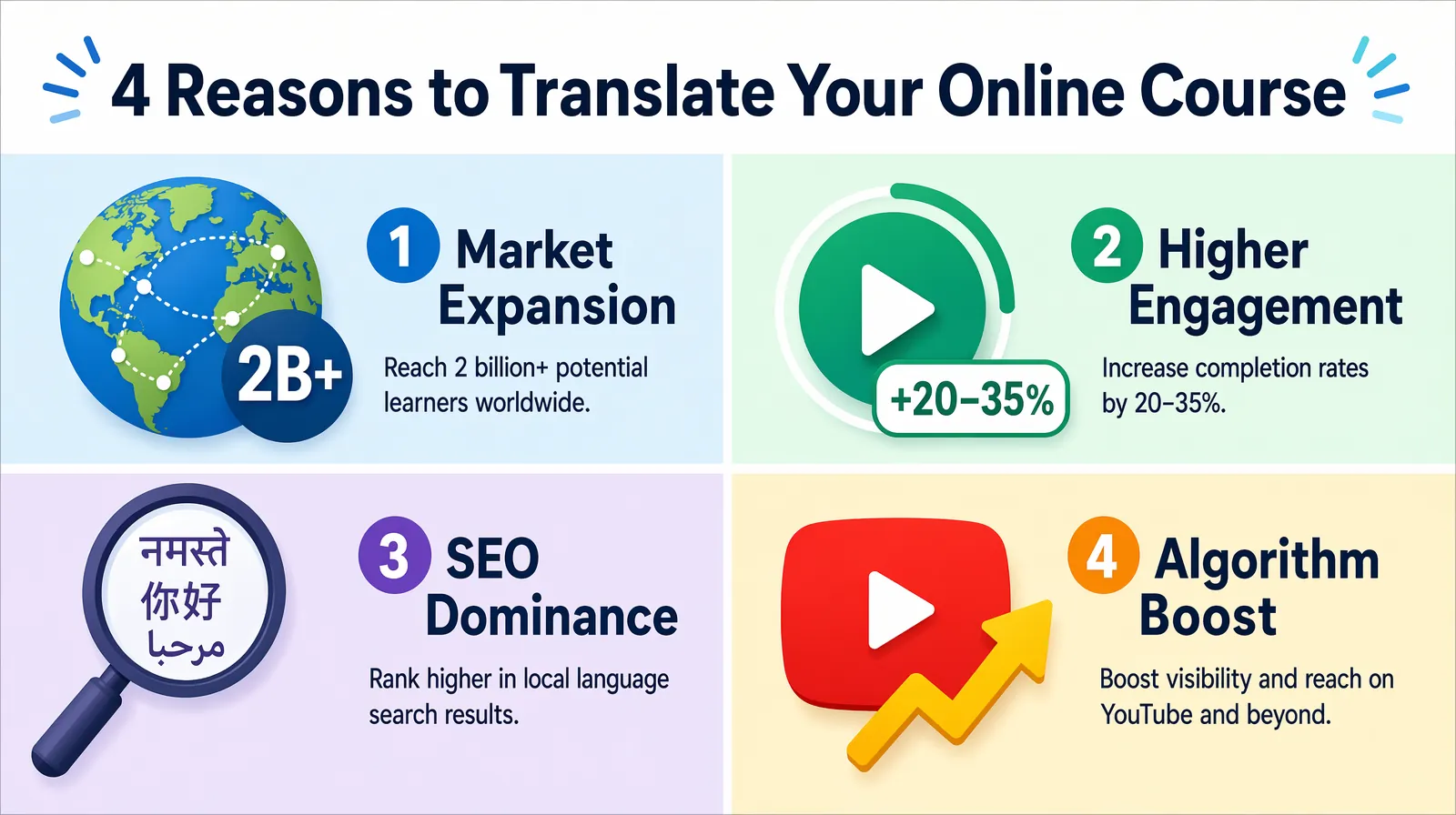
Translating courses unlocks four compounding benefits — market expansion, engagement lift, local SEO, and algorithmic ranking boosts on YouTube and Udemy.
Cost of Course Video Translation
Translation cost comparison
| Method | Cost per finished minute | Turnaround (1-hour course) | Voice consistency |
|---|---|---|---|
| Traditional dubbing studio | $50–$200 per minute per language | 3–8 weeks | New voice actor |
| Freelance voice talent + editor | $25–$80 per minute per language | 1–3 weeks | New voice |
| AI dubbing with voice cloning | $1–$8 per minute per language | 15–60 minutes | Original instructor voice |
A typical 10-hour course (600 minutes) translated into three languages costs:
- Studio dubbing: $90,000–$360,000 total
- AI dubbing: $1,800–$14,400 total
The AI route is 25–100× cheaper and delivers in hours rather than weeks. At a $50 average course price, a translated course needs just 5–10 new enrollments per language to recoup the full AI dubbing cost.
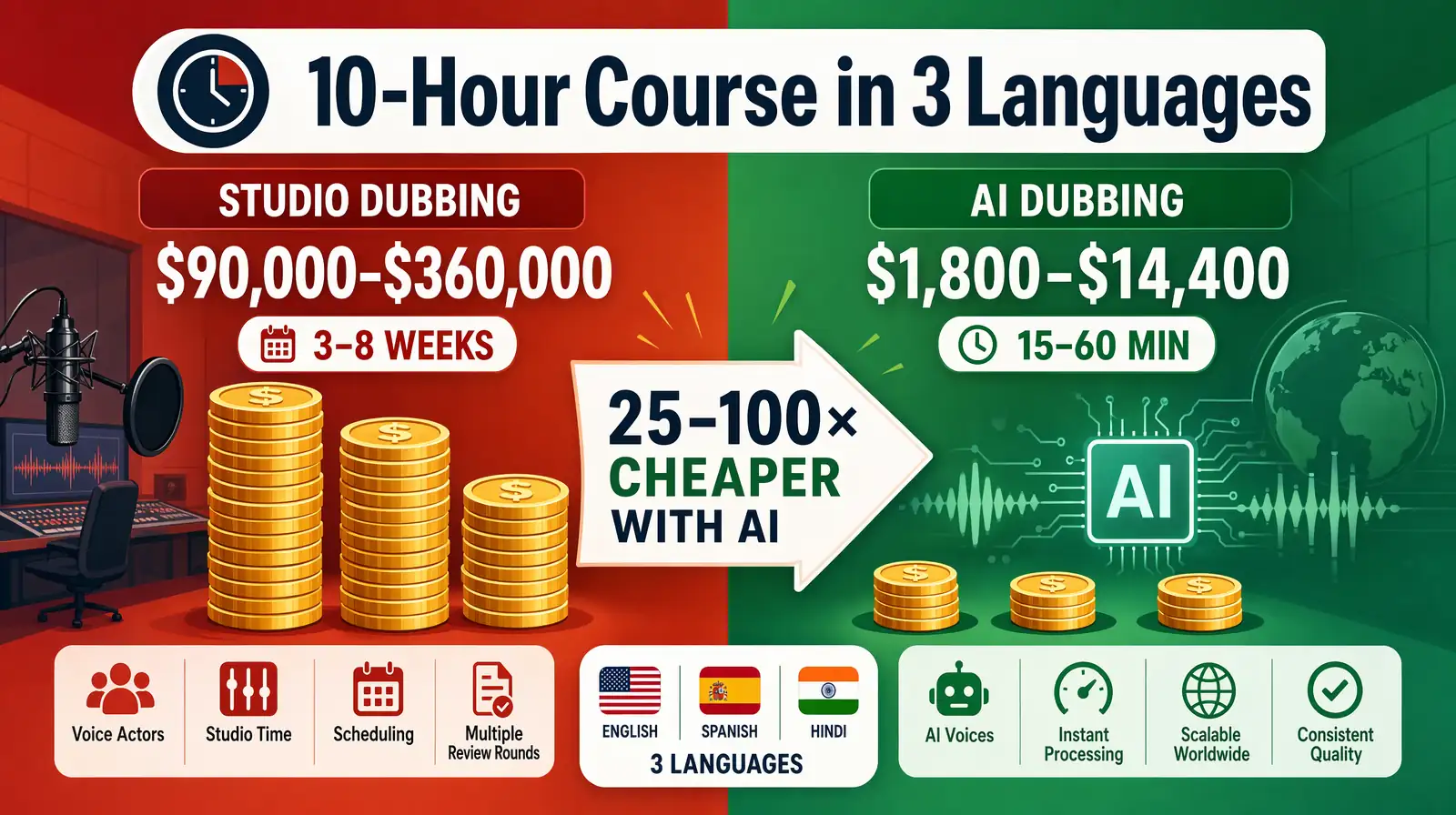
AI dubbing translates a 10-hour course into three languages for $1,800–$14,400 — 25–100× cheaper than studio dubbing.
Hidden costs to budget for
- Review and QA: 15–30 minutes per language per 10 minutes of content for native-speaker spot-checks
- On-screen text translation: Slides, lower-thirds, screen annotations require separate localization
- Platform re-upload time: 30–60 minutes per language to configure titles, descriptions, and captions
Which Languages Deliver the Best ROI?
Tier 1: Highest-ROI languages for most niches
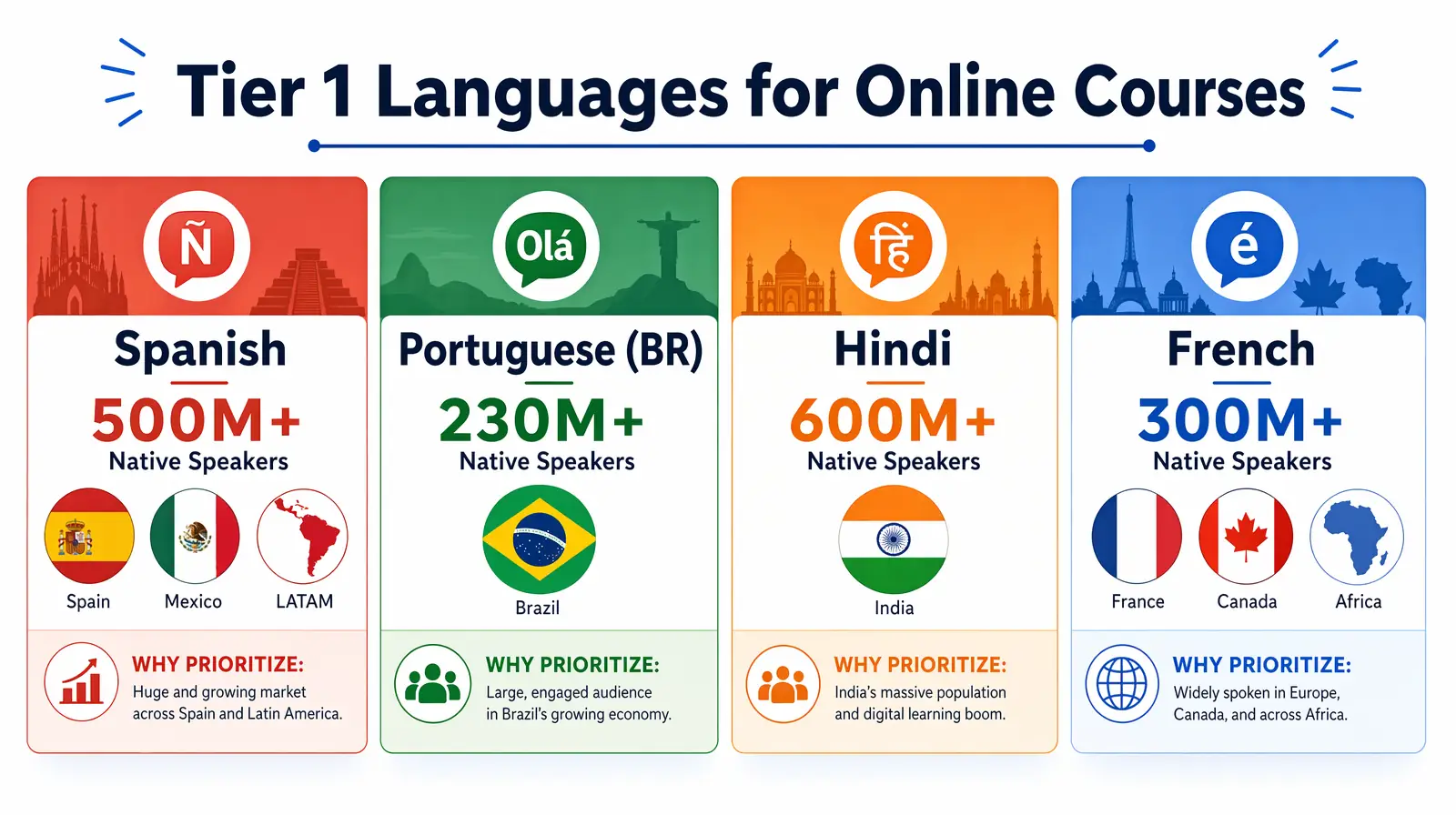
Spanish, Brazilian Portuguese, Hindi, and French are the Tier 1 languages delivering the strongest ROI for most online course niches in 2026.
| Language | Native speakers | Key markets | Why prioritize |
|---|---|---|---|
| Spanish | 500M+ | Mexico, Spain, LATAM | Massive market, high purchasing power, strong demand for professional skills |
| Portuguese (BR) | 230M+ | Brazil | Largest e-commerce and online education market in South America |
| Hindi | 600M+ | India | Fastest-growing e-learning market; English fluency varies widely |
| French | 300M+ | France, Belgium, Africa | Strong in business and professional certification niches |
Tier 2: High growth, lower competition
| Language | Key markets |
|---|---|
| German | Germany, Austria, Switzerland — high willingness to pay for premium courses |
| Japanese | Japan — strong market for tech, design, and business content |
| Arabic | MENA region — underserved market with rapid digital penetration growth |
| Indonesian | Indonesia — 270M+ population with booming digital economy |
How to find your personal best language
- Open your platform analytics (Udemy, Teachable, YouTube Studio).
- Navigate to Audience → Geography or Top Countries.
- Identify your top 3 non-English-speaking countries by enrollments or watch time.
- Those countries' primary languages are your first translation targets.
The AI Dubbing Advantage: Voice Cloning and Lip-Sync
AI video dubbing converts a source-language video into a target language by replacing spoken audio with a synthesized translation while preserving the original speaker's voice through cloning.
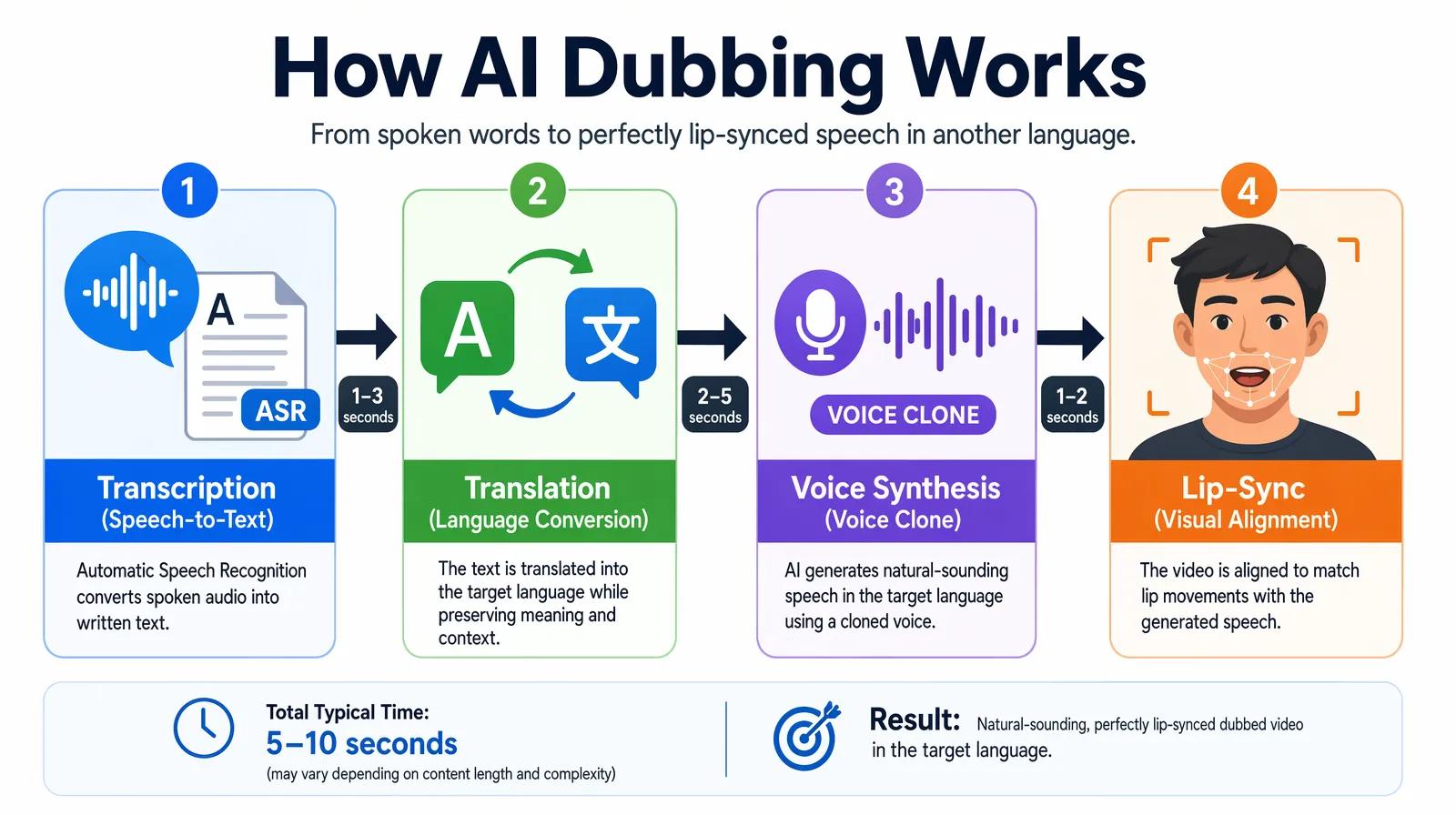
The four-stage AI dubbing pipeline — ASR transcription, neural translation, voice-cloned synthesis, and lip-sync alignment — runs in minutes instead of weeks.
How AI dubbing works (simplified)
- Transcription: ASR produces a timestamped transcript preserving sentence boundaries and natural pauses.
- Translation: Neural machine translation converts the transcript to the target language, preserving terminology and tone.
- Voice synthesis: A voice clone trained on the instructor's audio reproduces their pitch, cadence, and personality in the new language.
- Lip-sync alignment: Generative AI adjusts video frames so the speaker's mouth movements match the new audio.
Why voice cloning matters for e-learning
Learners form a parasocial relationship with the instructor — replacing their voice with generic TTS breaks that trust. Voice cloning preserves the instructor's personality in the target language, maintaining engagement that drives completion. VideoDubber requires as little as 30 seconds of source audio to build a voice model for full-course dubbing.
Lip-sync: the detail that makes or breaks immersion
AI lip-sync models analyze facial landmarks frame-by-frame and regenerate mouth movement to match new audio with sub-frame precision. The result appears to be the instructor speaking the target language natively. For a technical breakdown, see How Lip-Sync AI Works in Video Translation.
Manual vs. AI Translation: Head-to-Head Comparison
| Factor | Manual dubbing (studio) | AI dubbing (e.g. VideoDubber) |
|---|---|---|
| Cost per language | $50–$200/minute | $1–$8/minute |
| Turnaround time | Weeks to months | 15–60 minutes |
| Voice consistency | New voice actor (brand risk) | Original instructor voice preserved |
| Quality ceiling | Very high (professional studio) | High and improving rapidly |
| Scalability | Low (re-engagement per language) | Unlimited (one upload, many languages) |
| Best for | Flagship courses with large budgets | Most e-learning producers; ongoing libraries |
Verdict: For the vast majority of e-learning creators, AI dubbing delivers sufficient quality at a cost that makes global distribution viable. Modern AI models (2025–2026) score above 4.2/5 in listener quality ratings for major language pairs. Manual dubbing remains right only for premium products with six-figure budgets.
For scaling to 5+ languages simultaneously, AI dubbing with voice cloning (e.g. VideoDubber) turns one master recording into a complete multilingual library in a single workflow.
Step-by-Step: How to Translate an Online Course
Step 1: Audit your course library
List every module in a spreadsheet. Record duration, whether it contains on-screen text, and whether it includes language-sensitive content (idioms, cultural references, currency figures). Flag sensitive moments for human review. Most technical courses are 80–90% language-neutral.
Step 2: Prepare your master video
Ensure audio is clear with minimal background noise. Normalize audio to -14 LUFS, and separate music/ambience tracks from speech if possible — dubbed audio replaces only the speech layer.
Step 3: Upload to VideoDubber and select languages
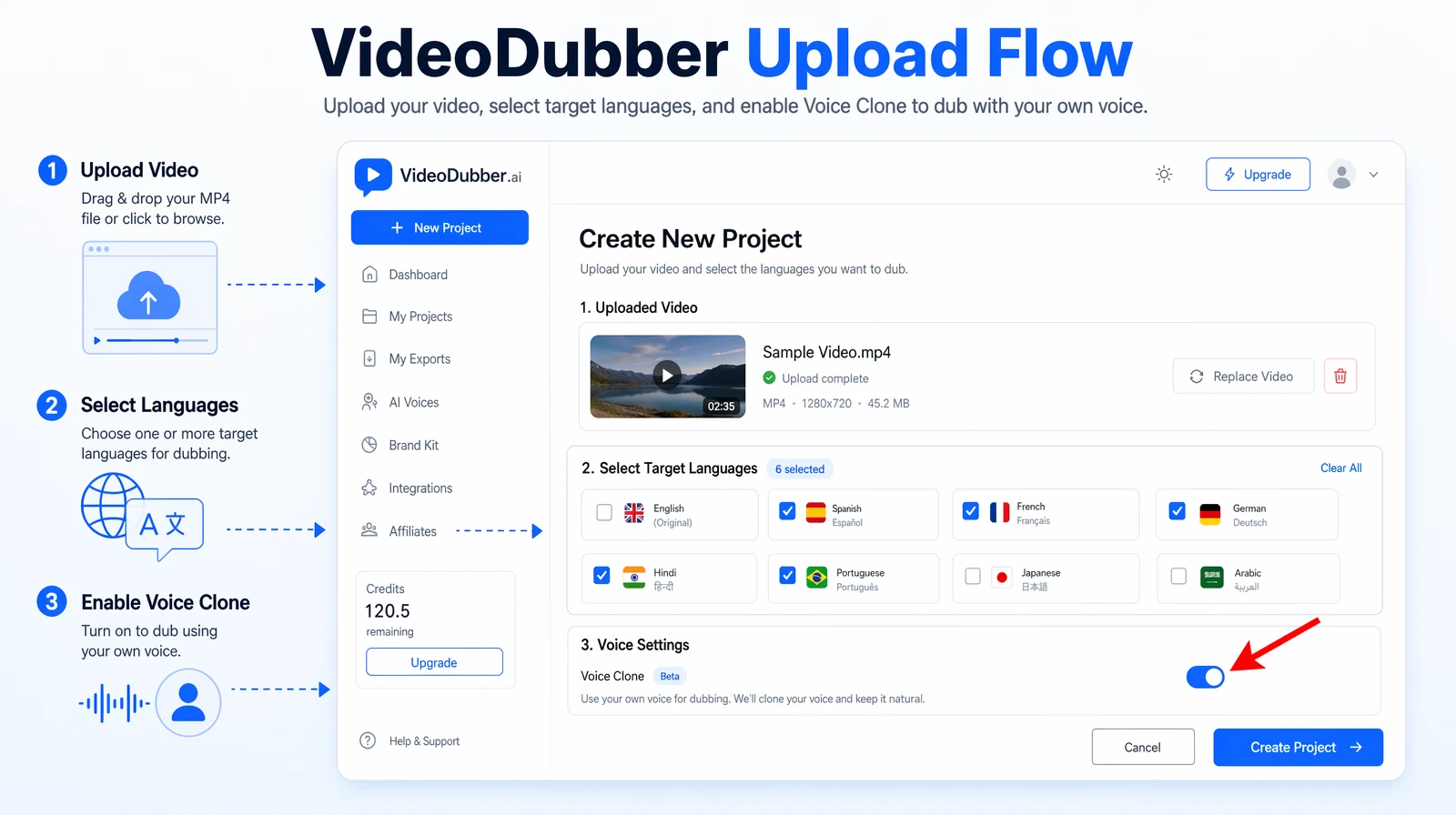
Upload a master video or paste a YouTube link, select target languages, and enable voice cloning — the platform returns dubbed videos plus synced captions.
- Go to VideoDubber.ai and create a project.
- Upload your MP4, MOV, or WebM file — or paste a YouTube/Vimeo/Google Drive link.
- Select target languages using the Tier 1 / Tier 2 framework above.
- Enable Voice Clone mode to preserve your instructor's voice.
- Click Translate and wait for processing.
The platform returns a dubbed video plus synchronized captions for each language — typically within minutes for videos under 30 minutes.
Step 4: Review and edit
AI translation accuracy is above 90% for well-supported language pairs. However, course content often includes technical terms that should not be translated (e.g. "React hooks", "SQL JOIN") and idiomatic phrases. Use the VideoDubber timeline editor to correct these segments. A native-speaker reviewer spending 15–20 minutes per 10-minute module catches most issues.
Step 5: Handle on-screen text
Export translated subtitles from VideoDubber as SRT files, then update slide decks with translated text. For screencasts, add translated text overlays using DaVinci Resolve or Adobe Premiere for the most visible UI labels.
Step 6: Distribute on your target platform
| Platform | Method |
|---|---|
| YouTube | Upload dubbed video as multi-language audio track (see How to Add Multilingual Audio Tracks to a Video) |
| Udemy | Upload separate video files per language as additional course language options |
| Teachable / Thinkific | Create separate course versions per language; link from a language-selection landing page |
| Corporate LMS | Upload per-language SCORM packages |
Step 7: Translate metadata and SEO elements
Translate the course title, subtitle, description, tags, and categories. For YouTube, also translate chapter markers. Use native speakers for metadata — these high-impact text fields benefit from natural regional phrasing that learners actually search for.
Distributing Translated Courses on Udemy, Teachable, and YouTube
YouTube: Multi-language audio tracks
YouTube's multi-language audio feature lets a single video serve dubbed tracks in multiple languages, concentrating all views and engagement signals on one URL. A video with 50,000 English views and 15,000 Spanish views ranks on 65,000 combined signals, whereas separate videos each fight independently. Best practice: Enable multi-language audio for all videos with more than 5,000 lifetime views.
Udemy: Separate courses per language
Udemy treats each language version as an independent listing with its own reviews and ranking. A translated listing starts at zero reviews but enters a far less competitive search environment. Many creators find their Spanish or Portuguese listing outperforms the English original in organic rank within 6 months.
Teachable and Thinkific: Language-specific enrollment paths
Use a global landing page that detects browser locale and routes visitors to the appropriate language version automatically. VideoDubber integrates with major LMS platforms via API and webhook for automated re-upload when source content is updated.
Best Practices and Common Pitfalls
Best practices
- Start with a pilot language: Translate your best-performing module into one language first. Measure completion rate and enrollment before committing to a full library translation.
- Use consistent terminology glossaries: Provide the AI with terms that must not be translated (product names, code syntax, brand acronyms). VideoDubber supports custom glossaries per project.
- Keep original audio clear: Record with a cardioid microphone, speak at a measured pace, and leave natural pauses between sentences.
- Pair dubbed audio with translated captions: Improves accessibility, meets legal requirements (EU Accessibility Act, ADA), and improves comprehension for complex technical material.
- Update translations when source changes: Re-translate affected modules whenever source content is updated to avoid quality inconsistency.
Common pitfalls to avoid
- Translating idioms literally: Phrases like "hit the ground running" become meaningless in direct translation. Rephrase to plain-language equivalents before uploading.
- Ignoring on-screen text: Dubbed audio with English slides creates jarring mixed-language experiences that signal low production quality.
- Skipping QA entirely: Even a 2% error rate in a 10-hour course means ~12 minutes with issues. A 30-minute native-speaker review per language prevents negative reviews.
- Publishing without localized metadata: A Spanish-dubbed video with an English title will not rank in Spanish search results. Always localize metadata before publishing.
Measuring the ROI of Course Translation
| Metric | What it tells you | How to measure |
|---|---|---|
| Enrollment rate (translated vs. original) | Market demand for the language | Platform analytics by language/region |
| Completion rate (translated vs. original) | Learner engagement quality | LMS completion reports per language |
| Revenue per language | Direct financial return | Platform revenue by geographic region |
| Organic search traffic | SEO value of translated metadata | YouTube Analytics → Traffic Source → Search; Google Search Console |
| Watch time increase | Algorithm signal strength | YouTube Studio → Reach → Traffic Source |
The break-even point for AI-dubbed course translation is typically 5–15 new enrollments per language. At a $50 course price, 10 incremental enrollments recoups the full translation cost. For courses above $100, even a single enrollment covers the AI dubbing cost. The downside is small and bounded; the upside — passive revenue from a one-time localization effort — is uncapped.
Setting a 90-day measurement window
Platform algorithms need 60–90 days to index new language content and accumulate engagement signals. Set a 90-day calendar reminder after each language launch to pull metrics and make the go/no-go decision on the next language tier.
Frequently Asked Questions
How accurate is AI video translation for online courses?
AI achieves 90–97% accuracy for well-supported language pairs (English to Spanish, French, Portuguese, Hindi). Accuracy drops for niche jargon and less-supported pairs. A native-speaker review of 15–20 minutes per 10-minute module catches remaining errors.
How long does it take to translate a full online course?
A 10-hour course translates into a single language in 1–3 hours of processing plus 2–4 hours of review. A 3-language rollout takes 1–2 business days versus 2–6 months for studio dubbing — a 30–90× speed advantage.
Should I dub my course or just add subtitles?
Dubbing outperforms subtitles on completion rate and learner satisfaction. Subtitles force split attention between reading and watching, especially damaging for screen-based tutorials. Use subtitles as a supplement to dubbing for accessibility and noisy environments, not as a replacement.
What is the best language to translate an online course into first?
Check your analytics for top non-English countries by enrollment or watch time — those are your highest-ROI targets. Without analytics data, Spanish is the default first choice: second-most-spoken language by native speakers, 21 countries, and strong willingness to pay for professional content.
Will voice cloning preserve my teaching style across languages?
Modern AI voice cloning reproduces the instructor's pitch, tempo, emotional range, and speaking style in the target language with high fidelity. Voice cloning makes AI-dubbed courses feel authentic rather than robotic, which is why learner ratings for dubbed courses match or exceed the original language version.
How do I handle course content that includes cultural references?
Flag cultural references during the audit phase and either replace with culturally equivalent references or neutralize to universal language. Most technical courses have fewer than a dozen cultural references per hour, making this manageable.
Can I translate a course that includes screen recordings?
Yes. Dubbed audio translates narration accurately, but UI elements on screen remain in the source language. For most professional software this is fine since users are accustomed to English UIs. For fully localized software markets, add translated text overlays to the most prominent UI elements.
Does translating my course hurt my original language SEO?
No. Platform algorithms treat different language versions as additive content, not competing content. They occupy entirely separate ranking spaces, meaning translation only adds ranking surface area and never cannibalizes English rankings.
How do I know when my translated course is ready to publish?
A translated course is ready when it passes four checks: dubbed audio is reviewed for terminology errors, on-screen text is localized, platform metadata is translated and keyword-optimized, and thumbnail text is localized.
Summary: Your Global Course Launch Checklist
- Video translation for online courses is the fastest path from a one-language course to a global curriculum — AI tools have reduced cost by 25–100× compared to traditional dubbing.
- Prioritize language selection using your existing analytics: your top non-English countries are your first-mover markets with proven demand.
- AI dubbing with voice cloning preserves instructor presence, supporting completion rates and reviews — the two most important signals for algorithmic ranking.
- Translate metadata alongside video — without localized metadata, even a perfectly dubbed course remains invisible to local search.
- Start with a pilot (one module, one language), measure over 90 days, then scale with confidence.
- Platform strategy differs: YouTube multi-language audio consolidates signals; Udemy requires separate listings; Teachable/Thinkific benefit from locale-based routing.
The next big educator in your niche might be you — but only if learners in their language can find and finish your course. With AI dubbing, the barrier to going global has never been lower.
Further Reading
Video Localization vs. Translation vs. Dubbing: Complete Guide [2026]
Video localization vs. translation vs. dubbing: full 2026 guide with cost tables, use-case matrix, AI dubbing workflow, and expert verdict on which to choose.
How to Use GPT-5.2 for Video Translation [2026 Guide]
How to use GPT-5.2 for video translation in VideoDubber: step-by-step, model comparison, context box tips, cost guide, and best practices for European languages. 2026.
How to Use Gemini for Video Translation [2026 Guide]
How to use Gemini for video translation: complete 2026 guide. Step-by-step in VideoDubber, Asian-language strength (Japanese, Korean, Hindi), multimodal context, and when to pick Gemini vs GPT or DeepSeek.
How Accurate Is AI Video Translation? Benchmarks, Data & Real Examples (2026)
How accurate is AI video translation in 2026? WER benchmarks, language accuracy tiers, cost data, and real-world examples—complete guide with data.
Gemini vs. DeepSeek vs. GPT for Video Translation: Which AI Wins in 2026?
Gemini vs DeepSeek vs GPT for video translation: 2026 benchmarks, dubbing scripts, subtitles, and language accuracy. Pick the right AI model for your content.