Bad video translation does not just fail to communicate — it actively damages your brand. A mistranslated subtitle can trigger social media backlash. A robotic AI voiceover signals low quality before your content has a chance. A lip-sync so far off it becomes a meme will define your channel.
Over 70% of global consumers say they prefer to buy products in their native language, according to the Common Sense Advisory. Yet the majority of brands and creators localize poorly or not at all — creating an enormous opportunity for anyone who gets it right.
This guide covers the 10 most common video translation mistakes, why each one happens, the real-world consequences, and exactly how to fix them using modern AI tools and editorial practices.
Literal Translation Failure
The most common video translation mistakes are: literal word-for-word translation that destroys idioms and humor, poor lip-sync that makes the video look amateurish, robotic TTS voices that kill emotional engagement, ignoring cultural context beyond the words, missing technical terminology review, inadequate subtitle timing, wrong regional variant selection, no back-translation quality check, untouched on-screen text, and over-reliance on translation without human review.
What This Guide Covers
Mistake 1: Literal Word-for-Word Translation
Literal translation is the practice of replacing each word or phrase with its closest dictionary equivalent without considering contextual meaning, idiomatic usage, or cultural register. It is the most common and most damaging translation mistake in video content.
Languages are not parallel structures where each word maps to exactly one equivalent in another language. They are complex systems of meaning built on idioms, metaphors, implied context, and cultural shared knowledge. Translating word-for-word ignores all of this.
The damage in practice
Consider the English phrase "It's raining cats and dogs." A literal translation into Spanish gives you "Está lloviendo gatos y perros" — a sentence that is grammatically correct but semantically absurd. The correct translation is "Está lloviendo a cántaros" (pouring from jugs) — a culturally equivalent idiom.
For business content, the damage is more serious. A marketing phrase like "We cut through the noise" may translate literally to something closer to "we cut through the sounds" in target languages — losing the metaphor entirely. In Japanese or Chinese markets, where translated business idioms are expected to sound native, literal translations signal disrespect for the audience's culture.
Literal Translation Failure
Research from the Localization Industry Standards Association (LISA) found that poor translation quality is the top reason consumers abandon websites and products after the language switch. Video content carries the same risk.
The fix: Context-aware AI translation
Modern AI translation engines like those used in VideoDubber analyze entire sentences and paragraphs to understand meaning and intent, not just vocabulary. They translate the sentiment — replacing an English idiom with a culturally appropriate equivalent in the target language.
| Translation type | "Break a leg" in German | "It's not rocket science" in Japanese |
|---|---|---|
| Literal | "Brich ein Bein" (break a bone — nonsensical) | "ロケット科学ではない" (makes no sense) |
| Context-aware | "Toi, toi, toi" (German equivalent good luck) | "難しくない" (it's not difficult) |
Actionable fix: Always use a translation engine that supports contextual and idiomatic translation. After AI translation, do a human spot-check of any idioms, humor, metaphors, or culturally-specific references in the original script.
Mistake 2: Ignoring Lip-Sync Accuracy
We have all seen it — the speaker finishes talking, but the dubbed voice continues for three more seconds. Or the speaker's mouth moves without any sound. This "dubbing drift" is the most visually jarring translation mistake, and it is particularly noticeable in talking-head videos, interviews, product demos, and any content where the speaker is on camera.
Lip-sync accuracy in video dubbing refers to how precisely the dubbed audio aligns with the visible mouth movements of the speaker in the original video — measured both in timing (audio matches the duration of mouth movement) and visual concordance (the mouth shapes approximate the sounds being made).
Bad vs Perfect Sync
Why dubbing drift happens
The root cause is linguistic: different languages require different amounts of time to express the same idea. German sentences are typically 30–40% longer than their English equivalents. Japanese is often shorter, but with different rhythm patterns. When you simply overlay translated audio on original video, the mismatch is inevitable.
| Language pair | Average length difference vs. English |
|---|---|
| German | +30–40% longer |
| Russian | +25–35% longer |
| Spanish | +15–25% longer |
| Japanese | -10–20% shorter |
| Mandarin | -20–30% shorter |
| French | +10–20% longer |
Source: Translated.com 2024 Language Length Expansion Index
The fix: AI dubbing with automatic lip-sync
Modern AI dubbing platforms do not just generate translated audio — they adjust the video itself. AI lip-sync technology subtly modifies the speaker's lip movements in the video to match the new language's phoneme patterns and timing. The result is a video that looks and sounds like the speaker was natively delivering the translated script.
Tools like VideoDubber use AI lip-sync as a standard feature in the dubbing pipeline, eliminating the drift that plagues manual dubbing workflows. For more on how this technology works, see our detailed guide on how lip-sync AI works in video translation.
Mistake 3: Using Flat, Robotic TTS Voices
Nothing destroys a video's emotional impact faster than a synthetic voice that sounds like it is reading a bus schedule. Cheap text-to-speech engines strip out the pacing, emphasis, and emotional coloring that give human speech its power — and viewers notice within the first five seconds.
The mistake: Using a generic, off-the-shelf TTS voice for dubbed content. This is especially damaging for marketing videos, educational content with a trusted instructor voice, ministry content, or any content where the speaker-audience relationship matters.
Flat, generic TTS dubbing makes content feel automated and impersonal. In markets where audiences are accustomed to high-quality local content, robotic dubbing signals that the creator does not value their audience enough to invest in quality.
Robotic vs Natural Voice Waveform
What you actually lose with robotic TTS
| Human speech element | Generic TTS | Voice cloning |
|---|---|---|
| Emotional emphasis | Missing | Preserved |
| Pause patterns | Mechanical | Natural |
| Pacing variation | Uniform | Context-sensitive |
| Tonal range | Narrow | Full range |
| Speaker identity | Generic | Recognizable |
The fix: AI voice cloning
AI voice cloning — as covered in our guide on how to clone celebrity voices for video dubbing — captures the speaker's unique vocal fingerprint: their tone, pacing, emphasis patterns, and emotional coloring. The dubbed audio sounds like the original speaker delivering the script in the target language, not a robot reading a translation.
Creators and brands using voice cloning for their dubbed content report that viewers in target markets frequently cannot tell that the audio is AI-generated — they assume the creator recorded natively in their language. This level of authenticity drives dramatically higher engagement and trust.
Mistake 4: Translating Words, Not Culture
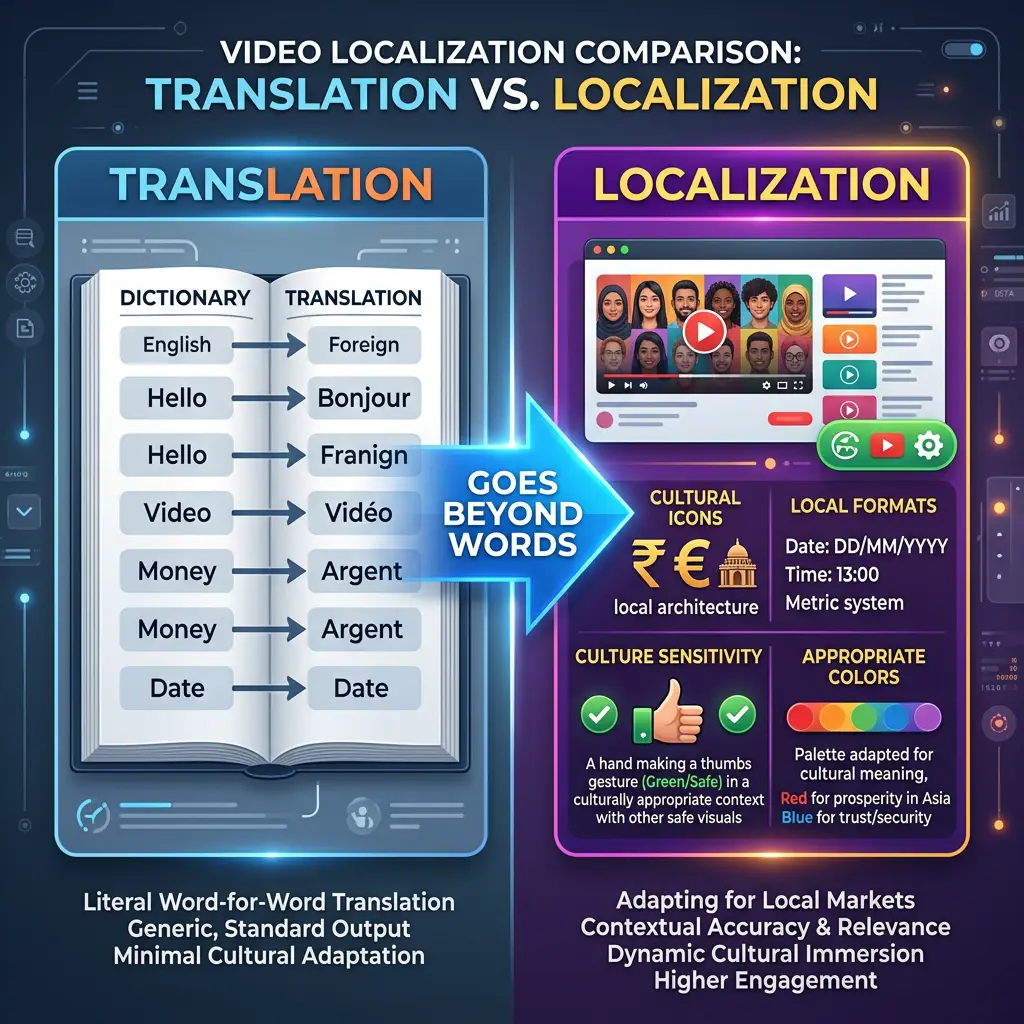
Translation converts words; localization adapts meaning across culture, visuals, idioms, and context.
Translation and localization are not the same thing. Translation converts language. Localization converts meaning — and meaning is embedded in culture, not just vocabulary.
Video localization is the comprehensive process of adapting video content — including audio, subtitles, on-screen text, cultural references, visual cues, and brand messaging — so that it feels native and appropriate to a specific target market, not just linguistically translated.
Cultural landmines in video content
| Cultural element | Translation-only approach | Localization approach |
|---|---|---|
| Hand gestures | Left unchanged | Review for offensive meanings (thumbs-up is offensive in some Middle Eastern cultures) |
| Color symbolism | Left unchanged | White is mourning in China; red is luck — adjust visuals for key markets |
| Humor | Direct translation | Replace with locally equivalent humor or remove if it cannot transfer |
| Numbers and dates | Direct translation | Adjust format (MM/DD/YYYY vs DD/MM/YYYY) and verify cultural significance |
| Product references | Direct translation | Replace with locally available equivalents |
| Religious references | Direct translation | Careful review for cross-cultural sensitivity |
The fix: Use platform editing tools for cultural review
AI handles the translation; the human review pass handles the cultural adaptation. Platforms like VideoDubber include an interactive transcript editor that displays original and translated text side by side, making it easy to spot and modify culturally inappropriate references before the video is published.
In practice, teams that add a 20–30 minute cultural review pass to their localization workflow — even just reviewing the transcript rather than the full video — catch the majority of cultural errors before they become public embarrassments.
Mistake 5: Mistranslating Technical and Brand Terminology
Technical content — software tutorials, medical information, legal documents, engineering documentation — carries the highest translation risk. A mistranslated software term sends users to the wrong screen. A mistranslated dosage instruction can cause harm.
Terminology types that require special handling
| Terminology type | Risk if mistranslated | Correct approach |
|---|---|---|
| Software UI terms | Users cannot find the buttons you're describing | Keep in original language or use the software's official localized term |
| Brand names | Confusion, legal issues | Always preserve brand names verbatim |
| Product model numbers | Wrong purchase, returns | Never translate alphanumeric product codes |
| Medical/legal terms | Liability, harm | Use officially recognized translation from professional body |
| Technical standards | Non-compliance | Use the standard's official name in the target language |
The fix: Build a terminology glossary
Before running AI translation on technical content, build a translation glossary — a list of terms that should be kept in original form, or mapped to specific approved translations. Most professional translation platforms, including VideoDubber's editor, support custom glossaries that override AI defaults for specific terms.
Quotable benchmark: Teams that use terminology glossaries in their localization workflow reduce post-publication correction rates by 40–60%, according to data from the Translation Automation User Society (TAUS).
Mistake 6: Poor Subtitle Timing and Readability
Subtitle timing is an often-overlooked technical mistake that accumulates into a frustrating viewer experience. Subtitles that appear too early, disappear too fast, or crowd the screen are a signal of low production quality.
Subtitle timing standards for professional broadcast specify: subtitles should appear no more than 0.2 seconds before the spoken word, remain on screen for at least 1 second and no more than 7 seconds, maintain 150–180 words per minute reading speed for the average viewer, and maintain a 0.2–0.5 second gap between consecutive subtitle lines.
| Timing guideline | Standard | Common mistake |
|---|---|---|
| Reading speed | 150–180 wpm | 250+ wpm (too fast to read) |
| Minimum display time | 1 second | 0.3–0.5 seconds (flashes on screen) |
| Maximum line length | 42 characters per line | 60+ characters (forces line breaks) |
| Sync offset | 0–0.2 seconds before speech | 0.5+ seconds (visible delay) |
| Gap between subtitles | 0.2–0.5 seconds | 0 seconds (subtitles merge visually) |
The fix: Use a precision timeline editor
The VideoDubber editor provides drag-and-drop timeline control for each subtitle segment. For detailed guidance on adjusting subtitle timing correctly, see the full walkthrough in our guide on how to edit translated videos online.
Mistake 7: Using the Wrong Language Variant
"Spanish" is not one language — it is 20+ regional variants with significant vocabulary, idiom, and cultural differences. "Portuguese" splits into Brazilian Portuguese and European Portuguese. "Chinese" splits into Simplified Chinese (Mainland), Traditional Chinese (Taiwan/HK), and further regional dialects. Publishing content in the wrong variant signals to the audience that you do not understand their market.
Language variant mismatch is the practice of translating content into one regional variant of a language and publishing it to audiences who speak a different variant — for example, using Spain Spanish (Castilian) for Latin American audiences, or European Portuguese for Brazilian audiences.
The highest-impact variant splits
| Language | Variants | Key difference |
|---|---|---|
| Spanish | Spain (Castilian) vs. Latin American | Vocabulary, "vosotros" vs. "ustedes", significantly different idioms |
| Portuguese | Brazilian vs. European | Pronunciation, vocabulary, tone (BR is more informal) |
| Chinese | Simplified vs. Traditional | Writing system; content for Mainland differs from Taiwan/HK |
| French | France vs. Canada (Québécois) vs. African French | Vocabulary, tone, cultural references |
| Arabic | Modern Standard vs. regional dialects | Formal MSA works for all; regional dialects feel more native |
Actionable rule: Always localize for the largest population center of your target market. For Spanish-language content targeting Latin America, use Latin American Spanish — not Spain Spanish. For Brazil, always use Brazilian Portuguese.
Mistake 8: Skipping Back-Translation and Review
Back-translation is the process of translating the translated content back into the original language (without referencing the original) to verify that the intended meaning survived. It is a standard quality-control step in professional localization that most creators skip.
Why back-translation catches errors automated QA misses
AI translation tools are excellent at producing grammatically correct output. What they sometimes miss: nuanced semantic shifts where the translation is technically correct but implies something slightly different from the original. Back-translation reveals these shifts quickly.
Quotable benchmark: A 2024 TAUS industry survey found that 85% of post-publication translation errors could have been caught during a human review or back-translation pass — a step that was skipped in the majority of cases.
The minimal review workflow (15 minutes per video)
- After AI translation, read through the transcript in the target language (even with a tool like DeepL to get the gist)
- Flag any segments where the back-translation sounds different from the original intent
- Edit those segments in the VideoDubber editor before regenerating audio
- Pay extra attention to: the opening 30 seconds (first impression), the closing CTA, and any claims with numbers or statistics
Mistake 9: Leaving On-Screen Text Untranslated
On-screen text — titles, lower-thirds, callouts, infographic text, captions on images — is as much a part of your video's communication as the spoken audio. Leaving it in English (or any source language) while the audio is dubbed creates a jarring inconsistency that immediately signals incomplete localization.
Types of on-screen text that need localization
| On-screen element | Localization requirement |
|---|---|
| Title cards and chapter text | Translate to match dubbed language |
| Lower-thirds (speaker names/titles) | Titles should use local language equivalents |
| Infographic labels | Translate all text within graphics |
| Call-to-action overlays | Translate; adapt phrasing to target-market conventions |
| Watermarks and logos | Usually keep as-is; brand names are typically not translated |
| Comments or on-screen notes | Translate if they add essential information |
The fix: Plan for on-screen text at the production stage
If you know a video will be localized, create the source video with text overlays on a separate layer (in video editing software) so they can be easily swapped for target-language versions. For already-published videos with baked-in on-screen text, tools like Adobe Premiere Pro, DaVinci Resolve, or specialized localization platforms can use AI inpainting to remove and replace text elements.
Mistake 10: No Human Review Pass
AI translation and dubbing tools have advanced dramatically in 2026, but they are not infallible. Relying entirely on automated output without any human review is the mistake that leads to all the high-profile translation failures that get screenshotted and mocked on social media.
Human review in video translation refers to the editorial pass where a native speaker (or someone with advanced proficiency) in the target language watches the final dubbed or subtitled video to verify accuracy, naturalness, cultural appropriateness, and brand consistency before publication.
The minimum viable human review: 20 minutes per video
You do not need a full localization agency for a human review. The minimum viable process:
- Watch the dubbed video from start to finish — even at 1.5× speed
- Check the 3 highest-risk sections: opening, any claims/statistics, and the call to action
- Verify all proper nouns: brand names, people's names, product names, legal terms
- Flag anything that sounds unnatural for a quick edit in the platform editor
- Confirm cultural appropriateness of any humor, visuals, or references
VideoDubber's editor enables one-click editing of any subtitle or transcript segment, making the human review pass fast and non-technical. Teams report a 20-minute review catches 90%+ of publishable-quality issues that the AI missed.
The Right Translation Workflow: Getting It Right Every Time
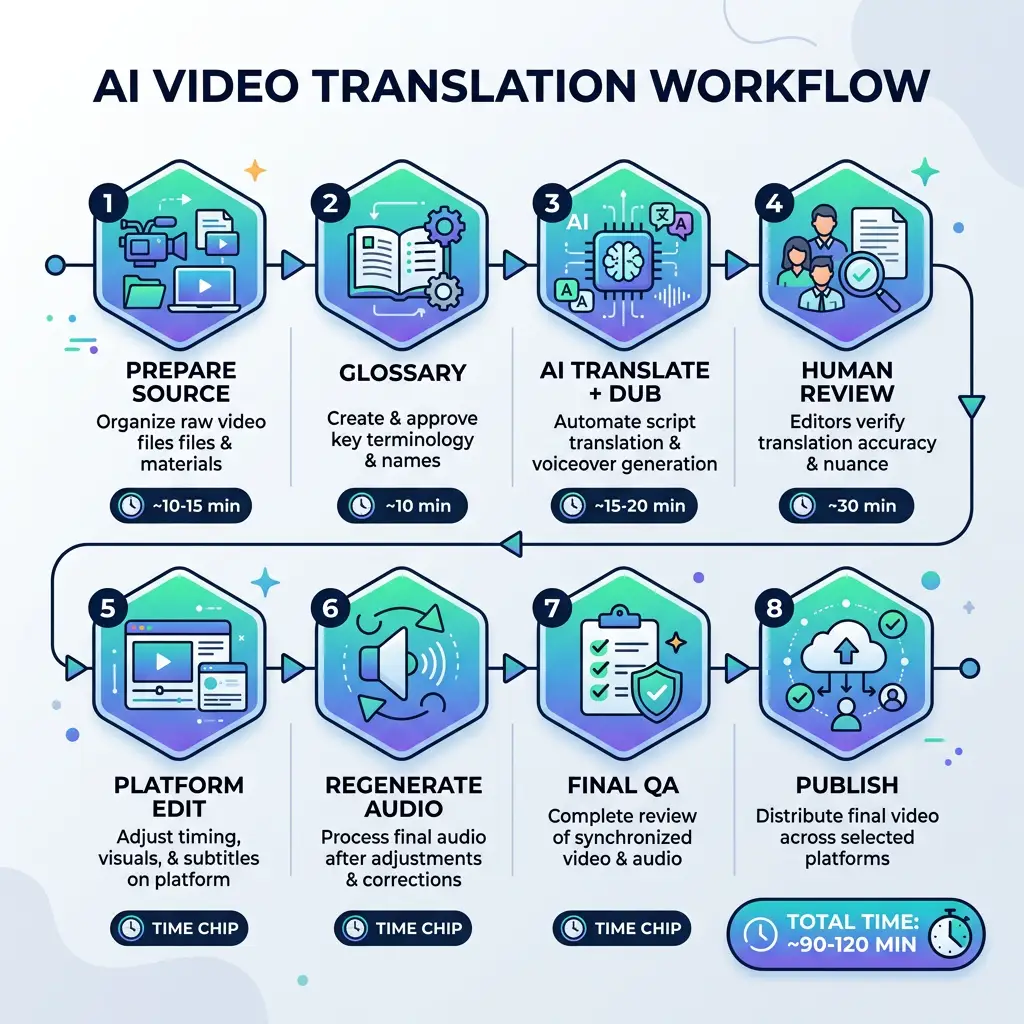
The eight-step video translation workflow — from glossary build through final QA — compresses weeks of studio work into ~90 minutes per language.
Combining the fixes for all 10 mistakes into a single workflow gives you a reliable, repeatable localization process.
| Step | Action | Time required |
|---|---|---|
| 1. Prepare source video | Record in quiet environment; speak clearly; avoid complex idioms in source | Pre-production |
| 2. Build terminology glossary | List all brand names, technical terms, and preferred translations | 30 minutes (one-time) |
| 3. Run AI translation + dubbing | Upload to VideoDubber; select target language(s); enable voice cloning | 10–30 minutes |
| 4. Human review pass | Native speaker reviews transcript and flagged segments | 15–30 minutes |
| 5. Edit in platform | Fix terminology, idioms, timing, cultural issues | 10–20 minutes |
| 6. Regenerate audio | Apply edits; generate final dubbed audio | 5–10 minutes |
| 7. Final QA check | Watch dubbed video for sync, pacing, and overall quality | 10–15 minutes |
| 8. Publish with localized metadata | Translate title, description, tags for YouTube/platform | 10 minutes |
Total workflow time per language per video: Approximately 90–120 minutes for a 10-minute video — compared to days or weeks with traditional studio workflows.
For additional guidance on the editing step, see our guide on how to edit translated videos online.
Frequently Asked Questions
What is the most common video translation mistake?
The most common and most damaging video translation mistake is literal word-for-word translation that fails to adapt idioms, humor, and cultural references. This error is pervasive in automated translations that lack contextual understanding, and it is immediately obvious to native speakers who feel the content was not created for them.
How do I test if my video translation is good quality?
The most reliable quality test is a native speaker review. Ask a native speaker of the target language to watch the dubbed video cold and rate: (1) naturalness of the language, (2) accuracy of the content, (3) appropriateness for the target culture, and (4) overall perception of production quality. A score below 4/5 on any dimension warrants a revision pass.
Is AI translation accurate enough for professional video content?
AI translation accuracy has reached production-ready quality for most standard content types as of 2026. Context-aware AI engines like those used in professional dubbing platforms correctly handle idioms, complex sentences, and domain-specific language in the majority of cases. The remaining errors — roughly 5–15% of sentences in specialized content — are caught and corrected in the human review pass, making AI + human review a professional-grade workflow.
How do I handle humor in video translation?
Humor is the hardest element to translate, because it depends on shared cultural context that often does not cross language barriers. Options: (1) Replace the joke with a culturally equivalent joke in the target language; (2) Remove the humor entirely if it cannot transfer; (3) Acknowledge in the transcript that this was a cultural reference that does not translate. Never attempt a literal translation of humor — the result is always confusing or offensive.
What is the difference between translation and localization for video?
Video translation converts spoken and written language from one language to another. Video localization is a broader process that adapts the entire content experience — audio, subtitles, on-screen text, cultural references, visual cues, pacing, and messaging — to feel native to the target market. Professional video localization includes translation as its first step, then adds cultural review, visual adaptation, and quality assurance.
Should I use subtitles or dubbing for my translated videos?
For most engagement-driven content — marketing videos, tutorials, educational courses, sermons — AI dubbing with voice cloning delivers significantly higher watch time and engagement than subtitle-only approaches. Subtitles should be included as a complement for accessibility. The exception is content where authenticity of the original voice is important to the audience even without language comprehension (e.g. celebrity interviews for language learners).
How much does professional video translation cost compared to AI dubbing?
Professional studio dubbing typically costs $50–$150 per minute per language for complete localization including voice talent and sync. AI dubbing with professional editing is significantly less expensive — typically $1–$10 per minute per language — while achieving near-professional output quality for standard content. At scale (multiple languages, recurring content), AI dubbing with human review delivers the best quality-to-cost ratio.
Summary: 10 Mistakes, 10 Fixes, One Workflow
- Literal translation kills idioms and humor — use context-aware AI and human idiom review.
- Bad lip-sync signals low production quality — use AI dubbing with automatic lip-sync alignment.
- Robotic TTS destroys emotional connection — use AI voice cloning to preserve the speaker's voice.
- Culture-blind translation damages brand trust — add a cultural review pass to every localization workflow.
- Mistranslated terminology creates user confusion — build and use a terminology glossary.
- Poor subtitle timing frustrates viewers — use platform timeline controls and follow professional standards.
- Wrong language variant alienates audiences — always localize to the specific regional variant of your target market.
- No back-translation lets semantic errors through — spot-check the 20% of your video with the highest risk of meaning drift.
- Untranslated on-screen text creates visual inconsistency — plan for text localization at the production stage.
- No human review allows all of the above to ship — budget 20 minutes per language per video for a review pass.
Avoid all 10 mistakes with VideoDubber's end-to-end dubbing platform →
Further Reading
Video Localization vs. Translation vs. Dubbing: Complete Guide [2026]
Video localization vs. translation vs. dubbing: full 2026 guide with cost tables, use-case matrix, AI dubbing workflow, and expert verdict on which to choose.
How to Use GPT-5.2 for Video Translation [2026 Guide]
How to use GPT-5.2 for video translation in VideoDubber: step-by-step, model comparison, context box tips, cost guide, and best practices for European languages. 2026.
How to Use Gemini for Video Translation [2026 Guide]
How to use Gemini for video translation: complete 2026 guide. Step-by-step in VideoDubber, Asian-language strength (Japanese, Korean, Hindi), multimodal context, and when to pick Gemini vs GPT or DeepSeek.
How Accurate Is AI Video Translation? Benchmarks, Data & Real Examples (2026)
How accurate is AI video translation in 2026? WER benchmarks, language accuracy tiers, cost data, and real-world examples—complete guide with data.
Gemini vs. DeepSeek vs. GPT for Video Translation: Which AI Wins in 2026?
Gemini vs DeepSeek vs GPT for video translation: 2026 benchmarks, dubbing scripts, subtitles, and language accuracy. Pick the right AI model for your content.